Crocodile — HackTheBox Writeup
Crocodile is a very easy Linux box that demonstrates how anonymous FTP access can expose credentials that unlock a web application login. The attack chain is short but teaches a fundamental methodology: always enumerate every open service, because sensitive information on one port can become your key into another.
Reconnaissance
I started with a service-version scan to understand what was running on the target:
nmap -sV -sC <TARGET>
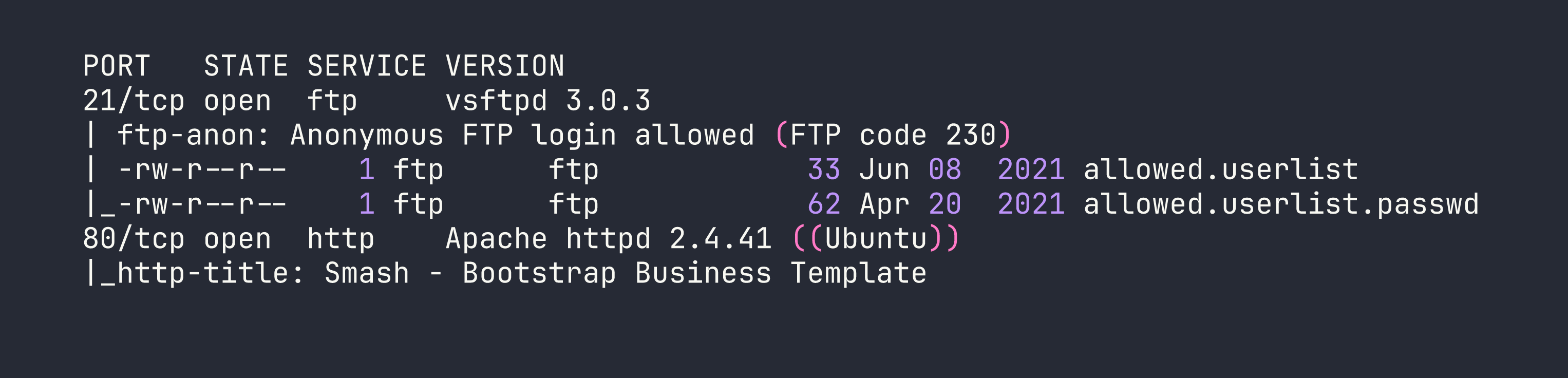
Two services: FTP on port 21 and a web server on port 80. The nmap output immediately flagged something important — anonymous FTP login is allowed, and there are two files sitting in the FTP root with very telling names: allowed.userlist and allowed.userlist.passwd. That’s a gift. Before chasing the web application, those files were the obvious first stop.
I also wanted to understand the web attack surface. Just browsing to the site showed a generic Bootstrap business template with no obvious login link — nothing interesting on the surface. That’s a hint that there may be pages not linked from the main navigation, so I ran Gobuster with a PHP extension filter to catch any server-side scripts:
gobuster dir -u http://<TARGET> -w /usr/share/wordlists/dirbuster/directory-list-2.3-medium.txt -x php

Two findings worth noting: /login.php is the authentication entry point, and /dashboard/ is likely where authenticated users land. Trying to access /dashboard/ directly without being logged in redirects back to the login page — so we need valid credentials.
Foothold
With a login page identified and anonymous FTP access confirmed, the path forward was clear. I connected to FTP as the anonymous user and pulled both files:
ftp <TARGET>
ftp> Name: anonymous
ftp> Password: [blank]
ftp> get allowed.userlist
ftp> get allowed.userlist.passwd
ftp> bye
Inspecting the files locally revealed exactly what the names implied:
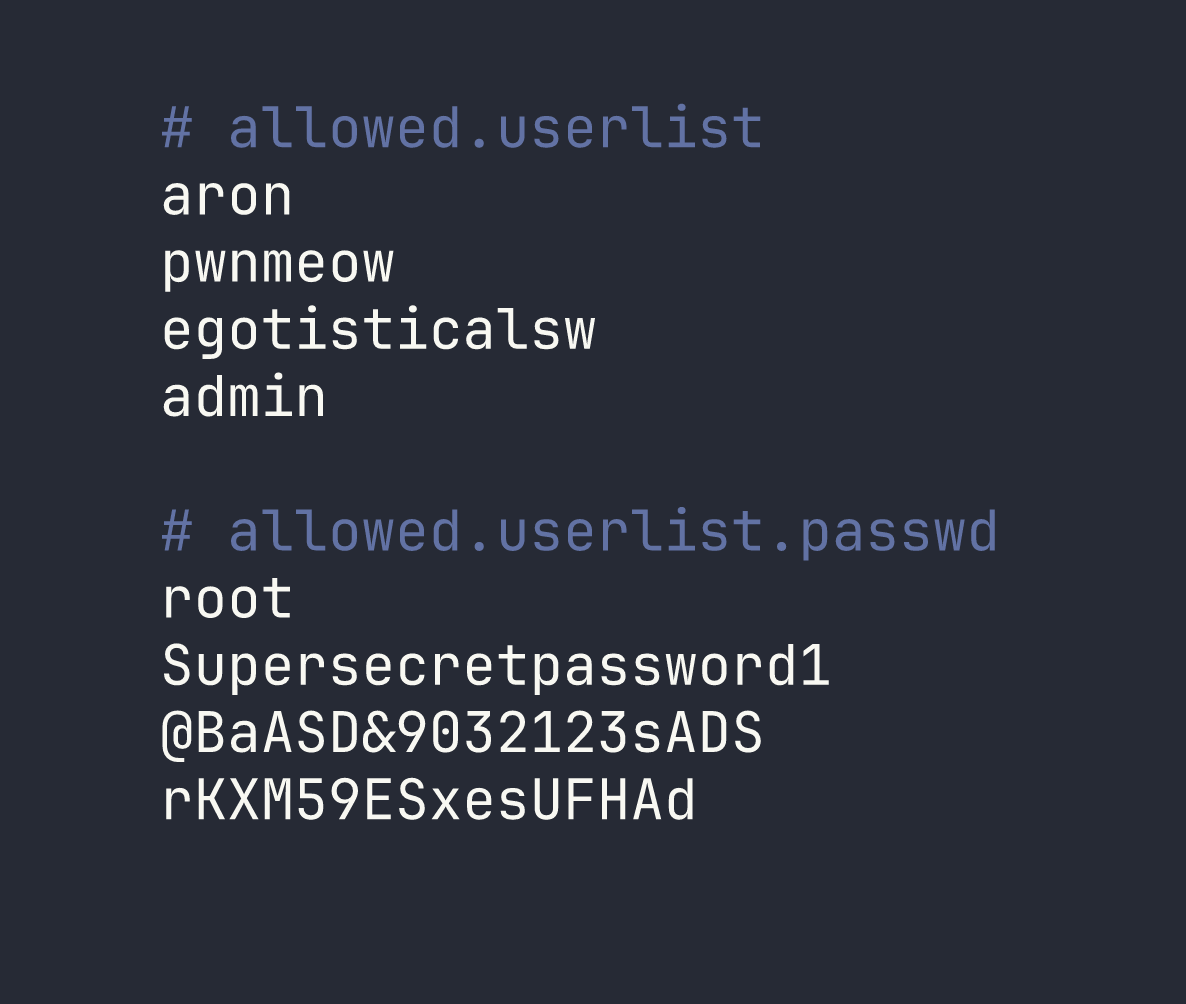
Four usernames, four passwords. The key insight here is that when two credential files have a matching line count, the entries are almost certainly paired by line number. This is a common pattern for simple flat-file credential stores — line 1 of the username list corresponds to line 1 of the password list, and so on.
That gives us the following pairs:
| Username | Password |
|---|---|
| aron | root |
| pwnmeow | Supersecretpassword1 |
| egotisticalsw | @BaASD&9032123sADS |
| admin | rKXM59ESxesUFHAd |
Rather than brute-forcing all combinations, the line-by-line pairing gives us a logical starting point. The admin account is the highest-value target for a web login, so I tried admin / rKXM59ESxesUFHAd first at /login.php.
It worked. The application authenticated successfully and landed on the dashboard, where the flag was waiting.
Lessons Learned
Anonymous FTP is always worth checking. It’s easy to see FTP on port 21 and move on if you don’t immediately get a foothold, but nmap’s default scripts will flag anonymous login automatically. Any time you see ftp-anon: Anonymous FTP login allowed, treat it as a high-priority lead — servers misconfigured this way frequently have files that were never meant to be public.
Enumerate every service, then combine what you find. The FTP and HTTP services looked independent, but the credentials from FTP were the direct key into the web application. A piecemeal approach — fully enumerating one service before connecting it to others — is how these cross-service attack chains get missed.
Extension-based directory brute-forcing catches hidden login pages. The main site had no visible link to /login.php. Running Gobuster with -x php found it immediately. If you’re only fuzzing for directories without checking for specific file extensions, you’ll miss pages like this regularly.
Matching line counts in credential files imply line-by-line pairing. When a username list and a password list have the same number of entries, start with the assumption that they’re paired positionally. This avoids the noise of testing every combination and focuses your effort on the most likely valid pairs first.