HackTheBox — Crocodile
Crocodile is a Very Easy Linux box that demonstrates how a single misconfigured service can compromise an entire application. By chaining anonymous FTP access with a hidden PHP login page, we go from zero to dashboard without writing a single line of exploit code.
Overview
The attack path here is refreshingly straightforward, but that’s exactly what makes it a great learning exercise. Two services are exposed — FTP and HTTP — and neither is particularly hardened. The real skill being tested is correlation: recognizing that files sitting on an FTP server might contain exactly the credentials needed to authenticate to the web app running on the same host.
Reconnaissance
Port Scanning
I started with an Nmap service scan to get a clear picture of what’s listening on the box.
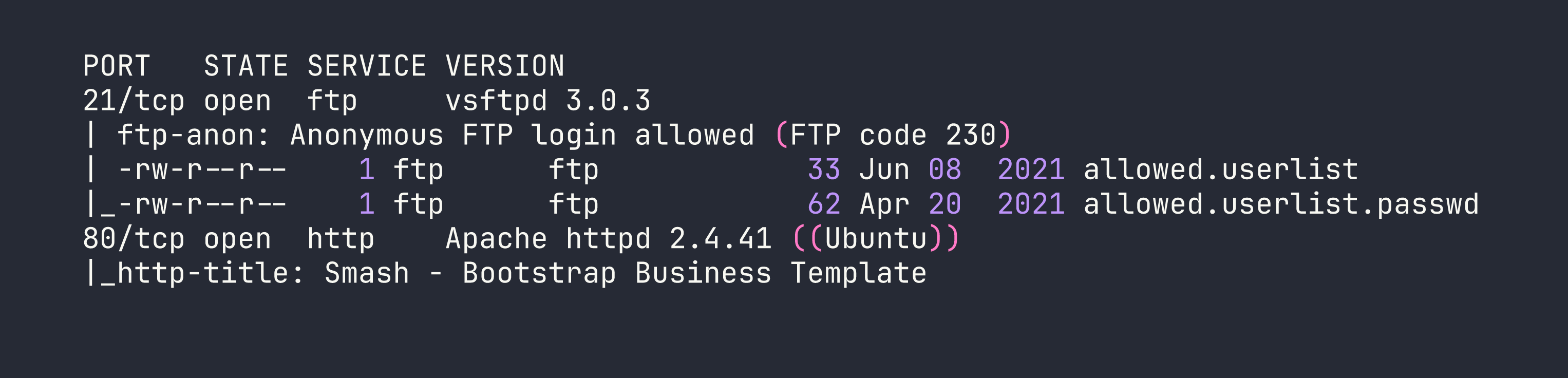
Two ports, two services. What immediately jumps out is the Nmap FTP script output: anonymous login is allowed, and the directory listing reveals two suspiciously named files — allowed.userlist and allowed.userlist.passwd. The naming convention alone is a red flag. These aren’t temp files or logs; someone put a credential store on a publicly accessible FTP server.
Port 80 is running Apache with what looks like a generic Bootstrap business template — nothing exciting on the surface, but definitely worth enumerating.
Web Enumeration
Browsing to http://<TARGET> confirmed the Bootstrap template — a nice-looking but entirely static marketing page with no obvious login functionality linked anywhere. This is where directory brute-forcing becomes essential. Hidden functionality doesn’t advertise itself.
I ran Gobuster with the -x php flag specifically to hunt for PHP files, since a login portal is far more likely to be a .php endpoint than a directory:
gobuster dir -u http://<TARGET> -w /usr/share/wordlists/dirb/common.txt -x php

Two interesting hits: /login.php is accessible directly, and /dashboard/ redirects — almost certainly requiring authentication before it’ll show anything useful. Now I have a target. The next step is finding valid credentials to feed into it.
Foothold
Harvesting Credentials via Anonymous FTP
With anonymous FTP access confirmed by Nmap, I connected to the server and grabbed both files without needing to supply a password:
ftp <TARGET>
At the username prompt, entering anonymous (with any password, or none at all) grants access. From there:
ftp> get allowed.userlist
ftp> get allowed.userlist.passwd
ftp> bye
Reading the files locally reveals the goods:
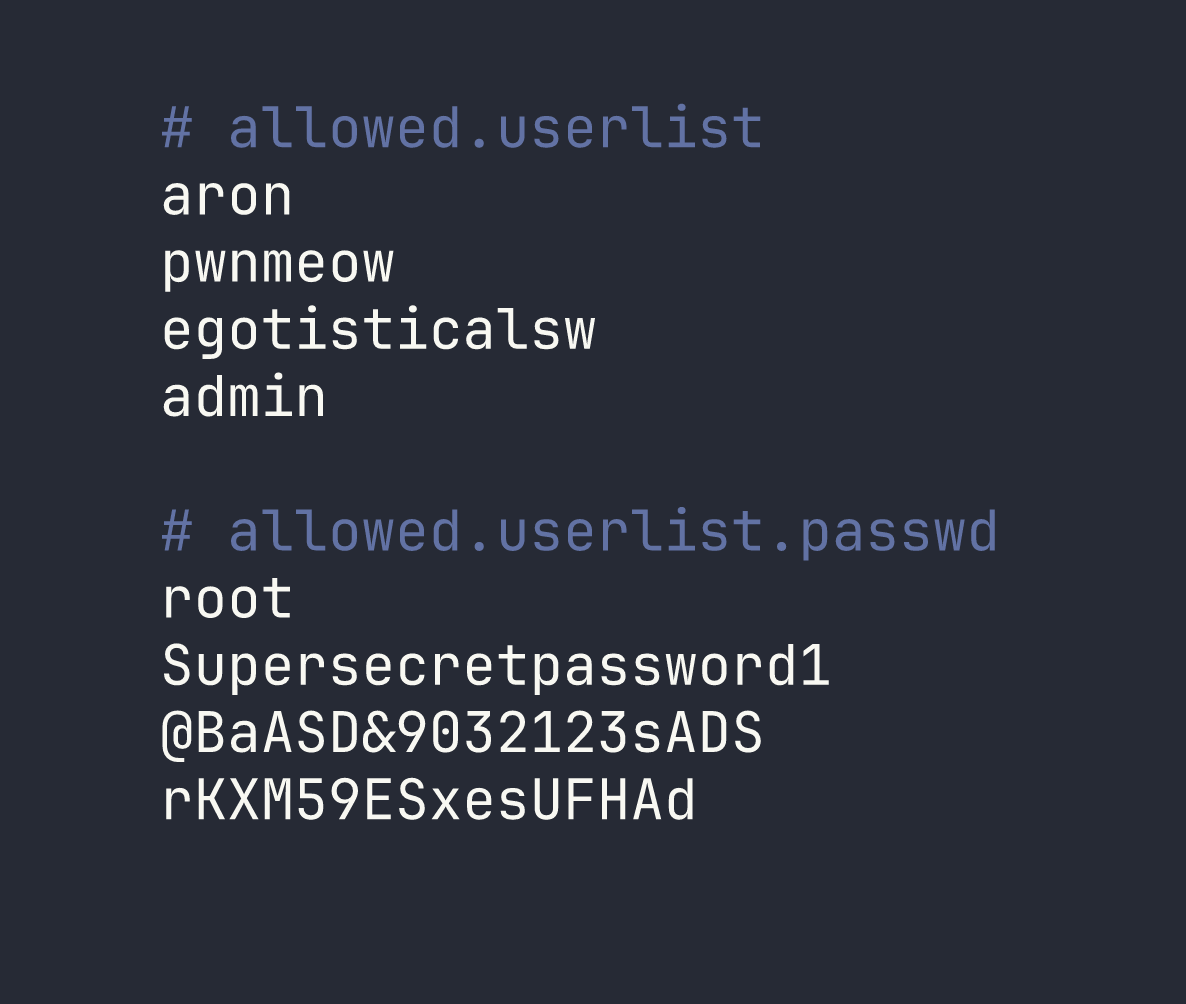
Four usernames, four passwords — and both files have the same line count. That’s not a coincidence. When credential files are structured this way, the most logical interpretation is that they’re paired line-by-line: aron:root, pwnmeow:Supersecretpassword1, and so on. The last pairing gives us admin:rKXM59ESxesUFHAd.
I could have written a quick script to try all 16 combinations, but given the small set and the obvious pairing structure, it made more sense to start with the most privileged-sounding account: admin.
Logging In
Navigating to http://<TARGET>/login.php presents a standard username/password form. I entered the admin credentials:
- Username:
admin - Password:
rKXM59ESxesUFHAd
One attempt. The page redirected immediately to /dashboard/, which displayed the flag.
No bruteforcing tools needed — just careful observation and logical deduction.
Lessons Learned
Anonymous FTP is always worth checking. It’s one of those services that gets enabled during initial setup and forgotten. Even if the FTP server doesn’t have anything obviously named “passwords,” it’s worth browsing for configuration files, backups, or anything that looks out of place.
Cross-service correlation is a core skill. The FTP server and the web application are separate services, but they exist on the same host and are managed by the same (presumably overworked) administrator. Credentials, usernames, and configuration details found on one service frequently apply to another. Always think about how findings from one foothold can unlock a different attack surface.
Directory brute-forcing with file extension flags matters. Running Gobuster without -x php would have missed /login.php entirely if it wasn’t indexed or linked from the main page. Always match your extension flags to the tech stack — Apache on Linux commonly serves PHP, so -x php is a natural addition. You can layer in others like -x html,txt depending on what you suspect.
Matching line counts in credential files strongly imply line-by-line pairing. This is a quick pattern recognition shortcut. When you pull two files named users and passwords and they have the same number of entries, treat them as paired before reaching for a brute-force tool. Start with the most privileged-looking account (here, admin) and work from there.